
Create: structures overhaul
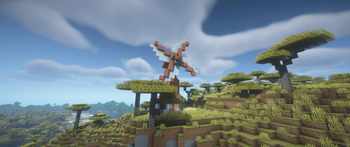
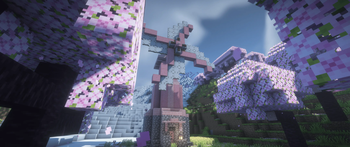
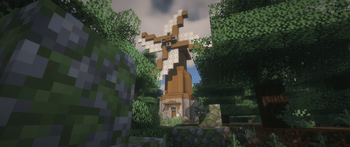
Create: structures overhaul - a structure expansion mod focused on enchasing world generation with create mod installed.
Screenshots



Über diese Mod
Create: Structures Overhaul

Last Update:
- Version: 1.3.0 & 1.3.1 – Spooky Update & Bug Fixes
- Date: 2025-10-24 - 2025-10-25
- Highlights: Added five new Halloween-themed structures; improved loot balance across most structures; increased generation rates; fixed loot in towers; fixed graveyard spawn.
- Status: Full bug-fixed release
Create: Structures Overhaul is a world generation expansion for Create, adding new structures and enhancing exploration. It integrates seamlessly with Create’s mechanics to enrich your worlds with immersive, biome-themed content.




Features
- Biome-based structure spawning across all biomes.
- Fully locatable using
/locate structure. - Optional Biomes O' Plenty compatibility via the official integration:
Create: Structures Overhaul – BOP Integration - Blends naturally with environments and matches Create’s aesthetics.
- Lightweight and optimized for performance.
Requirements
- Minecraft Fabric 1.20.1 / Forge 1.19.2+ / NeoForge 1.21.1
- Create mod installed
- For Fabric users, it is recommended to install this texture pack to see the newest Create copper block textures.
License
MIT – free to fork, create addons, and include in modpacks.
Verfügbare Versionen
Create: structures overhaul auf dem Server installieren
Server bestellen
Bestelle einen Minecraft Java Server mit mindestens 4 GB RAM (6 GB empfohlen).
fabric Loader setzen
Wähle im Panel unter "Egg" den fabric-Loader und die passende Minecraft-Version (1.21.1).
Mod installieren
Öffne den Mod-Browser im Dashboard und suche nach "Create: structures overhaul". Klicke "Installieren" – fertig! Alternativ: Lade die .jar via SFTP in den /mods Ordner.
Kompatibilität
Mod-Loader
Minecraft-Versionen
1.21.1, 1.20.1, 1.19.2
Server-seitig
✓ ErforderlichEmpfohlener RAM
6 GB(min. 4 GB)Häufige Fragen
Create: structures overhaul Server crasht beim Start – was tun?
Häufigste Ursache: falsche fabric-Version oder zu wenig RAM. Prüfe im Server-Log (latest.log), ob ein "OutOfMemoryError" oder "Mixin"-Fehler auftritt. Bei Mado Hosting: Stelle sicher, dass mindestens 4 GB RAM zugewiesen sind und der Loader zur Mod-Version passt (1.21.1). Über das Panel kannst du den Loader mit einem Klick wechseln.
Ist Create: structures overhaul mit fabric und forge und neoforge kompatibel?
Create: structures overhaul unterstützt offiziell fabric, forge, neoforge für Minecraft 1.21.1, 1.20.1, 1.19.2. Achtung: Forge- und Fabric-Mods sind NICHT untereinander kompatibel – wähle einen Loader und bleibe dabei. Im Mado Dashboard werden inkompatible Loader-Kombinationen automatisch erkannt.
Server laggt mit Create: structures overhaul – wie optimiere ich die Performance?
Empfohlener RAM: 6 GB (+1 GB pro 5 Spieler). Prüfe mit /spark profiler, ob Create: structures overhaul den meisten Tick-Time verbraucht. Häufige Fixes: Server-View-Distance auf 8-10 reduzieren, bei Forge "performant" oder "starlight" als Zusatz-Mod installieren. Bei Mado Hosting läuft dein Server auf NVMe-SSDs mit dedizierten CPU-Kernen für minimale Latenz.
Ähnliche Mods




Modded Server mieten
Installiere Create: structures overhaul mit nur einem Klick auf deinem Server.