
Create Defensive
Create: Defensive is a military-industrial expansion to the Create mod centered on warfare and defense.
Screenshots
Über diese Mod

Summary
Create: Defensive is a military industrial addon for the Create Mod. It's focused on combat capabilities and maximum devastation!
⚠️1.20.1 Forge is No longer supported!⚠️
Bugs and issues related to 1.20.1 Forge will not be resolved. Any new features, fixes, and changes, will be in future versions, with the current supported version being NeoForge 1.21.1
Mod Features
New Weapons
- Guns: Handguns, Rifles, and Shotguns! More planned soon
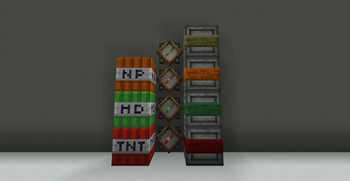
- Explosives: Chemical Explosives, Napalm Bombs, High Explosives, as well as Warheads and Dynamite are in the mod!
- Traps: Fire Grate traps, Gas Traps, Air Traps, Lightning Node Traps, Landmines, and Proximity Mines
- There are over a dozen new types of Weapons and Tools ranging from Halberds to Great Swords to Morningstars. The battlefield is your canvas and your enemies are your paint!
New Armor
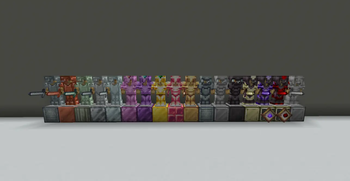
- The mod introduces 17 new armor sets to the game for every stage in the game. There are weaker sets like Copper or Aluminum that are weaker but more common than Iron, or endgame sets like Pyraen that are direct upgrades to Netherite.
- There are also blast-plating blocks and Bullet-proof glass that can protect you from explosions.
New Materials
The mod introduces well over a dozen brand new materials with many uses including more automation capabilities, chemical synthesis, and parts in machinery.
New Machinery
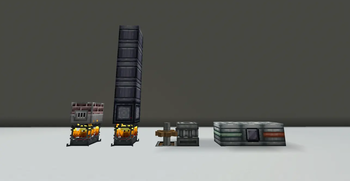
- Coking Oven: Can be used to turn Coal into Coal Coke and Logs into Charcoal, with Creosote Oil as a byproduct
- Electrolyzer: Can be used to separate some particles into their components
- Fractional Still: Can be used to separate Crude Oil and Natural Gas into their fractions
- Centrifuge: Can be used to separate items into their crafting materials
Verfügbare Versionen
Create Defensive auf dem Server installieren
Server bestellen
Bestelle einen Minecraft Java Server mit mindestens 4 GB RAM (6 GB empfohlen).
neoforge Loader setzen
Wähle im Panel unter "Egg" den neoforge-Loader und die passende Minecraft-Version (1.21.11).
Mod installieren
Öffne den Mod-Browser im Dashboard und suche nach "Create Defensive". Klicke "Installieren" – fertig! Alternativ: Lade die .jar via SFTP in den /mods Ordner.
Kompatibilität
Mod-Loader
Minecraft-Versionen
1.21.11, 1.21.10, 1.21.9 (+9 weitere)
Server-seitig
✓ ErforderlichEmpfohlener RAM
6 GB(min. 4 GB)Häufige Fragen
Create Defensive Server crasht beim Start – was tun?
Häufigste Ursache: falsche neoforge-Version oder zu wenig RAM. Prüfe im Server-Log (latest.log), ob ein "OutOfMemoryError" oder "Mixin"-Fehler auftritt. Bei Mado Hosting: Stelle sicher, dass mindestens 4 GB RAM zugewiesen sind und der Loader zur Mod-Version passt (1.21.11). Über das Panel kannst du den Loader mit einem Klick wechseln.
Ist Create Defensive mit neoforge kompatibel?
Create Defensive unterstützt offiziell neoforge für Minecraft 1.21.11, 1.21.10, 1.21.9. Im Mado Dashboard werden inkompatible Loader-Kombinationen automatisch erkannt.
Server laggt mit Create Defensive – wie optimiere ich die Performance?
Empfohlener RAM: 6 GB (+1 GB pro 5 Spieler). Prüfe mit /spark profiler, ob Create Defensive den meisten Tick-Time verbraucht. Häufige Fixes: Server-View-Distance auf 8-10 reduzieren, bei Forge "performant" oder "starlight" als Zusatz-Mod installieren. Bei Mado Hosting läuft dein Server auf NVMe-SSDs mit dedizierten CPU-Kernen für minimale Latenz.
Ähnliche Mods



![[TaCZ] Timeless and Classics Zero](https://cdn.modrinth.com/data/SzzJttH8/fd27766d2bb8390d284696b1dbd358f87e081439_96.webp)


Modded Server mieten
Installiere Create Defensive mit nur einem Klick auf deinem Server.