
Disenchanter
A flexible Disenchanter because loot shouldn't go to waste
Über diese Mod

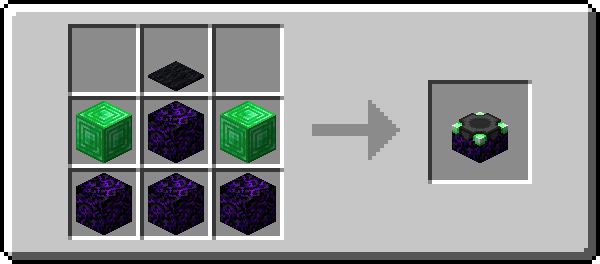
The Disenchanter is a deceptively simple device for recovering enchantments from items. Use it by itself, and the first enchantment will be returned and the item destroyed. Use one of the Catalysts however and you will get a different set of enchantments back. Some of them will even preserve the item in the process!
To use the Disenchanter, craft one, place it down and right-click to open its interface. In the leftmost slot you can put the item you want to be disenchanted. The rightmost slot takes books onto which the enchantments are transferred. The center slot is for the Catalysts, which are outlined in the following section. As mentioned above, you can also the Disenchanter without having anything in that slot.

- Amethyst Shard: Recovers the first enchantment and preserves the item
- Diamond: Recovers two random enchantments and the first one
- Emerald: Recovers two random enchantments
- Ender Pearl: Recovers one random enchantment. Here, the item is also preserved but will take 500 durability damage
- Experience Bottle: Recovers all enchantments that are at the same level as the highest one present
- Heart Of The Sea: Recovers all enchantments but reduces them by one level
- Nether Star: Recovers all enchantments and preserves the item
Verfügbare Versionen
Disenchanter auf dem Server installieren
Server bestellen
Bestelle einen Minecraft Java Server mit mindestens 3 GB RAM (4 GB empfohlen).
fabric Loader setzen
Wähle im Panel unter "Egg" den fabric-Loader und die passende Minecraft-Version (1.21.10).
Mod installieren
Öffne den Mod-Browser im Dashboard und suche nach "Disenchanter". Klicke "Installieren" – fertig! Alternativ: Lade die .jar via SFTP in den /mods Ordner.
Kompatibilität
Mod-Loader
Minecraft-Versionen
1.21.10, 1.21.9, 1.21.3 (+18 weitere)
Server-seitig
✓ ErforderlichEmpfohlener RAM
4 GB(min. 3 GB)Häufige Fragen
Disenchanter Server crasht beim Start – was tun?
Häufigste Ursache: falsche fabric-Version oder zu wenig RAM. Prüfe im Server-Log (latest.log), ob ein "OutOfMemoryError" oder "Mixin"-Fehler auftritt. Bei Mado Hosting: Stelle sicher, dass mindestens 3 GB RAM zugewiesen sind und der Loader zur Mod-Version passt (1.21.10). Über das Panel kannst du den Loader mit einem Klick wechseln.
Ist Disenchanter mit fabric und quilt kompatibel?
Disenchanter unterstützt offiziell fabric, quilt für Minecraft 1.21.10, 1.21.9, 1.21.3. Im Mado Dashboard werden inkompatible Loader-Kombinationen automatisch erkannt.
Server laggt mit Disenchanter – wie optimiere ich die Performance?
Empfohlener RAM: 4 GB (+1 GB pro 8 Spieler). Prüfe mit /spark profiler, ob Disenchanter den meisten Tick-Time verbraucht. Häufige Fixes: Server-View-Distance auf 8-10 reduzieren, bei Forge "performant" oder "starlight" als Zusatz-Mod installieren. Bei Mado Hosting läuft dein Server auf NVMe-SSDs mit dedizierten CPU-Kernen für minimale Latenz.
Ähnliche Mods



![[TaCZ] Timeless and Classics Zero](https://cdn.modrinth.com/data/SzzJttH8/fd27766d2bb8390d284696b1dbd358f87e081439_96.webp)


Modded Server mieten
Installiere Disenchanter mit nur einem Klick auf deinem Server.