
Dragon Mounts 2
A mod that adds fire breathing dragons, new equipments and armor, and adds nest structures all over your world, including The Nether and The End.
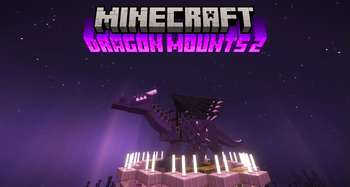
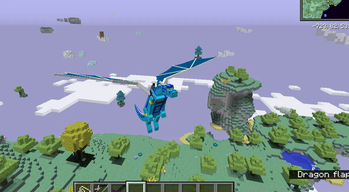
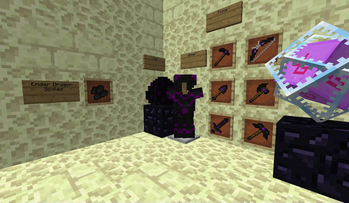
Screenshots


Über diese Mod

Recommended to include the recipe viewer: Just Enough Items (1.11 to 1.12)
Support Dragon Mounts 2
Discord: https://discord.gg/Ewm8aTTJ3K
QQ: https://qm.qq.com/q/iGfH75Ldsc - (Code: 974797002)
Overview
Dragon Mounts 2 is a mod that adds fire breathing dragons, nests structures, new tools and armor!
It is a different mod compared to it's prequel Dragon Mounts. The premise of this version is to expand the original Dragon Mounts by adding in an rpg adventure-styled experience.
- To hatch a dragon egg, you'll need to find a good place for it first. If you found one, place the egg block and simply right click it. The egg will then start to hatch, which will take a while.
- Once grown up, you can tame the dragon with any meat. It will then follow and protect you like other pets.
- You can command tamed dragons to lay down or stand up with the whistle or in the inventory.
- To ride a tamed dragon, use a saddle on it, then right click it without holding an action item.
- To heal injured dragons, feed it with any raw fish, chicken, beef or porkchop (four hearts) or with rotten flesh (two hearts).
- You can control the dragon with W, A, S and D keys.
For a beta 1.21.4 port, see our GitHub: https://github.com/DragonMounts-Team/NeoDragonMounts
Cheats
The Dragon Mounts 2 mod offers two cheats, the player can use when cheats are enabled:
/dragon state <State>: This will set the dragon the player is looking at to a different state. "egg", "hatchling", "juvenile" or "adult" can be used on the dragon the player is looking at.
Ownership of Dragon Mounts 2
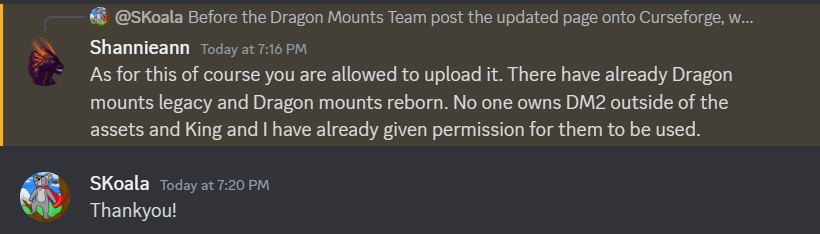
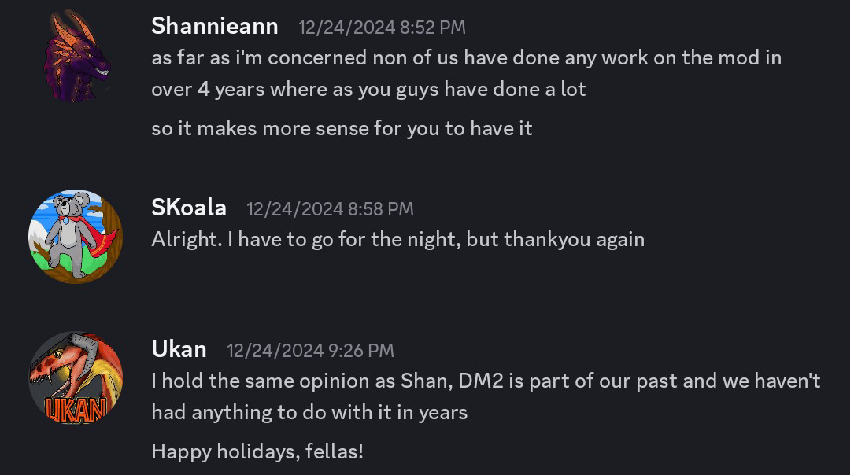
After the original development of the mod ended back in 2019, I (Tomanex) and SKoala have revived and own Dragon Mounts 2 with permissions from the original authors that was left uncredited by a different mod developer.
Dragon Mounts 2 is fully endorsed by the original former authors. Any projects created by unauthorized developers are unofficial works and fake.
Permissions granted by Kingdomall, Ukan and Shannieann for Dragon Mounts 2.
Dependencies
Post 1.12.2 (v1.6.3)
- None
Pre 1.12.2 (v1.6.2)
- Requires LLibrary
Issues / Bug Reports
If you found something that doesn't look right, is probably a bug, please head over to our Github to report it! Your bugs are most likely to be seen there versus our Discord server.
Credits
Development Team (2024-present)
Dragon Mounts 2 (since v2.0.0) - 1.12 and onwards
- Tomanex - Owner; Artist
- Skoala - Co-Owner; Beta Tester
- 2190303755 - Developer; Forge, Fabric - NeoForge
- Moaswies - Developer; Forge and Fabric
- YuanShine - Developer; Fabric (Kotlin)
- glyceryl6 - Developer; Forge
- EquinoxTheWingedWolf - Lead Texture Artist & Model Designer
- TheRPGAdventurer - Original author of the mod
- BarracudaATA - Original author; code, textures, ideas
- See contributors on GitHub for a full list of contributors
Legacy Development Team (2018-2019)
Dragon Mounts 2 (v1.6.3 and below) - 1.11 and 1.12
- TheRPGAdventurer - Lead Developer
- Kingdomall - Lead Texture Artist
- Shannieann - Texture Artist
- UkanGundan - Texture Artist
- Kay9Unit (WolfSh0tz) - Developer
- BarracudaATA - Original author; code, textures, ideas
- See contributors on GitHub for a full list of legacy contributors
Verfügbare Versionen
Dragon Mounts 2 auf dem Server installieren
Server bestellen
Bestelle einen Minecraft Java Server mit mindestens 3 GB RAM (4 GB empfohlen).
forge Loader setzen
Wähle im Panel unter "Egg" den forge-Loader und die passende Minecraft-Version (1.12.2).
Mod installieren
Öffne den Mod-Browser im Dashboard und suche nach "Dragon Mounts 2". Klicke "Installieren" – fertig! Alternativ: Lade die .jar via SFTP in den /mods Ordner.
Kompatibilität
Mod-Loader
Minecraft-Versionen
1.12.2, 1.12.1, 1.12 (+1 weitere)
Server-seitig
✓ ErforderlichEmpfohlener RAM
4 GB(min. 3 GB)Häufige Fragen
Dragon Mounts 2 Server crasht beim Start – was tun?
Häufigste Ursache: falsche forge-Version oder zu wenig RAM. Prüfe im Server-Log (latest.log), ob ein "OutOfMemoryError" oder "Mixin"-Fehler auftritt. Bei Mado Hosting: Stelle sicher, dass mindestens 3 GB RAM zugewiesen sind und der Loader zur Mod-Version passt (1.12.2). Über das Panel kannst du den Loader mit einem Klick wechseln.
Ist Dragon Mounts 2 mit forge kompatibel?
Dragon Mounts 2 unterstützt offiziell forge für Minecraft 1.12.2, 1.12.1, 1.12. Im Mado Dashboard werden inkompatible Loader-Kombinationen automatisch erkannt.
Server laggt mit Dragon Mounts 2 – wie optimiere ich die Performance?
Empfohlener RAM: 4 GB (+1 GB pro 8 Spieler). Prüfe mit /spark profiler, ob Dragon Mounts 2 den meisten Tick-Time verbraucht. Häufige Fixes: Server-View-Distance auf 8-10 reduzieren, bei Forge "performant" oder "starlight" als Zusatz-Mod installieren. Bei Mado Hosting läuft dein Server auf NVMe-SSDs mit dedizierten CPU-Kernen für minimale Latenz.
Ähnliche Mods




Modded Server mieten
Installiere Dragon Mounts 2 mit nur einem Klick auf deinem Server.