
DropAll+
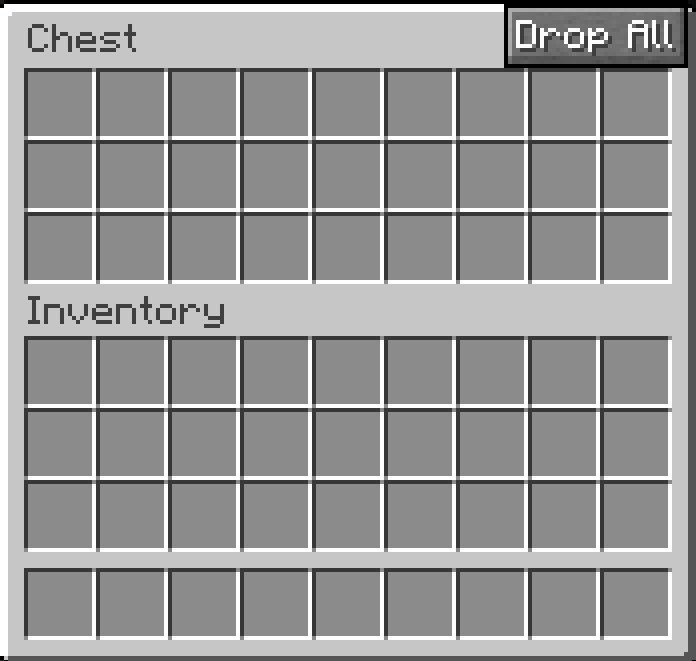
Adds a small Drop All button and a configurable hotkey to quickly throw out items from chests, shulker boxes, hoppers, and even your inventory.
Screenshots

Über diese Mod
DropAll+ is a lightweight client-side quality-of-life mod that helps you clear items much faster without manually
dropping every stack one by one.
It adds a small Drop All button directly into supported GUIs and also includes a configurable hotkey in Minecraft
controls. With a single click or key press, DropAll+ quickly throws out all items from the currently opened storage
screen. It also works in your normal player inventory.
DropAll+ is designed to support virtually every storage-style screen by handling container slots generically instead
of only working with a few hardcoded block types. That means it is useful across a wide range of containers, storage
UIs, and inventory cleanup situations.
Features
- Small built-in Drop All button inside the GUI
- Configurable hotkey in Minecraft controls
- Works in your player inventory
- Works across virtually every storage/container screen
- Fast stack-by-stack dropping
- Lightweight and fully client-side
How it works
- Open a storage screen or your inventory
- Click the Drop All button or press your assigned hotkey
- DropAll+ automatically throws out the available item stacks for you
DropAll+ is perfect for fast cleanup, emptying containers, clearing loot, and freeing inventory space during normal
gameplay.
Verfügbare Versionen
DropAll+ auf dem Server installieren
Server bestellen
Bestelle einen Minecraft Java Server mit mindestens 3 GB RAM (4 GB empfohlen).
fabric Loader setzen
Wähle im Panel unter "Egg" den fabric-Loader und die passende Minecraft-Version (1.21.11).
Mod installieren
Öffne den Mod-Browser im Dashboard und suche nach "DropAll+". Klicke "Installieren" – fertig! Alternativ: Lade die .jar via SFTP in den /mods Ordner.
Kompatibilität
Mod-Loader
Minecraft-Versionen
1.21.11
Server-seitig
✗ Nicht unterstütztEmpfohlener RAM
4 GB(min. 3 GB)Häufige Fragen
DropAll+ Server crasht beim Start – was tun?
Häufigste Ursache: falsche fabric-Version oder zu wenig RAM. Prüfe im Server-Log (latest.log), ob ein "OutOfMemoryError" oder "Mixin"-Fehler auftritt. Bei Mado Hosting: Stelle sicher, dass mindestens 3 GB RAM zugewiesen sind und der Loader zur Mod-Version passt (1.21.11). Über das Panel kannst du den Loader mit einem Klick wechseln.
Ist DropAll+ mit fabric kompatibel?
DropAll+ unterstützt offiziell fabric für Minecraft 1.21.11. Im Mado Dashboard werden inkompatible Loader-Kombinationen automatisch erkannt.
Server laggt mit DropAll+ – wie optimiere ich die Performance?
Empfohlener RAM: 4 GB (+1 GB pro 8 Spieler). Prüfe mit /spark profiler, ob DropAll+ den meisten Tick-Time verbraucht. Häufige Fixes: Server-View-Distance auf 8-10 reduzieren, bei Forge "performant" oder "starlight" als Zusatz-Mod installieren. Bei Mado Hosting läuft dein Server auf NVMe-SSDs mit dedizierten CPU-Kernen für minimale Latenz.
Ähnliche Mods






Modded Server mieten
Installiere DropAll+ mit nur einem Klick auf deinem Server.