
Durability Viewer Updated
Armor and Tool durability HUD
Screenshots
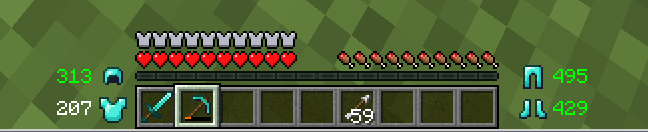
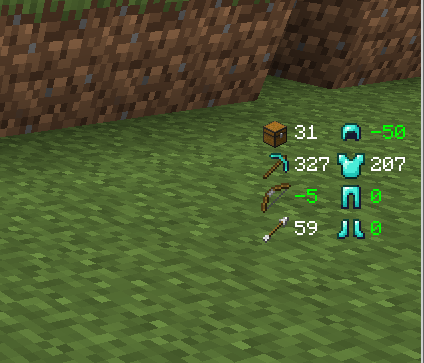
Über diese Mod
Mod description
This is another mod that shows your item durabilities as I couldn't find one that had everything I wanted.
Differences to other similar mods are:
Show item durability numbers in color (green/white/yellow/red) depending on items state
Items that are at almost 100% show damage, not durability. For example, your diamond pick that was used 5 times will show -5, not 1556. Great when you're using the mending enchantment to fix your stuff and don't know the exact number you want to reach
Also show number of empty inventory slots; know at a glance if you can continue mining or should return to your chest
Shows the amount of time for your buffs to run out so you don't have to press E to check whether that water breathing potion lasts for another minute (can be turned off in options)
Play a warning sound when your item is about to break; stop losing your Efficiency V pick to not looking at the GUI. The warning will play when your item is at less than 10% AND less than 100 - since 1.4, these values can be configured.
Set your window title to "
Durability Viewer was the first mod I ever made, and the fact that 61352151511 made the source code for his Durability Show (https://minecraft.curseforge.com/projects/durability-show) available on GitHub helped a lot. Thank you very much!
Some screenshots:
Configuration
All versions are configurable, but the way to configure them depends on the version and mod loader you're using.
Fabric with ModMenu: Use the cogwheel icon that ModMenu shows when you select the mod.
If you want to replace the sound, open the .jar file in a zip utility (7zip, winzip, winrar, ...). and replace the assets/durabilityviewer/sounds/tool_breaking.ogg file with your own. Or, remove that file from the jar to get rid of the sound forever (or at least until you redownload the jar file).
To make sure the mod doesn't slow down your minecraft, it has been optimized using jprofiler (https://www.ej-technologies.com/products/jprofiler/overview.html).
Verfügbare Versionen
Durability Viewer Updated auf deinem Client installieren
Mod-Loader lokal installieren
Installiere fabric für deine lokale Minecraft-Version.
Passende Datei herunterladen
Wähle die Durability Viewer Updated-Datei für fabric und Minecraft 26.3.
Mod installieren
Lege die .jar-Datei in deinem lokalen .minecraft/mods-Ordner ab und starte Minecraft neu. Eine Installation auf dem Server ist nicht nötig.
Kompatibilität
Mod-Loader
Minecraft-Versionen
26.3, 26.2, 26.1.2 (+17 weitere)
Server-seitig
✗ Nicht unterstütztEmpfohlener RAM
4 GB(min. 3 GB)Häufige Fragen
Muss Durability Viewer Updated auf dem Minecraft Server installiert werden?
Nein. Modrinth kennzeichnet Durability Viewer Updated serverseitig als nicht unterstützt. Installiere die Mod nur im lokalen Minecraft-Mods-Ordner. Dein Server kann unverändert bleiben, sofern die Mod-Seite keine zusätzliche Abhängigkeit nennt.
Welche Version und welchen Loader braucht Durability Viewer Updated?
Nutze eine Datei für fabric, forge, neoforge, quilt und exakt deine Minecraft-Version. Unterstützte Versionen sind unter anderem 26.3, 26.2, 26.1.2. Loader-Dateien sind nicht untereinander austauschbar.
Durability Viewer Updated funktioniert nicht – was kann ich prüfen?
Prüfe zuerst Minecraft-Version, Loader-Version und erforderliche Abhängigkeiten. Lege die .jar-Datei im lokalen .minecraft/mods-Ordner ab und entferne ältere Duplikate. Da die Mod clientseitig ist, löst mehr Server-RAM dieses Problem nicht.
Ähnliche Mods



![[TaCZ] Timeless and Classics Zero](https://cdn.modrinth.com/data/SzzJttH8/fd27766d2bb8390d284696b1dbd358f87e081439_96.webp)


Minecraft Server für deine Gruppe
Durability Viewer Updated bleibt auf deinem Client. Hoste dazu eine kompatible Welt für deine Mitspieler.