
Dynamic Lights
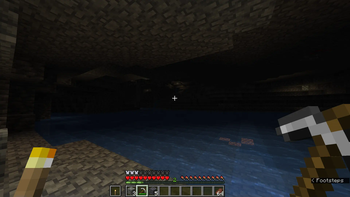
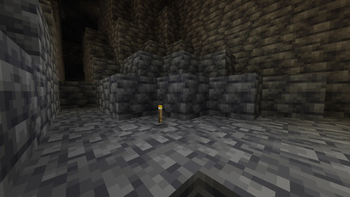
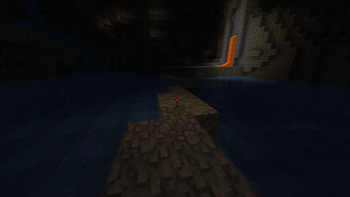
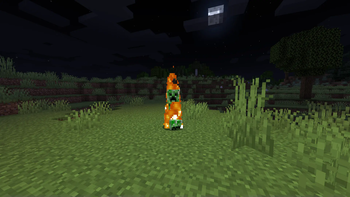
Supported entities and items such as torches, lanterns, or enchanted gear emit light! Server-side!
Screenshots
Über diese Mod
Tschipcraft's
Dynamic Lights



Server-side dynamic lighting for 1.17.x-26.2.x
| Support for 26.3 is in the works! |
|---|
 |
|---|
| For heavily modded setups, modpacks, as well as for playing on external servers, I recommend LambDynamicLights or similar client-side mods instead. -> For details, check this wiki page. |
💡 Features
This data pack/mod brings dynamic lighting to Minecraft without any client-side requirements. Supported entities and items (like torches, glowstone, or enchanted gear), held or worn by players, mobs, or placed in item frames, will emit light using the light block added in Snapshot 21w13a.
- 50+ supported vanilla items out of the box
- Multiple light levels: 3, 6, 9, 12, and 15
- Water-sensitive behavior with sounds for some items
- Enchanted items glow by default (light level 6), with special cases for Fire Aspect, Riptide, Channeling (light level 9)
- Amethyst-trimmed armor emits light
- Mobs, falling blocks, and display entities can emit light if carrying a supported item
Curios API support for modded inventory slotsSee issue #76
Since this project is completely server-side, players joining a server with Dynamic Lights installed will not need to install anything on their end for it to work! However, you can still use the mod version on the client for single-player worlds only. Joining a server that does not have Dynamic Lights installed will have no effect.
-> For a complete list of supported items & entities, and available settings, take a look at the 
ℹ️ Limitations
Since this is a data pack at its core, there are some limitations compared to other purely modded solutions.
Limitations (click to expand)
- Dynamic Lights may stutter while moving around. This project solely relies on vanilla light blocks, which are restricted to the block grid. Smooth transitions between blocks are not feasible
- This pack currently uses marker entities to keep track of dynamic light positions. If these entities are cleared by you or plugins like EntityTrackerFixer, light blocks will be left behind. See issue #25
- Vanilla light blocks are unfortunately immovable by pistons and block explosion damage. This can cause some redstone contraptions to malfunction. Please report any issues, I try to prevent common cases. See e.g. fixed issues #51, #15, #12, #10
- In Minecraft 1.21.4 and below, dynamic light updates will always trigger block updates. This could cause floating blocks affected by gravity, like sand or gravel, to fall
- Some shader packs that ignore the vanilla lightmap, such as Rethinking Voxels, will not display the dynamic lights. See issue #59
- Dynamic Lights cannot function in 1x1 block spaces occupied by non-solid blocks, as there is simply no space for placing light blocks. See issues #39 and #43
- Dynamic Lights per player operate globally. See a detailed explanation here
🔧 Installation & Use
Install either as:
- Data Pack [DP] ➜ Place
.zipin your world'sdatapacksfolder - Mod [Mod] ➜ Drop into your
modsfolder and optionally install MidnightLib for a global config file and UI
To manage settings, reset, or uninstall the pack, use /trigger tschipcraft.menu or /function #tschipcraft:menu.
🧩 Compatibility
Forge is only natively supported until Minecraft 1.21.5.
This data pack follows the Smithed and essential MC Datapacks Discord Server Conventions to ensure data pack compatibility.
External Links




Partner Offers
Verfügbare Versionen
Dynamic Lights auf dem Server installieren
Server bestellen
Bestelle einen Minecraft Java Server mit mindestens 3 GB RAM (4 GB empfohlen).
datapack Loader setzen
Wähle im Panel unter "Egg" den datapack-Loader und die passende Minecraft-Version (26.2).
Mod installieren
Öffne den Mod-Browser im Dashboard und suche nach "Dynamic Lights". Klicke "Installieren" – fertig! Alternativ: Lade die .jar via SFTP in den /mods Ordner.
Kompatibilität
Mod-Loader
Minecraft-Versionen
26.2, 26.2-rc-2, 26.2-rc-1 (+316 weitere)
Server-seitig
✓ ErforderlichEmpfohlener RAM
4 GB(min. 3 GB)Häufige Fragen
Dynamic Lights Server crasht beim Start – was tun?
Häufigste Ursache: falsche datapack-Version oder zu wenig RAM. Prüfe im Server-Log (latest.log), ob ein "OutOfMemoryError" oder "Mixin"-Fehler auftritt. Bei Mado Hosting: Stelle sicher, dass mindestens 3 GB RAM zugewiesen sind und der Loader zur Mod-Version passt (26.2). Über das Panel kannst du den Loader mit einem Klick wechseln.
Ist Dynamic Lights mit datapack und fabric und forge und neoforge und quilt kompatibel?
Dynamic Lights unterstützt offiziell datapack, fabric, forge, neoforge, quilt für Minecraft 26.2, 26.2-rc-2, 26.2-rc-1. Achtung: Forge- und Fabric-Mods sind NICHT untereinander kompatibel – wähle einen Loader und bleibe dabei. Im Mado Dashboard werden inkompatible Loader-Kombinationen automatisch erkannt.
Server laggt mit Dynamic Lights – wie optimiere ich die Performance?
Empfohlener RAM: 4 GB (+1 GB pro 8 Spieler). Prüfe mit /spark profiler, ob Dynamic Lights den meisten Tick-Time verbraucht. Häufige Fixes: Server-View-Distance auf 8-10 reduzieren, bei Forge "performant" oder "starlight" als Zusatz-Mod installieren. Bei Mado Hosting läuft dein Server auf NVMe-SSDs mit dedizierten CPU-Kernen für minimale Latenz.
Ähnliche Mods




Modded Server mieten
Installiere Dynamic Lights mit nur einem Klick auf deinem Server.