
Enchantments Unbound
Remove "Too Expensive!" anvil limits, bypass level caps, and combine Mending + Infinity, all with complete customization.
Screenshots
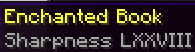
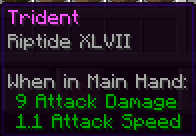
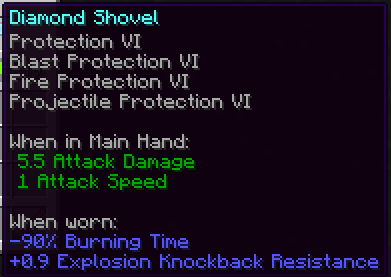
Über diese Mod


Enchantments Unbound provides full control over removing enchantment limits and setting individual level caps. The mod is completely survival-friendly and allows you to combine enchantments directly in the anvil without worrying about the vanilla "Too Expensive!" limit. The mod can also provide overleveled enchantments through villager trading, and vanilla conflicts can be disabled to allow Mending & Infinity or Sharpness on Tridents.

- Set any enchantment to any level (Sharpness 255)
- Remove all enchantment conflicts (Infinity + Mending, etc.)
- Bypass the “Too Expensive!” anvil limit
- Apply any enchantment to any item (Sharpness on Tridents)
- Customize anvil XP cost and scaling
- Generate high-level books via villager trading
- Supports custom enchantments automatically
- Works on vanilla servers (client-side optional)


The mod can be configured through the ingame ModMenu and Cloth Config GUI. Server owners can configure settings in the enchantmentsunbound.json
Individual Enchantment Level Caps
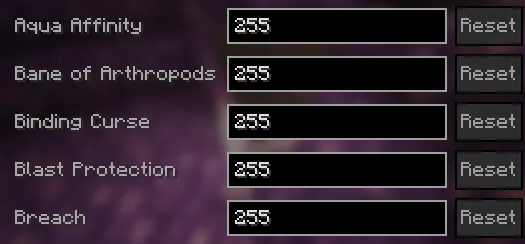
Enchantment Conflict Settings
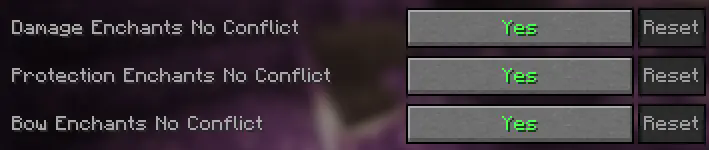
Level Cost Configuration

Server Support for Vanilla Clients


/eu configinfo anvilcaps (page #)

/eu configinfo anvilcost

/eu configinfo misc


Please join my Discord with feedback, questions, bugs, or to say thanks!
Planned Features
- Infinite anvil durability
- Modify enchantments from the enchantment table, fishing, chests, looted items, and piglins
- Particle effects for anvil transations
- Customizable grindstone behavior
Verfügbare Versionen
Enchantments Unbound auf dem Server installieren
Server bestellen
Bestelle einen Minecraft Java Server mit mindestens 3 GB RAM (4 GB empfohlen).
fabric Loader setzen
Wähle im Panel unter "Egg" den fabric-Loader und die passende Minecraft-Version (26.3).
Mod installieren
Öffne den Mod-Browser im Dashboard und suche nach "Enchantments Unbound". Klicke "Installieren" – fertig! Alternativ: Lade die .jar via SFTP in den /mods Ordner.
Kompatibilität
Mod-Loader
Minecraft-Versionen
26.3, 26.2, 26.1.2 (+14 weitere)
Server-seitig
✓ ErforderlichEmpfohlener RAM
4 GB(min. 3 GB)Häufige Fragen
Enchantments Unbound Server crasht beim Start – was tun?
Häufigste Ursache: falsche fabric-Version oder zu wenig RAM. Prüfe im Server-Log (latest.log), ob ein "OutOfMemoryError" oder "Mixin"-Fehler auftritt. Bei Mado Hosting: Stelle sicher, dass mindestens 3 GB RAM zugewiesen sind und der Loader zur Mod-Version passt (26.3). Über das Panel kannst du den Loader mit einem Klick wechseln.
Ist Enchantments Unbound mit fabric kompatibel?
Enchantments Unbound unterstützt offiziell fabric für Minecraft 26.3, 26.2, 26.1.2. Im Mado Dashboard werden inkompatible Loader-Kombinationen automatisch erkannt.
Server laggt mit Enchantments Unbound – wie optimiere ich die Performance?
Empfohlener RAM: 4 GB (+1 GB pro 8 Spieler). Prüfe mit /spark profiler, ob Enchantments Unbound den meisten Tick-Time verbraucht. Häufige Fixes: Server-View-Distance auf 8-10 reduzieren, bei Forge "performant" oder "starlight" als Zusatz-Mod installieren. Bei Mado Hosting läuft dein Server auf NVMe-SSDs mit dedizierten CPU-Kernen für minimale Latenz.
Ähnliche Mods



![[TaCZ] Timeless and Classics Zero](https://cdn.modrinth.com/data/SzzJttH8/fd27766d2bb8390d284696b1dbd358f87e081439_96.webp)


Modded Server mieten
Installiere Enchantments Unbound mit nur einem Klick auf deinem Server.