
Environmental Mover
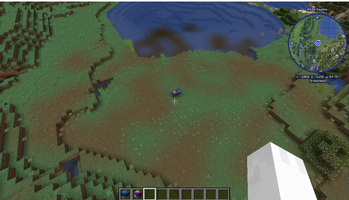
A utility mod that uses special machines powered by RF to absorb and move biomes!
Screenshots
Über diese Mod

A small mod that allows you to power machines that can absorb and move biomes in the world!
Blocks:
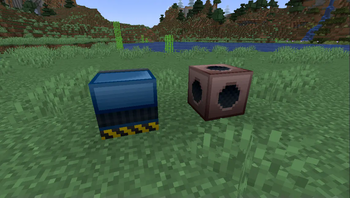
- Biome Absorber: Takes in an empty biome container and RF to produce a filled biome container based on what biome the block is in.
- Biome Applicator: Uses power to paint the blocks around it in the biome contained within the filled biome container.
Items:
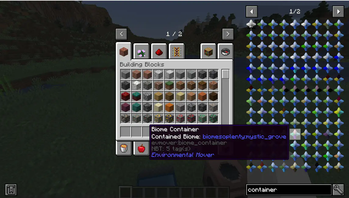
- Empty Biome Container: An item used for containing a biome. Upon crafting, these are empty. Place them in a Biome Absorber to fill them with a biome.
- Filled Biome Container: An item that contains a biome. The four points on the item represents the biome's sky color, water color, fog color and foliage color by default, but can be changed in the item's NBT.
- Terrastar: By default, this is a crafting ingredient for the Biome Applicator. This special item requires specific filled biome containers in order to craft it.
Compatabilities:
- JEI (Optional) - Shows the power requirements for absorbing a biome and painting it, as well as the special recipe for the Terrastar
- Patchouli (Required)- Internal guide on how to use the mod
Extra Info:
- The amount of energy used to extract/distribute a biome can be edited with datapacks (/reload command is your friend!)
- Using the "
see recipes"and"see uses"keys from JEI on the biome containers shows you extra information about them! - Colors for the item can be changed in the item's NBT tags
Verfügbare Versionen
Environmental Mover auf dem Server installieren
Server bestellen
Bestelle einen Minecraft Java Server mit mindestens 3 GB RAM (4 GB empfohlen).
forge Loader setzen
Wähle im Panel unter "Egg" den forge-Loader und die passende Minecraft-Version (1.18.2).
Mod installieren
Öffne den Mod-Browser im Dashboard und suche nach "Environmental Mover". Klicke "Installieren" – fertig! Alternativ: Lade die .jar via SFTP in den /mods Ordner.
Kompatibilität
Mod-Loader
Minecraft-Versionen
1.18.2
Server-seitig
✓ ErforderlichEmpfohlener RAM
4 GB(min. 3 GB)Häufige Fragen
Environmental Mover Server crasht beim Start – was tun?
Häufigste Ursache: falsche forge-Version oder zu wenig RAM. Prüfe im Server-Log (latest.log), ob ein "OutOfMemoryError" oder "Mixin"-Fehler auftritt. Bei Mado Hosting: Stelle sicher, dass mindestens 3 GB RAM zugewiesen sind und der Loader zur Mod-Version passt (1.18.2). Über das Panel kannst du den Loader mit einem Klick wechseln.
Ist Environmental Mover mit forge kompatibel?
Environmental Mover unterstützt offiziell forge für Minecraft 1.18.2. Im Mado Dashboard werden inkompatible Loader-Kombinationen automatisch erkannt.
Server laggt mit Environmental Mover – wie optimiere ich die Performance?
Empfohlener RAM: 4 GB (+1 GB pro 8 Spieler). Prüfe mit /spark profiler, ob Environmental Mover den meisten Tick-Time verbraucht. Häufige Fixes: Server-View-Distance auf 8-10 reduzieren, bei Forge "performant" oder "starlight" als Zusatz-Mod installieren. Bei Mado Hosting läuft dein Server auf NVMe-SSDs mit dedizierten CPU-Kernen für minimale Latenz.
Ähnliche Mods





Modded Server mieten
Installiere Environmental Mover mit nur einem Klick auf deinem Server.