
Eternal Furnace
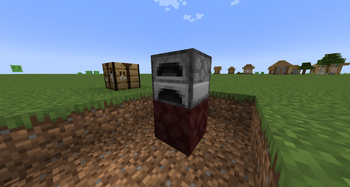
Craft Hellfire Netherrack, place it under a Furnace, and get infinite fuel forever — no more hauling coal. The catch: it smelts 1.8x slower. Gives Netherrack a real purpose.
Screenshots
Über diese Mod
Eternal Furnace
Gives Netherrack a new purpose — craft Hellfire Netherrack, place it under a Furnace, and burn forever. No more hauling coal. The catch: eternal fuel smelts slower than the real thing.
How it works
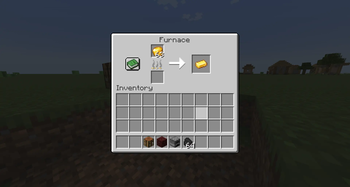
Combine Flint and Steel + Netherrack to craft Hellfire Netherrack. Place that block directly beneath a regular Furnace, and the furnace runs on infinite fuel — no need to feed the fuel slot at all. The trade-off is speed: each item takes 1.8x longer than normal.
| Normal Furnace | Eternal Furnace | |
|---|---|---|
| Fuel | Consumes fuel | Infinite, no fuel needed |
| Speed | ~10s per item | ~18s per item |
Set up a stack of ore, walk away, and let it cook through the night.
Features
- New block: Hellfire Netherrack, a darker, smoldering variant of Netherrack
- Simple recipe — Flint and Steel + Netherrack (the Flint and Steel is consumed)
- Infinite fuel when placed under a Furnace, balanced by 1.8x slower smelting
- Works only on the regular Furnace — Blast Furnaces and Smokers are untouched, keeping their role as the fast option
- Remove the block and the furnace reverts to normal vanilla behavior
Installation
- Install Minecraft Forge for 1.20.1
- Download the latest
.jarfrom the Versions tab - Place it in your
mods/folder - Launch the game and enjoy!
Requirements
- Minecraft 1.20.1
- Forge
Verfügbare Versionen
Eternal Furnace auf dem Server installieren
Server bestellen
Bestelle einen Minecraft Java Server mit mindestens 3 GB RAM (4 GB empfohlen).
forge Loader setzen
Wähle im Panel unter "Egg" den forge-Loader und die passende Minecraft-Version (1.20.1).
Mod installieren
Öffne den Mod-Browser im Dashboard und suche nach "Eternal Furnace". Klicke "Installieren" – fertig! Alternativ: Lade die .jar via SFTP in den /mods Ordner.
Kompatibilität
Mod-Loader
Minecraft-Versionen
1.20.1
Server-seitig
✓ ErforderlichEmpfohlener RAM
4 GB(min. 3 GB)Häufige Fragen
Eternal Furnace Server crasht beim Start – was tun?
Häufigste Ursache: falsche forge-Version oder zu wenig RAM. Prüfe im Server-Log (latest.log), ob ein "OutOfMemoryError" oder "Mixin"-Fehler auftritt. Bei Mado Hosting: Stelle sicher, dass mindestens 3 GB RAM zugewiesen sind und der Loader zur Mod-Version passt (1.20.1). Über das Panel kannst du den Loader mit einem Klick wechseln.
Ist Eternal Furnace mit forge kompatibel?
Eternal Furnace unterstützt offiziell forge für Minecraft 1.20.1. Im Mado Dashboard werden inkompatible Loader-Kombinationen automatisch erkannt.
Server laggt mit Eternal Furnace – wie optimiere ich die Performance?
Empfohlener RAM: 4 GB (+1 GB pro 8 Spieler). Prüfe mit /spark profiler, ob Eternal Furnace den meisten Tick-Time verbraucht. Häufige Fixes: Server-View-Distance auf 8-10 reduzieren, bei Forge "performant" oder "starlight" als Zusatz-Mod installieren. Bei Mado Hosting läuft dein Server auf NVMe-SSDs mit dedizierten CPU-Kernen für minimale Latenz.
Modded Server mieten
Installiere Eternal Furnace mit nur einem Klick auf deinem Server.