
Fletcher (Fabric)
Adds Fletching Table functionality to Minecraft!
Screenshots
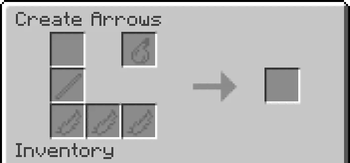
Über diese Mod
Fletcher
Fletcher is an advanced Fletching Table mod for Fabric servers, adding a custom GUI to Fletching Tables that lets you make a variety of different types of arrow.
This is the Fabric version of Fletcher. It must be installed on both the server and the client.
You can download the plugin version for PaperMC servers here, which is only required on the server.
Arrow Tips
The following items can be used as arrow tips:
- Flint - Makes a Flint Arrow, the default arrow
- Iron Nugget - Makes a Weighted Arrow, deals 2x damage but is not shot as far
- Gold Nugget - Makes a Gilded Arrow, deals 1.5x damage and flies further than Weighted Arrows but not as far as Flint Arrows, also breaks on impact
- Glowstone Dust - Makes a Spectral Arrow, similar to a flint arrow but gives the Glowing effect for 8 minutes on impact
- Echo Shard - Makes a Sonic Arrow, which deals splash damage (and draws the attention of nearby wardens)
- Ender Pearl - Makes a Teleportation Arrow, which teleports the shooter to where it lands, but hurts the shooter as if they were hit by it
- Slimeball - Makes a Bouncy Arrow, which deals no damage but pushes back the hit entity
Arrow Hilts
- Stick - Default hilt, no effect
- Blaze Rod - Makes a Blazing Arrow, which is shot 2x as fast
- Breeze Rod - Makes a Breezing Arrow, which is less affected by gravity
Feathers
You can use up to 3 feathers to boost the accuracy of an arrow.
- 1 feather is less accurate than vanilla
- 2 is the same as vanilla
- 3 is a perfectly straight shot
Tipped Arrows
Only Flint Arrows can be turned into Tipped Arrows, using the Splash Potion slot in the Fletching Table.
Infinity
All arrows except for Tipped Arrows work with Infinity.
This helps with balancing, as iron arrows deal less damage than Harming II arrows, encouraging players to try out various types of arrows.
Verfügbare Versionen
Fletcher (Fabric) auf dem Server installieren
Server bestellen
Bestelle einen Minecraft Java Server mit mindestens 3 GB RAM (4 GB empfohlen).
fabric Loader setzen
Wähle im Panel unter "Egg" den fabric-Loader und die passende Minecraft-Version (1.21.8).
Mod installieren
Öffne den Mod-Browser im Dashboard und suche nach "Fletcher (Fabric)". Klicke "Installieren" – fertig! Alternativ: Lade die .jar via SFTP in den /mods Ordner.
Kompatibilität
Mod-Loader
Minecraft-Versionen
1.21.8, 1.21.7, 1.21.6 (+9 weitere)
Server-seitig
✓ ErforderlichEmpfohlener RAM
4 GB(min. 3 GB)Häufige Fragen
Fletcher (Fabric) Server crasht beim Start – was tun?
Häufigste Ursache: falsche fabric-Version oder zu wenig RAM. Prüfe im Server-Log (latest.log), ob ein "OutOfMemoryError" oder "Mixin"-Fehler auftritt. Bei Mado Hosting: Stelle sicher, dass mindestens 3 GB RAM zugewiesen sind und der Loader zur Mod-Version passt (1.21.8). Über das Panel kannst du den Loader mit einem Klick wechseln.
Ist Fletcher (Fabric) mit fabric und quilt kompatibel?
Fletcher (Fabric) unterstützt offiziell fabric, quilt für Minecraft 1.21.8, 1.21.7, 1.21.6. Im Mado Dashboard werden inkompatible Loader-Kombinationen automatisch erkannt.
Server laggt mit Fletcher (Fabric) – wie optimiere ich die Performance?
Empfohlener RAM: 4 GB (+1 GB pro 8 Spieler). Prüfe mit /spark profiler, ob Fletcher (Fabric) den meisten Tick-Time verbraucht. Häufige Fixes: Server-View-Distance auf 8-10 reduzieren, bei Forge "performant" oder "starlight" als Zusatz-Mod installieren. Bei Mado Hosting läuft dein Server auf NVMe-SSDs mit dedizierten CPU-Kernen für minimale Latenz.
Ähnliche Mods



![[TaCZ] Timeless and Classics Zero](https://cdn.modrinth.com/data/SzzJttH8/fd27766d2bb8390d284696b1dbd358f87e081439_96.webp)


Modded Server mieten
Installiere Fletcher (Fabric) mit nur einem Klick auf deinem Server.