
Vanillin
Instanced rendering for entities and block entities using Flywheel
Über diese Mod
How it Works
Vanillin optimizes Minecraft by implementing instanced rendering for entities and block entities through Flywheel.
With Flywheel doing the heavy lifting, Vanillin is able to achieve significant performance improvements on all the game objects it affects. The end result is that ten thousand of something have the same frame time impact as one of something.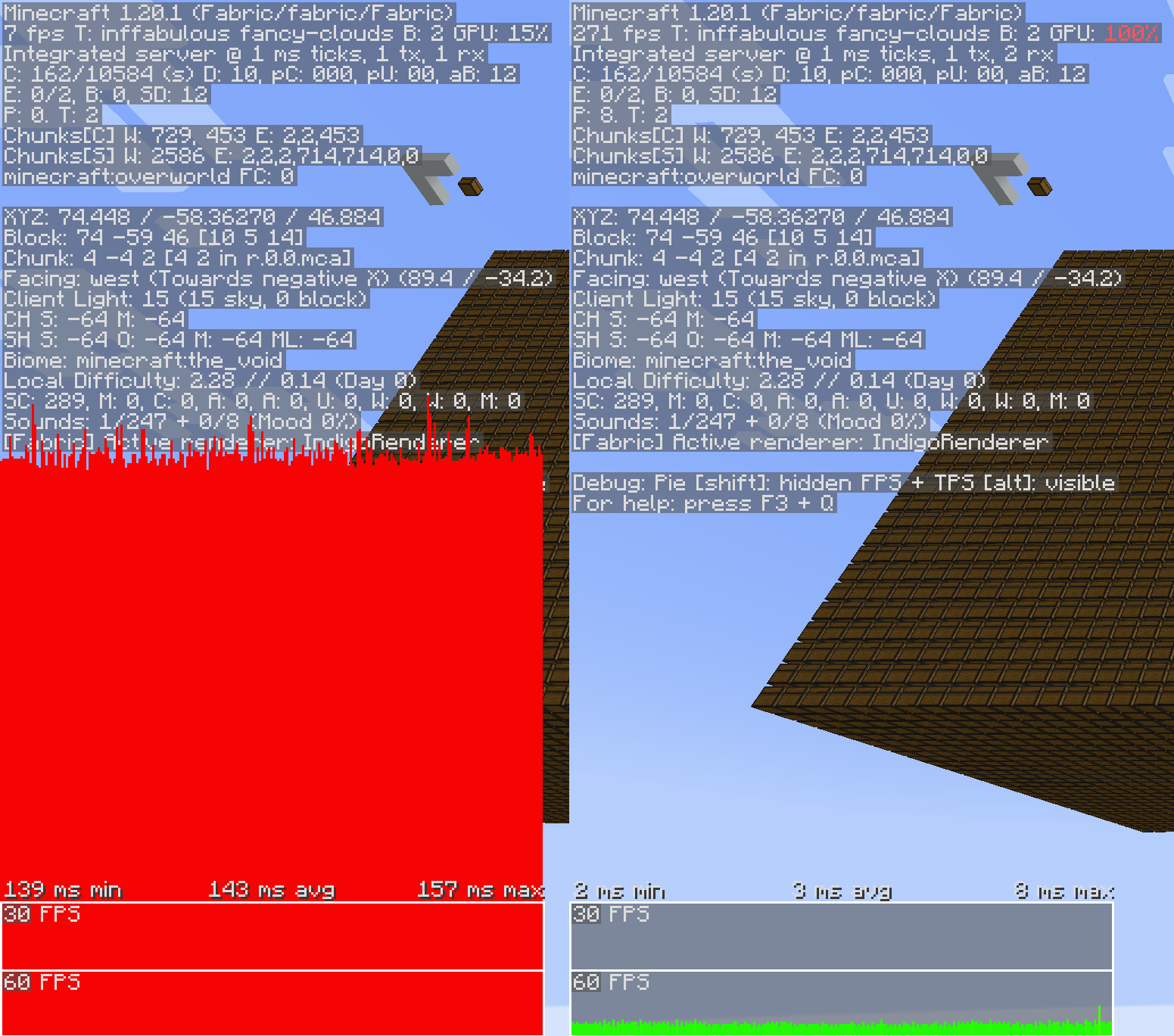
Shaders
Flywheel 1.0, and therefore Vanillin, is currently incompatible with shaders. Work is underway to make first party compat between Flywheel and shaders a reality, but no time estimates can be made.
Optimizations
Vanillin does not optimize everything by default. Special support needs to be built for each type of entity and block entity. Those that are currently optimized are listed below.
✅ = Stable, enabled by default.
🧪 = Experimental, enabled behind a config.
❌ = Temporarily disabled entirely due to crashes/compat/etc.
Block Entities
- ✅ Chests
- ✅ Shulker boxes
- ✅ Bells
- ❌ Signs
Entities
- ✅ Minecarts (and all variants)
- 🧪 Items
- 🧪 Item Displays
- 🧪 Block Displays
Config
To enable experimental optimizations, edit the config file:
Forge/NeoForge
config/vanillin.toml
[entities]
    #Allowed Values: DEFAULT, DISABLE, FORCE_ENABLE
-   "minecraft:item" = "DEFAULT"
+   "minecraft:item" = "FORCE_ENABLE"
Fabric
config/vanillin.json
{
  "entities": {
-   "minecraft:item": "default",
+   "minecraft:item": "force_enable",
  }
}
Alternatively, you can disable optimizations that you find to be causing conflict:
Forge/NeoForge
config/vanillin.toml
[entities]
    #Allowed Values: DEFAULT, DISABLE, FORCE_ENABLE
-   "minecraft:minecart" = "DEFAULT"
+   "minecraft:minecart" = "DISABLE"
Fabric
config/vanillin.json
{
  "entities": {
-   "minecraft:minecart": "default",
+   "minecraft:minecart": "disable",
  }
}
Verfügbare Versionen
Vanillin auf deinem Client installieren
Mod-Loader lokal installieren
Installiere fabric für deine lokale Minecraft-Version.
Passende Datei herunterladen
Wähle die Vanillin-Datei für fabric und Minecraft 1.21.1.
Mod installieren
Lege die .jar-Datei in deinem lokalen .minecraft/mods-Ordner ab und starte Minecraft neu. Eine Installation auf dem Server ist nicht nötig.
Kompatibilität
Mod-Loader
Minecraft-Versionen
1.21.1, 1.20.1
Server-seitig
✗ Nicht unterstütztEmpfohlener RAM
4 GB(min. 3 GB)Häufige Fragen
Muss Vanillin auf dem Minecraft Server installiert werden?
Nein. Modrinth kennzeichnet Vanillin serverseitig als nicht unterstützt. Installiere die Mod nur im lokalen Minecraft-Mods-Ordner. Dein Server kann unverändert bleiben, sofern die Mod-Seite keine zusätzliche Abhängigkeit nennt.
Welche Version und welchen Loader braucht Vanillin?
Nutze eine Datei für fabric, forge, neoforge und exakt deine Minecraft-Version. Unterstützte Versionen sind unter anderem 1.21.1, 1.20.1. Loader-Dateien sind nicht untereinander austauschbar.
Vanillin funktioniert nicht – was kann ich prüfen?
Prüfe zuerst Minecraft-Version, Loader-Version und erforderliche Abhängigkeiten. Lege die .jar-Datei im lokalen .minecraft/mods-Ordner ab und entferne ältere Duplikate. Da die Mod clientseitig ist, löst mehr Server-RAM dieses Problem nicht.
Minecraft Server für deine Gruppe
Vanillin bleibt auf deinem Client. Hoste dazu eine kompatible Welt für deine Mitspieler.