
FTechResource
Bring the surface mineral veins and mining machines from the Factorio game to the Minecraft
Screenshots
Über diese Mod
FTech Resource
✨ Highlights
- Surface Ore Veins — Ore patches generate naturally on the terrain surface. No more branch-mining: find, place, collect.
- Terrain‑adaptive surface vein generation — Generates ore veins only on the surface, adaptively adjusting their placement and quantity based on terrain features.
- Two Tiers of Mining Drills
- Burner Mining Drill — runs on coal/charcoal/any fuel. Simple early-game automation.
- Electric Mining Drill — powered by FE (Forge Energy). Mines all veins in range simultaneously. Auto-ejects output to adjacent container.
- Multiple Mineral Types — Coal, iron, copper, gold, redstone, lapis, emerald, diamond (Overworld) + nether quartz (Nether). Each with custom weight, size, and surface tint.
- Rich Configuration
- Disable vanilla ore generation per-block-ID (replace unwanted ores with stone/deepslate/netherrack on chunk load).
- Tune vein generation chance, drill speed, fuel efficiency, and energy consumption.
- Define custom vein types via JSON — add ores from any mod.
- Vanilla+ Feel — Pickaxes work on veins (drops scaled by config). Left-click a vein to collect a few items; automate the rest with drills.
- JEI & Jade Integration — View vein type info (dimension, biome) in JEI. Hover with Jade to see remaining blocks and drill energy.
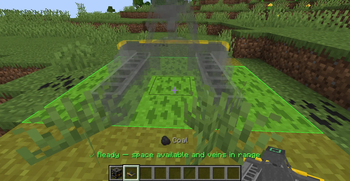
- Clean Placement UX — Live overlay shows drill range and vein locations before you place.
⚙️ Configuration
ftresource_vein_types.json — (generated at config/ftresource/ on first run)
Define which ores appear as surface veins:
Key fields:
| Field | Description |
|---|---|
outputItem |
What the drill (or pickaxe) drops |
weight |
Generation probability relative to other types |
maxBlocks |
Total ore reserves in one patch |
maxPerBlock |
Max blocks per world block (0 = default 64) |
color |
ARGB tint on the vein overlay |
noiseFreq / noiseGamma / shapeThreshold |
Controls vein shape & density |
biomes / dimensions |
Where the vein can generate (empty = all) |
surfaces |
Valid surface blocks to generate on (# prefix for tags) |
surfaceMode |
"auto" (default), "nether" |
Verfügbare Versionen
FTechResource auf dem Server installieren
Server bestellen
Bestelle einen Minecraft Java Server mit mindestens 4 GB RAM (6 GB empfohlen).
neoforge Loader setzen
Wähle im Panel unter "Egg" den neoforge-Loader und die passende Minecraft-Version (1.21.1).
Mod installieren
Öffne den Mod-Browser im Dashboard und suche nach "FTechResource". Klicke "Installieren" – fertig! Alternativ: Lade die .jar via SFTP in den /mods Ordner.
Kompatibilität
Mod-Loader
Minecraft-Versionen
1.21.1
Server-seitig
✓ ErforderlichEmpfohlener RAM
6 GB(min. 4 GB)Häufige Fragen
FTechResource Server crasht beim Start – was tun?
Häufigste Ursache: falsche neoforge-Version oder zu wenig RAM. Prüfe im Server-Log (latest.log), ob ein "OutOfMemoryError" oder "Mixin"-Fehler auftritt. Bei Mado Hosting: Stelle sicher, dass mindestens 4 GB RAM zugewiesen sind und der Loader zur Mod-Version passt (1.21.1). Über das Panel kannst du den Loader mit einem Klick wechseln.
Ist FTechResource mit neoforge kompatibel?
FTechResource unterstützt offiziell neoforge für Minecraft 1.21.1. Im Mado Dashboard werden inkompatible Loader-Kombinationen automatisch erkannt.
Server laggt mit FTechResource – wie optimiere ich die Performance?
Empfohlener RAM: 6 GB (+1 GB pro 5 Spieler). Prüfe mit /spark profiler, ob FTechResource den meisten Tick-Time verbraucht. Häufige Fixes: Server-View-Distance auf 8-10 reduzieren, bei Forge "performant" oder "starlight" als Zusatz-Mod installieren. Bei Mado Hosting läuft dein Server auf NVMe-SSDs mit dedizierten CPU-Kernen für minimale Latenz.
Ähnliche Mods






Modded Server mieten
Installiere FTechResource mit nur einem Klick auf deinem Server.