
GhostZ
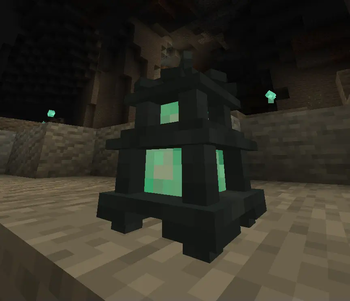
Adds a unique lighting tool - the Ghost Lantern, upgrade of Soul Lantern.
Screenshots
Über diese Mod
 GhostZ
GhostZ is a small lightweight FabricMC mod. It adds a very unique Ghost Lantern item - a lighting tool with which you will never need torches for your cave or mining sessions again!
Dependencies
Features
- Ghost Lantern item, which:
- is an upgrade of vanilla Soul Lantern
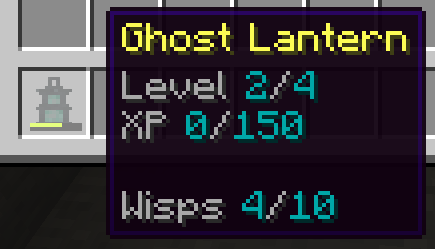
- can place small wisps - temporary light sources
- number of placed wisps is limited - at max, new wisp will delete the oldest, wisps can be sucked all at once to restore the meter
- levels up during your adventures (by killing mobs)
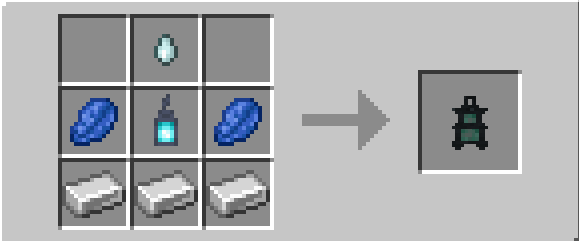
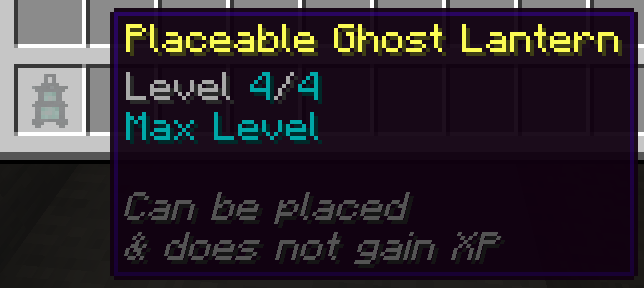
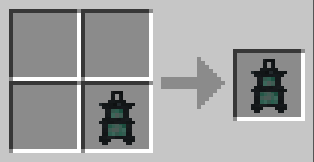
- Placeable Ghost Lantern block - light-source, crafted from normal Ghost Lantern
Learn more on Wiki
Configuration, Modpacks & Balance
You can configure and balance this mod through config/ghostz.json file.
Feel free to use this mod in any modpack, it shouldn't break anything :).
Plans
- cooler visuals
- Haunted Graveyard/Crypt structures with naturally spawning Ghost Lanterns
- ...ghosts?
and more in Discussions
Issues & Suggestions
Verfügbare Versionen
GhostZ auf dem Server installieren
Server bestellen
Bestelle einen Minecraft Java Server mit mindestens 3 GB RAM (4 GB empfohlen).
fabric Loader setzen
Wähle im Panel unter "Egg" den fabric-Loader und die passende Minecraft-Version (1.20.1).
Mod installieren
Öffne den Mod-Browser im Dashboard und suche nach "GhostZ". Klicke "Installieren" – fertig! Alternativ: Lade die .jar via SFTP in den /mods Ordner.
Kompatibilität
Mod-Loader
Minecraft-Versionen
1.20.1, 1.20, 1.19.4 (+4 weitere)
Server-seitig
✓ ErforderlichEmpfohlener RAM
4 GB(min. 3 GB)Häufige Fragen
GhostZ Server crasht beim Start – was tun?
Häufigste Ursache: falsche fabric-Version oder zu wenig RAM. Prüfe im Server-Log (latest.log), ob ein "OutOfMemoryError" oder "Mixin"-Fehler auftritt. Bei Mado Hosting: Stelle sicher, dass mindestens 3 GB RAM zugewiesen sind und der Loader zur Mod-Version passt (1.20.1). Über das Panel kannst du den Loader mit einem Klick wechseln.
Ist GhostZ mit fabric kompatibel?
GhostZ unterstützt offiziell fabric für Minecraft 1.20.1, 1.20, 1.19.4. Im Mado Dashboard werden inkompatible Loader-Kombinationen automatisch erkannt.
Server laggt mit GhostZ – wie optimiere ich die Performance?
Empfohlener RAM: 4 GB (+1 GB pro 8 Spieler). Prüfe mit /spark profiler, ob GhostZ den meisten Tick-Time verbraucht. Häufige Fixes: Server-View-Distance auf 8-10 reduzieren, bei Forge "performant" oder "starlight" als Zusatz-Mod installieren. Bei Mado Hosting läuft dein Server auf NVMe-SSDs mit dedizierten CPU-Kernen für minimale Latenz.
Ähnliche Mods



![[TaCZ] Timeless and Classics Zero](https://cdn.modrinth.com/data/SzzJttH8/fd27766d2bb8390d284696b1dbd358f87e081439_96.webp)


Modded Server mieten
Installiere GhostZ mit nur einem Klick auf deinem Server.