
Guess The Block Minigame
Tired of building a minigame all by yourself? Bored of playing minecraft too? A new minigame now awaits you!
Screenshots
Über diese Mod
DESCRIPTION
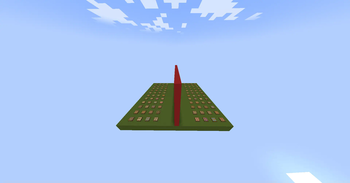
This datapack/mod summons a minigame structure at coordinates 0, 100, 0. The minigame structure
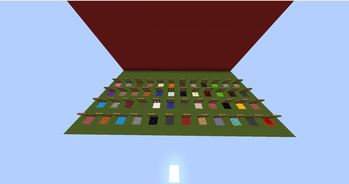
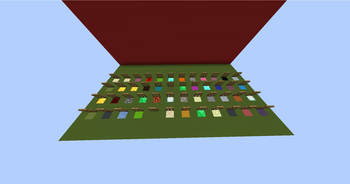
comprises of a platform made out of green concrete and a wall made out of red concrete at the center of the platform. The wall divides the platform into two equal parts. The platform further consists of 96 trapdoors for identifying the block and 96 random blocks.
HOW TO USE THE DATAPACK/MOD
execute the following command to summon the minigame structure:
function minigame:guesstheblock
You can execute this command after you are done playing and if you want to play again too
ABOUT THE MINIGAME
The minigame is known as "Guess The Block". As the name suggests, you have to guess the block. However this minigame requires two players. The platform is divided into parts by a red concrete wall for the players, the players must be on either sides of the platform.
There will be 96 random blocks, 48 for one player and another 48 for the other. 96 trapdoors will be placed above the random blocks for identification. After the players start the game, they will have to choose any one block from their opponent's side/territory, and the opponent has to do the same.
After the block is chosen, you have to start asking your opponent the characteristics of their block, for example: "Does your block drop something?" or "Is your block related to gold". The opponent will do the same as well. Once the opponent guesses your chosen block or you guess your opponent's chosen block, you win or the opponent wins.
INSTALLATION GUIDE
go to your saves folder located here on Windows:
C:\Users(your name)\AppData\Roaming\.minecraft\saves
put the zipped file in the data packs folder, and either restart your world or execute /reload
OTHER THINGS TO NOTE
- Please consider asking me at my discord if you have any other doubts or problems regarding this datapack/mod. My discord username is
oshielder - Kindly note that some blocks may be placed more than twice, so make sure to replace them with the block of your choice
Verfügbare Versionen
Guess The Block Minigame auf dem Server installieren
Server bestellen
Bestelle einen Minecraft Java Server mit mindestens 3 GB RAM (4 GB empfohlen).
datapack Loader setzen
Wähle im Panel unter "Egg" den datapack-Loader und die passende Minecraft-Version (1.21.4).
Mod installieren
Öffne den Mod-Browser im Dashboard und suche nach "Guess The Block Minigame". Klicke "Installieren" – fertig! Alternativ: Lade die .jar via SFTP in den /mods Ordner.
Kompatibilität
Mod-Loader
Minecraft-Versionen
1.21.4, 1.21.3, 1.21.2 (+36 weitere)
Server-seitig
✓ ErforderlichEmpfohlener RAM
4 GB(min. 3 GB)Häufige Fragen
Guess The Block Minigame Server crasht beim Start – was tun?
Häufigste Ursache: falsche datapack-Version oder zu wenig RAM. Prüfe im Server-Log (latest.log), ob ein "OutOfMemoryError" oder "Mixin"-Fehler auftritt. Bei Mado Hosting: Stelle sicher, dass mindestens 3 GB RAM zugewiesen sind und der Loader zur Mod-Version passt (1.21.4). Über das Panel kannst du den Loader mit einem Klick wechseln.
Ist Guess The Block Minigame mit datapack und fabric und forge und neoforge und quilt kompatibel?
Guess The Block Minigame unterstützt offiziell datapack, fabric, forge, neoforge, quilt für Minecraft 1.21.4, 1.21.3, 1.21.2. Achtung: Forge- und Fabric-Mods sind NICHT untereinander kompatibel – wähle einen Loader und bleibe dabei. Im Mado Dashboard werden inkompatible Loader-Kombinationen automatisch erkannt.
Server laggt mit Guess The Block Minigame – wie optimiere ich die Performance?
Empfohlener RAM: 4 GB (+1 GB pro 8 Spieler). Prüfe mit /spark profiler, ob Guess The Block Minigame den meisten Tick-Time verbraucht. Häufige Fixes: Server-View-Distance auf 8-10 reduzieren, bei Forge "performant" oder "starlight" als Zusatz-Mod installieren. Bei Mado Hosting läuft dein Server auf NVMe-SSDs mit dedizierten CPU-Kernen für minimale Latenz.
Ähnliche Mods




Modded Server mieten
Installiere Guess The Block Minigame mit nur einem Klick auf deinem Server.