
GuideME
A guidebook toolkit for mods and modpack makers alike with comfortable markdown formatting, and live 3d scenes!
Screenshots
Über diese Mod
GuideME
This project offers the foundation for your mods or modpacks guidebook. Based on the technology powering Applied Energistics 2s guidebook, it allows you to write your guide in simple Markdown, while embedding 3d scenes straight from structure files.
For players, guides based on GuideME offer:
- Smooth scrolling goodness
- Content being front and center, with an advanced text layout engine supporting reflow and inline elements
- Interactive 3D scenes with annotations, intuitively illustrating concepts from your mod
- Cross-linking between topics and quick information in link tooltips
- Showing inline-recipes in your guidebook "JEI-Style"
- Offers the ability to "hold G" to quickly jump to the relevant guidebook page in any item tooltip
For modders, it offers a rich extensibility API, allowing you to:
- Add custom inline or block tags to Markdown, backed by a custom Widget system
- Extend the recipe rendering to display your custom recipes in the guide
- Use custom Markdown front-matter to easily add arbitrary information to guidebook pages
- Use custom indices to quickly find pages based on custom attributes
- Allow resource packs or addons to add their own content to your guide
Example
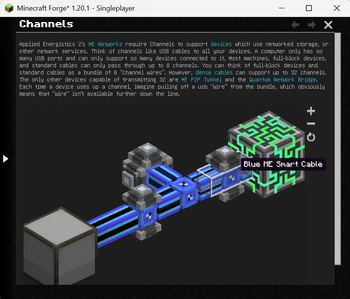
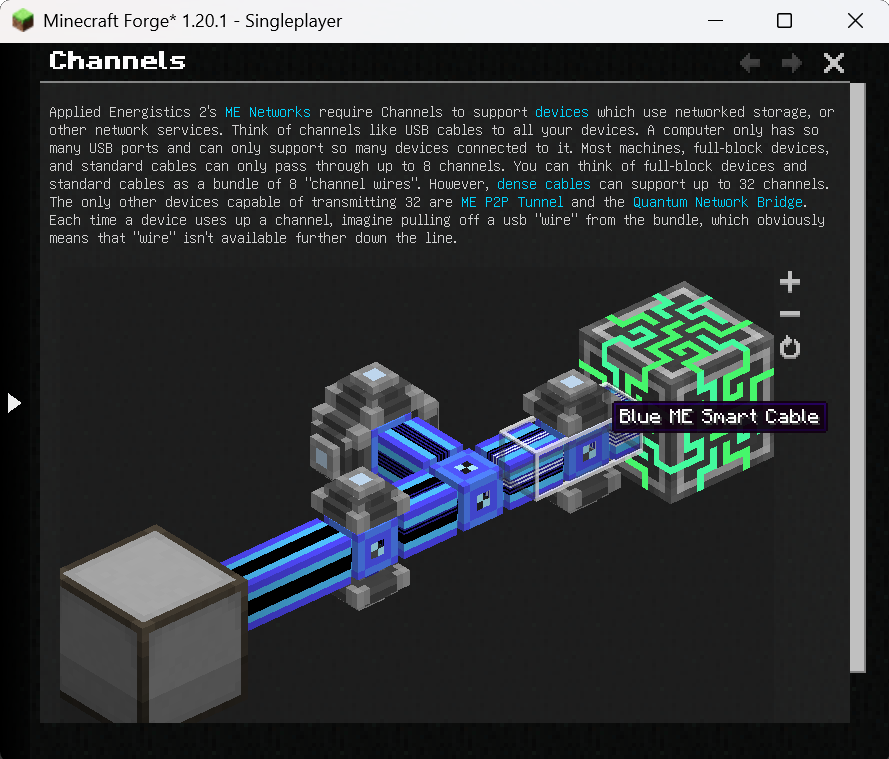
The following is an example page from the AE2 guidebook (source).
---
navigation:
  parent: ae2-mechanics/ae2-mechanics-index.md
  title: Channels
  icon: controller
---

# Channels

Applied Energistics 2's [ME Networks](me-network-connections.md) require
Channels to support [devices](../ae2-mechanics/devices.md) which use networked storage, or other network
services. Think of channels like USB cables to all your devices. A computer only has so many USB ports and can only support
so many devices connected to it. Most machines, full-block devices, and standard cables can only pass through
up to 8 channels. You can think of full-block devices and standard cables as a bundle of 8 "channel wires". However, [dense cables](../items-blocks-machines/cables.md#dense-cable) can support up
to 32 channels. The only other devices capable of transmitting 32 are <ItemLink id="me_p2p_tunnel" />
and the [Quantum Network Bridge](../items-blocks-machines/quantum_bridge.md). Each time a device uses up a channel, imagine pulling off a usb "wire" from
the bundle, which obviously means that "wire" isn't available further down the line.

<GameScene zoom="7" interactive={true}>
  <ImportStructure src="../assets/assemblies/channel_demonstration_1.snbt" />
</GameScene>
Verfügbare Versionen
GuideME auf dem Server installieren
Server bestellen
Bestelle einen Minecraft Java Server mit mindestens 3 GB RAM (4 GB empfohlen).
forge Loader setzen
Wähle im Panel unter "Egg" den forge-Loader und die passende Minecraft-Version (26.4-snapshot-3).
Mod installieren
Öffne den Mod-Browser im Dashboard und suche nach "GuideME". Klicke "Installieren" – fertig! Alternativ: Lade die .jar via SFTP in den /mods Ordner.
Kompatibilität
Mod-Loader
Minecraft-Versionen
26.4-snapshot-3, 26.4-snapshot-2, 26.4-snapshot-1 (+30 weitere)
Server-seitig
✓ ErforderlichEmpfohlener RAM
4 GB(min. 3 GB)Häufige Fragen
GuideME Server crasht beim Start – was tun?
Häufigste Ursache: falsche forge-Version oder zu wenig RAM. Prüfe im Server-Log (latest.log), ob ein "OutOfMemoryError" oder "Mixin"-Fehler auftritt. Bei Mado Hosting: Stelle sicher, dass mindestens 3 GB RAM zugewiesen sind und der Loader zur Mod-Version passt (26.4-snapshot-3). Über das Panel kannst du den Loader mit einem Klick wechseln.
Ist GuideME mit forge und neoforge kompatibel?
GuideME unterstützt offiziell forge, neoforge für Minecraft 26.4-snapshot-3, 26.4-snapshot-2, 26.4-snapshot-1. Im Mado Dashboard werden inkompatible Loader-Kombinationen automatisch erkannt.
Server laggt mit GuideME – wie optimiere ich die Performance?
Empfohlener RAM: 4 GB (+1 GB pro 8 Spieler). Prüfe mit /spark profiler, ob GuideME den meisten Tick-Time verbraucht. Häufige Fixes: Server-View-Distance auf 8-10 reduzieren, bei Forge "performant" oder "starlight" als Zusatz-Mod installieren. Bei Mado Hosting läuft dein Server auf NVMe-SSDs mit dedizierten CPU-Kernen für minimale Latenz.
Ähnliche Mods



Modded Server mieten
Installiere GuideME mit nur einem Klick auf deinem Server.