
The Guild
Quests, expeditions and adventures await you!
Über diese Mod
Introduction
Welcome to The Guild, a quest mod inspired by Bountiful.
Have you ever wanted to go on an adventure? Or maybe you're more inclined for a stable life?
Either way The Guild has got you covered!
Choose between 15 different professions (5 available at the moment) and embark on a journey of questing!
This mod adds quests to the game.
Ok, but what are quests?
A quest is a set of randomly generated tasks usually accompanied by a corresponding reward based on said tasks.
Quests are highly customizable through datapacks, with a solid base of defaults so you can start adventuring out of the box.
Getting started
To start, find a Guild Master in a plains village, and buy a Profession Licence.
Here's The Guild, a build found mainly in plains villages and more rarely in other ones. Here you can buy professions licences to start accepting quests or to expand your choices.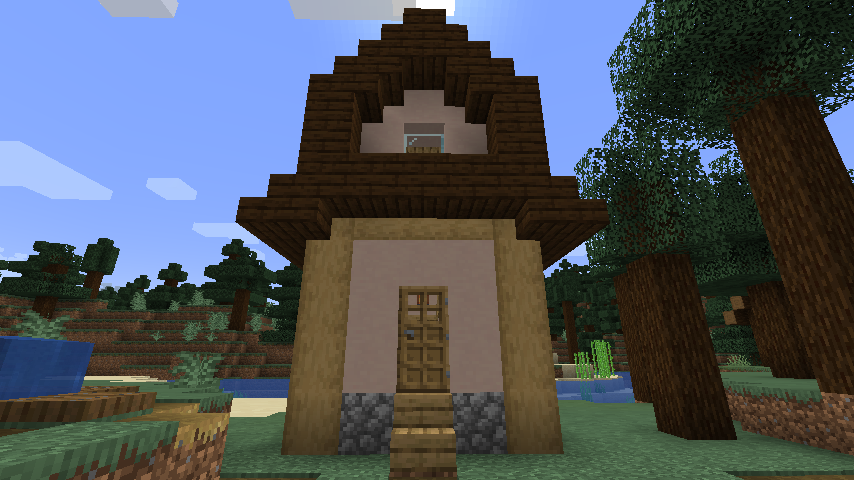
Quests screen
Obtaining and using a licence will unlock the entire Questing system.
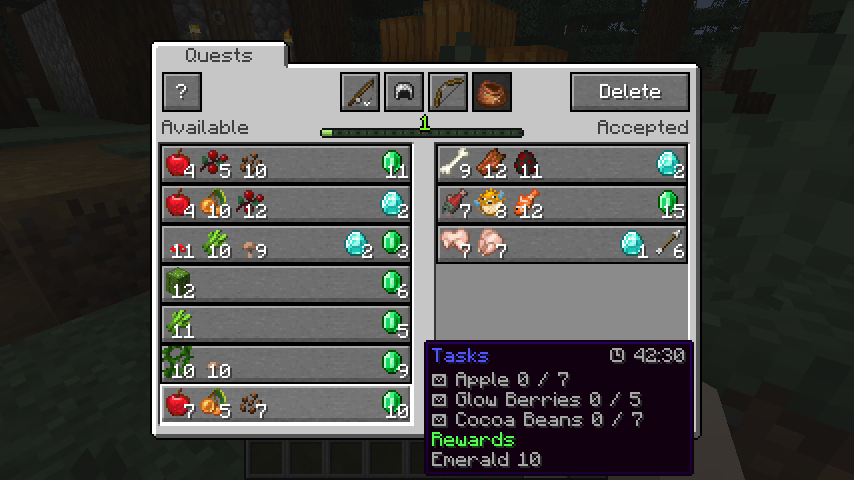
To open the Quests Screen press the Guild Screen Key (J by default).
The Quests Screen showing available quests (on the left) and accepted quests (on the right). Professions are also visible on the top.
Datapack guide
Customizing quests is easy, you can follow the guide here to create your own quests datapacks in minutes!
https://github.com/Fulmineo64/Guild/tree/master/examples/datapacks
FAQ
Is there gonna be a Forge version?
No, but you can download the Bountiful mod which offers many of the functionalities.
Discord
You can discuss, suggest new features and get previews of my mods on my Discord server!
Have fun living your adventures!
Verfügbare Versionen
The Guild auf dem Server installieren
Server bestellen
Bestelle einen Minecraft Java Server mit mindestens 4 GB RAM (6 GB empfohlen).
fabric Loader setzen
Wähle im Panel unter "Egg" den fabric-Loader und die passende Minecraft-Version (1.20.4).
Mod installieren
Öffne den Mod-Browser im Dashboard und suche nach "The Guild". Klicke "Installieren" – fertig! Alternativ: Lade die .jar via SFTP in den /mods Ordner.
Kompatibilität
Mod-Loader
Minecraft-Versionen
1.20.4, 1.20.3, 1.20.2 (+11 weitere)
Server-seitig
✓ ErforderlichEmpfohlener RAM
6 GB(min. 4 GB)Häufige Fragen
The Guild Server crasht beim Start – was tun?
Häufigste Ursache: falsche fabric-Version oder zu wenig RAM. Prüfe im Server-Log (latest.log), ob ein "OutOfMemoryError" oder "Mixin"-Fehler auftritt. Bei Mado Hosting: Stelle sicher, dass mindestens 4 GB RAM zugewiesen sind und der Loader zur Mod-Version passt (1.20.4). Über das Panel kannst du den Loader mit einem Klick wechseln.
Ist The Guild mit fabric kompatibel?
The Guild unterstützt offiziell fabric für Minecraft 1.20.4, 1.20.3, 1.20.2. Im Mado Dashboard werden inkompatible Loader-Kombinationen automatisch erkannt.
Server laggt mit The Guild – wie optimiere ich die Performance?
Empfohlener RAM: 6 GB (+1 GB pro 5 Spieler). Prüfe mit /spark profiler, ob The Guild den meisten Tick-Time verbraucht. Häufige Fixes: Server-View-Distance auf 8-10 reduzieren, bei Forge "performant" oder "starlight" als Zusatz-Mod installieren. Bei Mado Hosting läuft dein Server auf NVMe-SSDs mit dedizierten CPU-Kernen für minimale Latenz.
Ähnliche Mods




Modded Server mieten
Installiere The Guild mit nur einem Klick auf deinem Server.