
Hardcore Revive Reloaded
Implements a three life system that creates a more multiplayer-friendly hardcore mechanic. Discontinued -- Use the new Hardcore Revive+ instead.
Screenshots
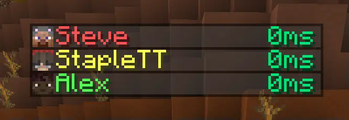
Über diese Mod
Hardcore Revive Reloaded has been discontinued and will no longer receive updates. Please use Hardcore Revive+ instead.
Overview
Do not activate Hardcore mode with this pack enabled! It will not work!
This is a continuation of the Hardcore Revive+ project that aims to reduce the challenge of hardcore multiplayer by giving each player three lives.
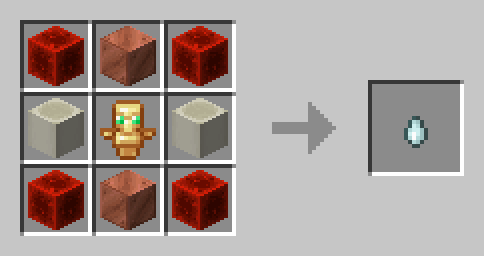
Once a player loses all three of their lives, they become a ghost. Ghosts can be revived when another player throws a Soul Charm at them. Until then, your ghost is able to move freely around the world in spectator mode.
Soul Charm Recipe
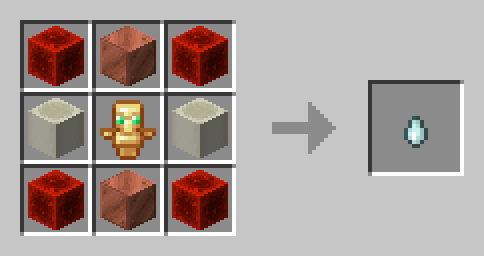
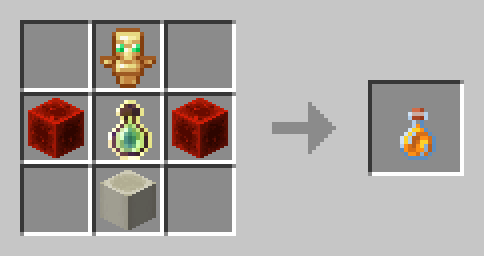
Players can also regain their lost lives by crafting Life Jam. Drinking this item restores one life to the player, with a maximum of 4 lives. Players with 4 lives receive two extra hearts, totaling to 12.
Life Jam Recipe
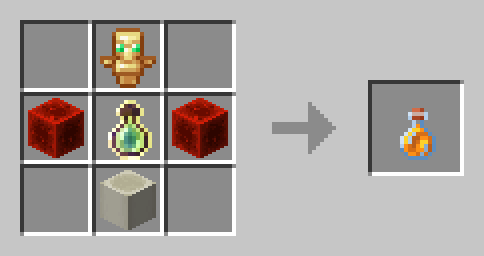
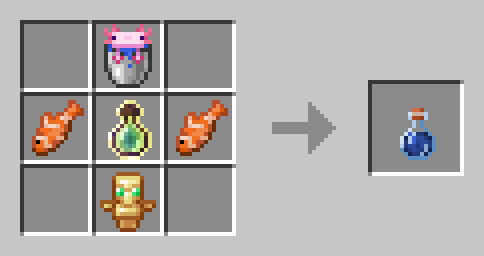
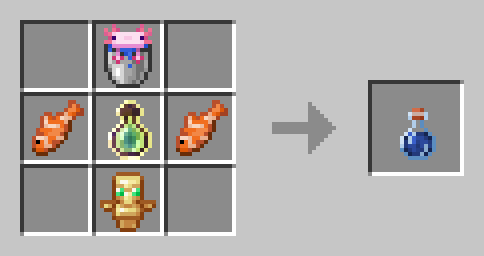
As of Version 1.5, there are two craftable potions, called Bedrock Essence and Axolotl's Blessing. Bedrock Essence grants the player Resistance I until death, while Axolotl's Blessing grants Regeneration I until death. These effects cannot be used at the same time.
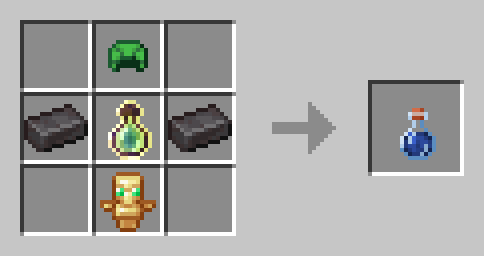
Bedrock Essence Recipe
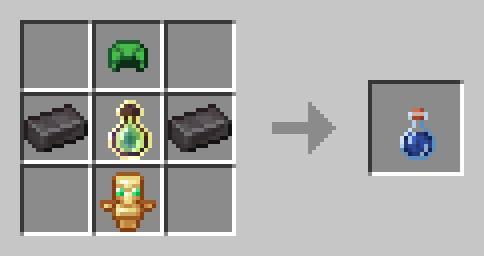
Axolotl's Blessing Recipe
Configuration
You can configure settings in-game via the command /function hcrplus:_settings.
Features
- You can can revive other players who have lost their 3 lives
- Players can use Life Jam to restore their lost lives
- Ghosts can possess other players or mobs to grant either buffs or debuffs
- Health is reduced after being revived or crafting a Soul Charm
- Adds more challenge to Minecraft multiplayer without being as punishing as Hardcore mode.
Incompatibilities
- Vanilla Hardcore mode
- Hardcore Revive+
- Any "Unlock all recipes" data pack or mod
Verfügbare Versionen
Hardcore Revive Reloaded auf dem Server installieren
Server bestellen
Bestelle einen Minecraft Java Server mit mindestens 3 GB RAM (4 GB empfohlen).
datapack Loader setzen
Wähle im Panel unter "Egg" den datapack-Loader und die passende Minecraft-Version (1.21.4).
Mod installieren
Öffne den Mod-Browser im Dashboard und suche nach "Hardcore Revive Reloaded". Klicke "Installieren" – fertig! Alternativ: Lade die .jar via SFTP in den /mods Ordner.
Kompatibilität
Mod-Loader
Minecraft-Versionen
1.21.4, 1.21.3, 1.21.2 (+2 weitere)
Server-seitig
✓ ErforderlichEmpfohlener RAM
4 GB(min. 3 GB)Häufige Fragen
Hardcore Revive Reloaded Server crasht beim Start – was tun?
Häufigste Ursache: falsche datapack-Version oder zu wenig RAM. Prüfe im Server-Log (latest.log), ob ein "OutOfMemoryError" oder "Mixin"-Fehler auftritt. Bei Mado Hosting: Stelle sicher, dass mindestens 3 GB RAM zugewiesen sind und der Loader zur Mod-Version passt (1.21.4). Über das Panel kannst du den Loader mit einem Klick wechseln.
Ist Hardcore Revive Reloaded mit datapack und fabric und forge und neoforge und quilt kompatibel?
Hardcore Revive Reloaded unterstützt offiziell datapack, fabric, forge, neoforge, quilt für Minecraft 1.21.4, 1.21.3, 1.21.2. Achtung: Forge- und Fabric-Mods sind NICHT untereinander kompatibel – wähle einen Loader und bleibe dabei. Im Mado Dashboard werden inkompatible Loader-Kombinationen automatisch erkannt.
Server laggt mit Hardcore Revive Reloaded – wie optimiere ich die Performance?
Empfohlener RAM: 4 GB (+1 GB pro 8 Spieler). Prüfe mit /spark profiler, ob Hardcore Revive Reloaded den meisten Tick-Time verbraucht. Häufige Fixes: Server-View-Distance auf 8-10 reduzieren, bei Forge "performant" oder "starlight" als Zusatz-Mod installieren. Bei Mado Hosting läuft dein Server auf NVMe-SSDs mit dedizierten CPU-Kernen für minimale Latenz.
Ähnliche Mods




Modded Server mieten
Installiere Hardcore Revive Reloaded mit nur einem Klick auf deinem Server.