
Harder Natural Healing
Harder Natural Healing gives you control of healing in your game! Fine tune your game or your modpack's challenge level to your taste!
Screenshots
Über diese Mod

Harder Natural Healing gives you control of healing in your game! Fine tune your game or your modpack's challenge level to your taste!
Harder Natural Healing will make beacons, bandages, potions, healing items, and healing spells much more useful!
By default, this mod simply restores the slower healing rate minecraft used to have and adds the option to have a small heal each morning when the player wakes up.
However, Harder Natural Healing actually gives you complete control over natural healing in your game or modpack.
What Options do you have?
Do you want players to heal faster? Or Slower? You control how fast a player heals per second.
Do you want healing to use more food? Or less food? You control how much hunger healing causes.
Do you want to allow players to still heal when they are hungrier? Or to be less hungry to heal? You control how much hunger before healing stops.
Do you want players to heal when they sleep and wakeup? Or not? To heal a little or a lot after sleeping? You control how much a person heals when they wake up.
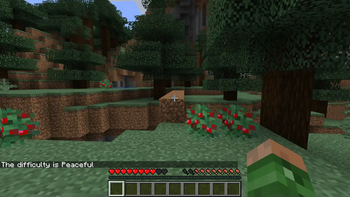
Do you want to play in Peaceful mode but want hunger to still work? And take damage (even die if you want to!) from starvation.
And In Version 11+ You can configure it so players will starve to hit point level including 0 hit points in any difficulty setting.
Default Configuration File
The Default settings restore the original Minecraft healing rates and add a small heal each morning a person wakes up in bed.
["Harder Natural Healing Control Values"]
#healingPerSecond #Range: 0.0 ~ 10.0
healingPerSecond = 0.25
#Can the player get hungry and maybe even starve to death in peaceful mode.
peacefulHunger = true
#minimum hit points for peaceful mode starvation.
#Range: 0 ~ 20
minimumStarvationHealth = 0
#Attack Healing Delay in Ticks
#Attack Healing Delay in Ticks #Range: 0 ~ 3600
attackHealingDelayTicks = 400
#minimumFoodHealingLevel #Range: 0.0 ~ 22.0*
minimumFoodHealingLevel = 16.0
#healingExhaustionCost - Hunger exhausted per healing event. #Range: 0.0 ~ 10.0
healingExhaustionCost = 2.0
#extraExhaustionWhenHurt #extraExhaustionWhenHurt #Range: 0.0 ~ 1.0
extraExhaustionWhenHurt = 0.0125
#wakeupHealingAmount #Range: 0.0 ~ 10.0
wakeupHealingAmount = 4.0
#Debug Level: 0 = Off, 1 = Log, 2 = Chat+Log #Range: 0 ~ 2
debugLevel = 0
Commands
Users with operator level (or in creative LAN game with cheats on) can use the following commands.
type /hardernaturalhealing and then the command option. The parameters are in the brackets []. You choose one value.
0-ShowSettings displays the current settings.1-NewSettings [0 to 4] Sets multiple settings in one easy command. Settings are "easy", "normal", "harder", "superhard", "wakeup"
1-PeacefulHunger [true or false] true means the player can starve to death even in peaceful mode
1-MinimumStarvationHealth [0 or 1] 0 means player can starve to death. 1 means player will starve to 1 health.
1-HealthAfterDeath [1 to 20]
1-HungerAfterDeath [ 0 to 20]
2-healingPerSecond [0.25 to 10]
2-attackHealingDelayTicks [0 to 3000] (there are 20 ticks per second. So 10 would be a half second delay, 3000 would be a 150 second delay after attacking)
2-minimumFoodHealingLevel [0 to 22] half hunger bars (so 20 is 10 full foodbars)
2-healingExhaustionCost [0.0 to 10.0] how much food healing costs
2-wakeupHealingAmount [0.0 to 10.0] how much a player heals when they wake up from a bed
2-extraExhaustionWhenHurt [0.0 to 1.0] anything over 0.0 means player consumes food faster when wounded
3-debugLevel [0 to 2] 0 is quiet, 1 is high level details, 2 is everything. For modpack developers.
Setup Suggestions
There are several built in settings. Any operator can set these values with in game commands.
Verfügbare Versionen
Harder Natural Healing auf dem Server installieren
Server bestellen
Bestelle einen Minecraft Java Server mit mindestens 3 GB RAM (4 GB empfohlen).
forge Loader setzen
Wähle im Panel unter "Egg" den forge-Loader und die passende Minecraft-Version (1.21.1).
Mod installieren
Öffne den Mod-Browser im Dashboard und suche nach "Harder Natural Healing". Klicke "Installieren" – fertig! Alternativ: Lade die .jar via SFTP in den /mods Ordner.
Kompatibilität
Mod-Loader
Minecraft-Versionen
1.21.1, 1.20.6, 1.20.5 (+11 weitere)
Server-seitig
✓ ErforderlichEmpfohlener RAM
4 GB(min. 3 GB)Häufige Fragen
Harder Natural Healing Server crasht beim Start – was tun?
Häufigste Ursache: falsche forge-Version oder zu wenig RAM. Prüfe im Server-Log (latest.log), ob ein "OutOfMemoryError" oder "Mixin"-Fehler auftritt. Bei Mado Hosting: Stelle sicher, dass mindestens 3 GB RAM zugewiesen sind und der Loader zur Mod-Version passt (1.21.1). Über das Panel kannst du den Loader mit einem Klick wechseln.
Ist Harder Natural Healing mit forge kompatibel?
Harder Natural Healing unterstützt offiziell forge für Minecraft 1.21.1, 1.20.6, 1.20.5. Im Mado Dashboard werden inkompatible Loader-Kombinationen automatisch erkannt.
Server laggt mit Harder Natural Healing – wie optimiere ich die Performance?
Empfohlener RAM: 4 GB (+1 GB pro 8 Spieler). Prüfe mit /spark profiler, ob Harder Natural Healing den meisten Tick-Time verbraucht. Häufige Fixes: Server-View-Distance auf 8-10 reduzieren, bei Forge "performant" oder "starlight" als Zusatz-Mod installieren. Bei Mado Hosting läuft dein Server auf NVMe-SSDs mit dedizierten CPU-Kernen für minimale Latenz.
Ähnliche Mods




Modded Server mieten
Installiere Harder Natural Healing mit nur einem Klick auf deinem Server.