
Harry Potter | And The Wizarding World
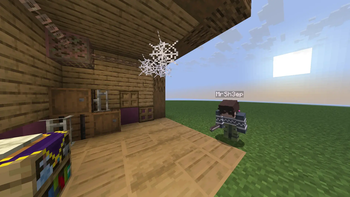
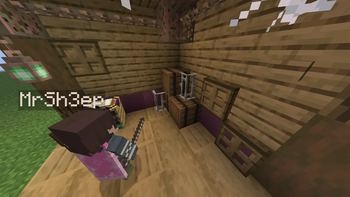
The best Harry Potter Datapack/Mod out there! :p Focusing on immersive multiplayer dueling, ALL while in a fully vanilla survival world; No map your stuck in! Packed with 28 wands, 40+ spells (WIP) and an unmatched cinematic Harry Potter experience!
Screenshots


Über diese Mod

Information
To see more behind the scenes, join my Discord
This Project contains spoilers to the Harry Potter Book series by J. K. Rowling.
ALL CREDIT goes to J. K. Rowling, including: Spells, items, etc.. She created every aspect of Harry Potter, I simply coded them into minecraft.
Installation Steps
Mod
- Download the mod version of the project.
- Place the downloaded file in the
modsfolder of your Minecraft instance.
Datapack And Resourcepack
The datapack and Resourcepack are a 2 in 1 file meaning, you can put the same zip folder in both the datapack and the resourcepack folders. It will say incompatible, ignore it.. the game thinks its right when its not..
- Download the datapack version (both resourcepack and datapack are in the same folder).
- Place the Datapack in the
world datapack folder. - Place the Resourcepack in your
Resourcepack folderand select it.
(Credit to The_Freenix for the amazing hogwarts map I used in the banner!)
Roadmap Release 1.0 (Next Update)
Roadmap Release 1.0 (Next Update)

Beta 0.4 (Latest Update)
Changelog
Changelog Beta 0.4
- Added the Field Guide GUI, replacing the old settings menu. (BIG FEATURE WITH MUCH MORE INSIDE IT TO COME!!)
- Performance Optimizatios up to 3x faster than beta 0.3
- Added many tutorials through out the Datapack.
- Removed Basic cast spell to align with the books
- Reduced spell cooldowns 1-4s to align more with the books
- Optimized player/global resets for debugging
- Added UUID selector API.
- Protego Optimizations
Introduction
If you've ever read the Harry Potter book series by the author, J. K. Rowling, then you have most likely wondered.. "These books are incredible.. I WISH IT WAS IN MINECRAFT!". Well Im proud to present, Harry Potter | And The Wizarding World! Its a fan made datapack and Mod that brings exactly everything you've ever read in the Harry Potter series, right into your survival world or server.
Harry Potter | And the Wizarding World is desigend to be integrated into a survival world, so you can experience Harry Potter outside of an adventure map!
Duel your friends with your choice of 27 wands, customize your spell wheel with over 30+ spells(not fully added yet), and experience the magical world of Harry Potter with your friends like never before!
Features
Crafting
- This is a datapack, so I can not add items to the creative inventory. If you want an alternitave to crafting though, run
loot give @s loot pack:<item>With this command you can get the Wand Crafting Table, and all 3 Wand Cores
Recipes
Recipes
Wand Crafting Table

- 3 Oak Planks
- 2 Amethyst Shards
- One Book
- One Diamond
Phoenix Feather

- 4 Honeycomb
- 2 Gold Ingots
- 2 Amethyst Shards
- 1 Feather
Dragon Heartstring

- 4 Magma Cream
- 2 Fermented Spider Eyes
- 2 Amethyst Shards
- 1 Crimsion Hyphae
Unicorn Hair

- 4 Ghast Tears
- 2 Echo Shards
- 2 Amethyst Shards
- 1 Phantom Membrane

If you ever loose your copy of the Field Guide, you can always craft one!
Wand Crafting Table
Wand crafting is made easy with a custom crafting system! Simply throw your choice of wood and wand core onto the wand crafting table, and the wand will apear right on top!

(This is an example of crafting a Mangrove Unicorn Hair Wand!)
Wand Crafting Materials
Wand Cores:- Phoenix Feather
- Dragon Heartstring
- Unicorn Hair
Wood Types:
wood types are stripped woods. Ex: Oak Stripped Wood
- Oak
- Spruce
- Dark Oak
- Birch
- Acacia
- Jungle
- Cherry
- Mangrove
- Pale Oak

(A picture of all current 27 wand varrients. 9 wood types, 3 cores, and a picture of Dragon Heartstring, Phoenix Feather, and the Unicorn Hair wand cores)
The Main Wand
About
The main tool of Harry Potter | And The Wizarding World is the wand, also know as the Main wand, to differentiate the Main wand And Spell wheel wands. The main wand is the item that allows you to control your activated spell (if avalible), or open the spell wheel, a UI overlay above your hotbar, displaying customizable pages of binded spells, making dueling and fighting with wands easy and cinimatic! (more information can be found in the "The Spell Wheel" section below)

Controls
To control your activated spell, or trigger a spell's action, press the
attack/destroykeybind. (default: Left Click) If there is no action, then the chat will return "No Action."Simularly, press the
use.item/place_blockkeybind to open the spell wheel
The Spell Wheel
About
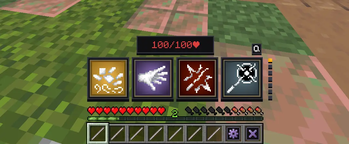
The highlight of the project is the Spell Wheel; a completely custom UI that displays seven pages, each with four spell slots above the hotbar. You can bind any spell to any slot, and activate that slot with the respective keybind (read below) to activate that spell!
Activation and Deactivation
Activating the spell wheel could not be more simple! Simply press the use.item/place.block keybind (Default: Right Click) to open the spell wheel.
Closing the spell wheel is just as easy. Again, press the attack / destroy keybind (Default: Right Click) on the exit button (hotbar slot 9) to exit the spell wheel. Once done, you automatically recive all of your hotbar items back! (and any wands extra wands from the spell wheel is also removed..)
Controls
The spell wheel has 7 pages, and 2 buttons. Every page has 4 slots. Scroll with your mouse to change pages The first slot is activated by single pressing the attack/destroy keybind (default: Left Click). The second slot is activated by doubble pressing the attack/destroy keybind. The third and fourth slot can be activated the same way, just by pressing and doubble pressing the use.item/place.block keybind (default: Right Click)
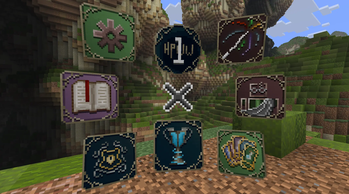
Press the book icon in your hotbar to open the field guide. The only page done is the settings page (Where you can find a list of tutorials) and the Spell Wheel Settings, where you can customize your spell wheel to your preference.
Field Guide Spell Wheel Settings Page
In the spell wheel page, you can bind any unlocked spell to anywhere on your spell wheel!
Simply right click any unlocked spell from the "Spell Drawer (Bottom 8 slots)", then click on any of the 4 slots on the "Spell Wheel (Top 4 Slots)" to bind a spell. You can also Left click any of the Spell Wheel slots to clear that slot.
"Use the arrows next to the "Spell Wheel" to change your Spell Wheel page. Additionally, use the arrows next to the "Spell Drawer" to change the spell category the drawer displays."
"There are 10 categories: Damage, Control, Force, Utility, Curses, Other_1-5. Every spell currently In HPWW will be in one of the drawer pages. This message can also be found in the settings page of the field guide."
Spells
Expelliarmus
Expelliarmus
Expelliarmus is an essential damgage spell when it comes to dueling. cast this powerful charm and disarm your enimies wand! very powerful..
Depulso
Depulso
Depulso is a powerful charm used everywhere in the Wizarding world. Cast this spell and watch, as your opponents fly into the air! (even more useful if paired with the Levioso Charm!)
Levioso
Levioso
Levioso, one of the most common offense/defense charms in the wizzarding world. With an effortless flick of the wand, levitate your enimies high in the air, allowing you to make an attack!
Lumos
Lumos
Lumos is an essential charm in the Wizarding World. Lumos allows you to shine a light for any ammount of time at your location. You can also exit your spell wheel and still have lumos activated when holding your main wand! (you can quickly deactivate it with the main wand spell trigger action)

Protego
Protego
- Protego, or the shield charm, is a utility spell that allows players to fully block incoming spell attacks! simply press
Qkeybind to activate.

Known Bugs
if any bugs appear, try reseting your wand wheel player data with /function pack:main/spellwheel/wheel/function/reset_player_data or use the button in the spell wheel settings menu. If that still does not work, run a hard reset with /function pack:main/spellwheel/wheel/reset_global_storage
and then run /reload
If you find any bugs, please share them on my GitHub Page
Verfügbare Versionen
Harry Potter | And The Wizarding World auf dem Server installieren
Server bestellen
Bestelle einen Minecraft Java Server mit mindestens 3 GB RAM (4 GB empfohlen).
datapack Loader setzen
Wähle im Panel unter "Egg" den datapack-Loader und die passende Minecraft-Version (26.2).
Mod installieren
Öffne den Mod-Browser im Dashboard und suche nach "Harry Potter | And The Wizarding World". Klicke "Installieren" – fertig! Alternativ: Lade die .jar via SFTP in den /mods Ordner.
Kompatibilität
Mod-Loader
Minecraft-Versionen
26.2, 26.1.2, 26.1.1 (+2 weitere)
Server-seitig
✓ ErforderlichEmpfohlener RAM
4 GB(min. 3 GB)Häufige Fragen
Harry Potter | And The Wizarding World Server crasht beim Start – was tun?
Häufigste Ursache: falsche datapack-Version oder zu wenig RAM. Prüfe im Server-Log (latest.log), ob ein "OutOfMemoryError" oder "Mixin"-Fehler auftritt. Bei Mado Hosting: Stelle sicher, dass mindestens 3 GB RAM zugewiesen sind und der Loader zur Mod-Version passt (26.2). Über das Panel kannst du den Loader mit einem Klick wechseln.
Ist Harry Potter | And The Wizarding World mit datapack und fabric und forge und minecraft und neoforge und quilt kompatibel?
Harry Potter | And The Wizarding World unterstützt offiziell datapack, fabric, forge, minecraft, neoforge, quilt für Minecraft 26.2, 26.1.2, 26.1.1. Achtung: Forge- und Fabric-Mods sind NICHT untereinander kompatibel – wähle einen Loader und bleibe dabei. Im Mado Dashboard werden inkompatible Loader-Kombinationen automatisch erkannt.
Server laggt mit Harry Potter | And The Wizarding World – wie optimiere ich die Performance?
Empfohlener RAM: 4 GB (+1 GB pro 8 Spieler). Prüfe mit /spark profiler, ob Harry Potter | And The Wizarding World den meisten Tick-Time verbraucht. Häufige Fixes: Server-View-Distance auf 8-10 reduzieren, bei Forge "performant" oder "starlight" als Zusatz-Mod installieren. Bei Mado Hosting läuft dein Server auf NVMe-SSDs mit dedizierten CPU-Kernen für minimale Latenz.
Ähnliche Mods




Modded Server mieten
Installiere Harry Potter | And The Wizarding World mit nur einem Klick auf deinem Server.
Details
- Lizenz
- Creative Commons Attribution Non Commercial No Derivatives 4.0 International
- Server-seitig
- Erforderlich