
Hbm's Nuclear Tech Mod Reloaded
HBM's Nuke Mod now ported to 1.12.2
Screenshots
Über diese Mod
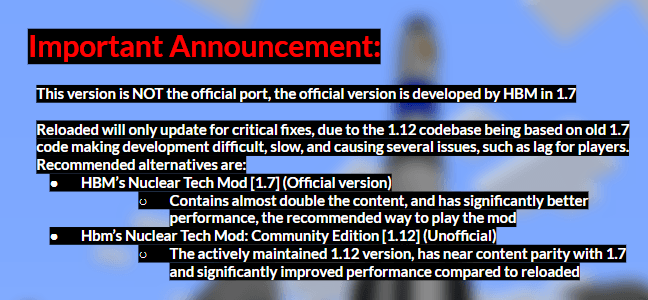
HBM made the original mod.
Link to original mod: https://github.com/HbmMods/Hbm-s-Nuclear-Tech-GIT
Drillgon200's 1.12.2 Port.
Link to Mod: https://github.com/Drillgon200/Hbm-s-Nuclear-Tech-GIT
This project will contain Drillgon200's releases, as well as my fork of his port.
Description:
Use of Just Enough Items strongly recommended!
Hbm's Nuclear Tech Mod is, as the name implies, all about technology, atomic science and nuclear weapons. It features an expansive tech tree of various processing and utility machines, craftable bombs and missiles, guns, and abandoned structures to explore. No longer are nukes just green TNT blocks - you will have to synthesize new types of explosives and enrich uranium before you can send nuclear missiles towards your pals.
Installation
HBM's NTM does not have any special dependencies, so the installation procedure is the usual:
Download the .jar file
Install Forge modloader on your 1.12.2 Minecraft profile
Launch the game once (or manually create the mods folder)
Navigate to .minecraft and drop the jar file into the mods folder
First steps
Getting started might be a bit confusing at first, so here's a list of things to do in survival
Craft a template folder
Craft a burner press
Make flat stamps
Use folder to turn flat stamps into plate stamps
Make copper plates
Craft a blast furnace
Make steel and Minecraft grade copper
Stamp copper into wires
Craft an assembly machine
Once you've gotten this far, you should have a feel for how the mod works and with the help of JEI you'll find out what you want to do next. For more information, check out the official wiki!
Special Thanks to HBM and Drillgon200.
Verfügbare Versionen
Hbm's Nuclear Tech Mod Reloaded auf dem Server installieren
Server bestellen
Bestelle einen Minecraft Java Server mit mindestens 3 GB RAM (4 GB empfohlen).
forge Loader setzen
Wähle im Panel unter "Egg" den forge-Loader und die passende Minecraft-Version (1.12.2).
Mod installieren
Öffne den Mod-Browser im Dashboard und suche nach "Hbm's Nuclear Tech Mod Reloaded". Klicke "Installieren" – fertig! Alternativ: Lade die .jar via SFTP in den /mods Ordner.
Kompatibilität
Mod-Loader
Minecraft-Versionen
1.12.2
Server-seitig
✓ ErforderlichEmpfohlener RAM
4 GB(min. 3 GB)Häufige Fragen
Hbm's Nuclear Tech Mod Reloaded Server crasht beim Start – was tun?
Häufigste Ursache: falsche forge-Version oder zu wenig RAM. Prüfe im Server-Log (latest.log), ob ein "OutOfMemoryError" oder "Mixin"-Fehler auftritt. Bei Mado Hosting: Stelle sicher, dass mindestens 3 GB RAM zugewiesen sind und der Loader zur Mod-Version passt (1.12.2). Über das Panel kannst du den Loader mit einem Klick wechseln.
Ist Hbm's Nuclear Tech Mod Reloaded mit forge kompatibel?
Hbm's Nuclear Tech Mod Reloaded unterstützt offiziell forge für Minecraft 1.12.2. Im Mado Dashboard werden inkompatible Loader-Kombinationen automatisch erkannt.
Server laggt mit Hbm's Nuclear Tech Mod Reloaded – wie optimiere ich die Performance?
Empfohlener RAM: 4 GB (+1 GB pro 8 Spieler). Prüfe mit /spark profiler, ob Hbm's Nuclear Tech Mod Reloaded den meisten Tick-Time verbraucht. Häufige Fixes: Server-View-Distance auf 8-10 reduzieren, bei Forge "performant" oder "starlight" als Zusatz-Mod installieren. Bei Mado Hosting läuft dein Server auf NVMe-SSDs mit dedizierten CPU-Kernen für minimale Latenz.
Ähnliche Mods



![[TaCZ] Timeless and Classics Zero](https://cdn.modrinth.com/data/SzzJttH8/fd27766d2bb8390d284696b1dbd358f87e081439_96.webp)


Modded Server mieten
Installiere Hbm's Nuclear Tech Mod Reloaded mit nur einem Klick auf deinem Server.
Details
- Lizenz
- GNU Lesser General Public License v3.0 only
- Server-seitig
- Erforderlich