
Hero's Journey
A datapack inspired by End Remastered, gather eyes and go to The End!
Screenshots

Über diese Mod


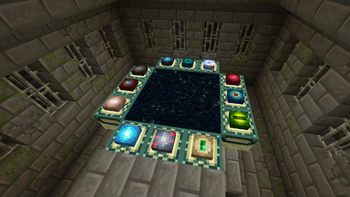
Hero's Journey is a datapack inspired by jack-bagel's End Remastered mod! There are 16 different eyes to collect littered around the world, you will need to gather 12 different ones to open the end portal and go to The End!
The main intention of this datapack is to encourage players to do things they wouldn't normally do in the game, when was the last time you built a turtle sanctuary?
This datapack does have a resource pack, which adds textures for all 16 eyes! While not required, it is recommended. If you're downloading the mod version, you do not need to install the resource pack!
The resource pack is contained within the datapack itself, just drop the whole zip into your game's resource pack folder!
All available eyes and hints to their locations can be found in this datapack's advancements! If you want more detail, check out the wiki!
Compatibility
Hero's Journey IS compatible with any datapack that modifies loot tables. This datapack does not modify any loot tables, and inserts the eyes using other methods to maximise compatibility.
This datapack is also compatible with datapacks that modify the stronghold, such as YUNG's Better Strongholds!
As of v2.0, the eyes added by Hero's Journey are fully data-driven, meaning that other datapacks can add their own eyes!
Thanks
Thanks to my partner, Avery for the textures! <3
Thanks to the following people for translations:
- Bloodaxe95 (Norwegian Nynorsk and Bokmål)
Like this? Check out some other packs I've worked on:
Verfügbare Versionen
Hero's Journey auf dem Server installieren
Server bestellen
Bestelle einen Minecraft Java Server mit mindestens 3 GB RAM (4 GB empfohlen).
datapack Loader setzen
Wähle im Panel unter "Egg" den datapack-Loader und die passende Minecraft-Version (26.3).
Mod installieren
Öffne den Mod-Browser im Dashboard und suche nach "Hero's Journey". Klicke "Installieren" – fertig! Alternativ: Lade die .jar via SFTP in den /mods Ordner.
Kompatibilität
Mod-Loader
Minecraft-Versionen
26.3, 26.2, 26.1.2 (+10 weitere)
Server-seitig
✓ ErforderlichEmpfohlener RAM
4 GB(min. 3 GB)Häufige Fragen
Hero's Journey Server crasht beim Start – was tun?
Häufigste Ursache: falsche datapack-Version oder zu wenig RAM. Prüfe im Server-Log (latest.log), ob ein "OutOfMemoryError" oder "Mixin"-Fehler auftritt. Bei Mado Hosting: Stelle sicher, dass mindestens 3 GB RAM zugewiesen sind und der Loader zur Mod-Version passt (26.3). Über das Panel kannst du den Loader mit einem Klick wechseln.
Ist Hero's Journey mit datapack und fabric und forge und neoforge und quilt kompatibel?
Hero's Journey unterstützt offiziell datapack, fabric, forge, neoforge, quilt für Minecraft 26.3, 26.2, 26.1.2. Achtung: Forge- und Fabric-Mods sind NICHT untereinander kompatibel – wähle einen Loader und bleibe dabei. Im Mado Dashboard werden inkompatible Loader-Kombinationen automatisch erkannt.
Server laggt mit Hero's Journey – wie optimiere ich die Performance?
Empfohlener RAM: 4 GB (+1 GB pro 8 Spieler). Prüfe mit /spark profiler, ob Hero's Journey den meisten Tick-Time verbraucht. Häufige Fixes: Server-View-Distance auf 8-10 reduzieren, bei Forge "performant" oder "starlight" als Zusatz-Mod installieren. Bei Mado Hosting läuft dein Server auf NVMe-SSDs mit dedizierten CPU-Kernen für minimale Latenz.
Ähnliche Mods




Modded Server mieten
Installiere Hero's Journey mit nur einem Klick auf deinem Server.