
HexDebug
A Hex Casting addon for debugging and editing hexes.
Screenshots

Über diese Mod
HexDebug
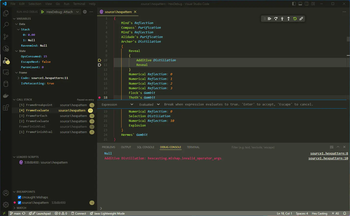
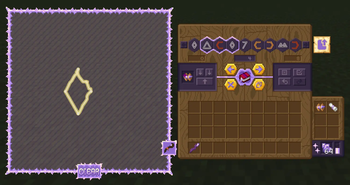
A Hex Casting addon for debugging and editing hexes. The Debugger runs a debug server using the Debug Adapter Protocol, allowing you to use real debugging tools like VSCode to find bugs in your hexes; and the Splicing Table provides an easy-to-use GUI for finding and fixing mistakes.
Features
- Debugging: Step through your hexes pattern-by-pattern with vscode-hex-casting or any other DAP-compatible editor!
- Editing: Use the Splicing Table to edit hexes just like in a text editor, with buttons and keyboard shortcuts to select, move, duplicate, delete, and copy/paste iotas, and even draw patterns in a mini staff grid.
- Step Modes: Use any of the well-known step modes (step in/out/over, continue, restart, stop) with the ingame item and/or through VSCode.
- Variables: See the stack, ravenmind, and even some internal values like the evaluated pattern count.
- Call Stack: Debug complex meta-evaluating hexes with the call stack, generated from the next continuation to be executed. Learn how Hex Casting's internals work!
- Breakpoints: Set breakpoints on specific patterns, or use the Uncaught Mishaps option to pause the debugger when a mishap occurs and see what went wrong.
- Multiplayer: Debug your hexes in multiplayer! The debug client connects to a port opened by the game client (configurable, defaults to 4444), and each player can have up to one active debugger instance at a time.
Attribution


Verfügbare Versionen
HexDebug auf dem Server installieren
Server bestellen
Bestelle einen Minecraft Java Server mit mindestens 3 GB RAM (4 GB empfohlen).
fabric Loader setzen
Wähle im Panel unter "Egg" den fabric-Loader und die passende Minecraft-Version (1.20.1).
Mod installieren
Öffne den Mod-Browser im Dashboard und suche nach "HexDebug". Klicke "Installieren" – fertig! Alternativ: Lade die .jar via SFTP in den /mods Ordner.
Kompatibilität
Mod-Loader
Minecraft-Versionen
1.20.1, 1.19.2
Server-seitig
✓ ErforderlichEmpfohlener RAM
4 GB(min. 3 GB)Häufige Fragen
HexDebug Server crasht beim Start – was tun?
Häufigste Ursache: falsche fabric-Version oder zu wenig RAM. Prüfe im Server-Log (latest.log), ob ein "OutOfMemoryError" oder "Mixin"-Fehler auftritt. Bei Mado Hosting: Stelle sicher, dass mindestens 3 GB RAM zugewiesen sind und der Loader zur Mod-Version passt (1.20.1). Über das Panel kannst du den Loader mit einem Klick wechseln.
Ist HexDebug mit fabric und forge und quilt kompatibel?
HexDebug unterstützt offiziell fabric, forge, quilt für Minecraft 1.20.1, 1.19.2. Achtung: Forge- und Fabric-Mods sind NICHT untereinander kompatibel – wähle einen Loader und bleibe dabei. Im Mado Dashboard werden inkompatible Loader-Kombinationen automatisch erkannt.
Server laggt mit HexDebug – wie optimiere ich die Performance?
Empfohlener RAM: 4 GB (+1 GB pro 8 Spieler). Prüfe mit /spark profiler, ob HexDebug den meisten Tick-Time verbraucht. Häufige Fixes: Server-View-Distance auf 8-10 reduzieren, bei Forge "performant" oder "starlight" als Zusatz-Mod installieren. Bei Mado Hosting läuft dein Server auf NVMe-SSDs mit dedizierten CPU-Kernen für minimale Latenz.
Ähnliche Mods





Modded Server mieten
Installiere HexDebug mit nur einem Klick auf deinem Server.