
Hundred Years Warfare
NPC-based combat and production gameplay, multiple control methods including RTS mode, special compatibility and integration with various mods, with future plans to expand into structures, management, RPG mechanics, and more.
Screenshots
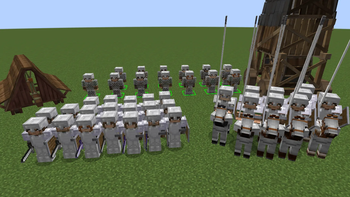
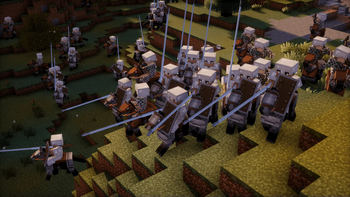
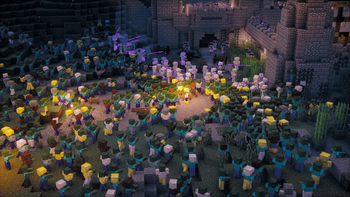
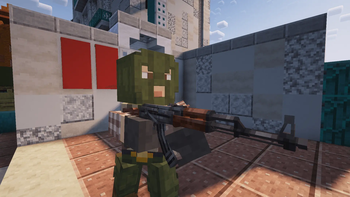
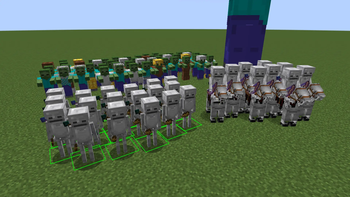
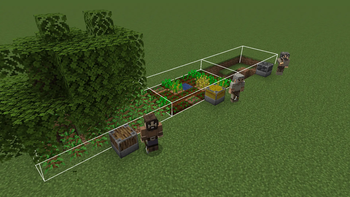
Über diese Mod
Hundred Years Warfare
Hundred Years Warfare aims to add civilizations and entirely new gameplay mechanics to Minecraft. The mod currently includes entity-focused content, including various units and siege weapons, recruitment and command systems, as well as worker gameplay reworked based on Ancient Warfare 2. The mod also adds support for other mods; see the Current Features section for details. Future plans include expanded structures, settlement management, RPG mechanics, and more.


✨ Current Features:
In-game tutorial manual providing detailed instructions on controls and gameplay.
Diverse unit types and behaviors, including arcing shot, cavalry charges, and siege weapons. Different unit types have counter relationships.
Worker and workstation gameplay reworked based on Ancient Warfare 2, supporting various forms of resource production, item transport, crafting, storage, and more.
Multiple soldier command methods: RTS mode, command wheel, and command staff. RTS mode supports hotkeys, formations, and shift commands.
Relationship system supporting relationship management and team gameplay.
Special compatibility and integration with other mods, only taking effect when the corresponding mods are installed. Currently supported mods include:
Better CombatEpic FightTimeless and Classics ZeroIron's Spells 'n SpellbooksFreecam
⚠️ Important Notes:
This mod does not specifically reference or recreate the English-French Hundred Years' War, but may include elements inspired by it and beyond. This means the content and settings may be fictional.
This is not an RTS-focused mod, but rather a PvE-oriented combat/adventure mod similar to Ancient Warfare 2. The mod's goal is to add dynamically developing NPC factions and structures to the game, with extensive expansion of raid mechanics.
Set a higher entity render distance such as 150% for the complete experience. It is recommended to play with the following optimization mods:
Client-side optimization:
Sodiumfor Fabric orEmbeddiumfor ForgeEntityCullingAccelerated RenderingandImmediatelyFast
Server-side optimization:
Lithiumfor Fabric orRadiumfor Forge
Tip: If using shaders, you can disable entity shadow rendering for significant performance improvements.
📜 Mod Usage Terms:
You may include this mod in modpacks as long as you credit the author and source, and do not profit from it. Commercial use or redistribution of this mod is prohibited. This mod is provided "as is," and the author is not responsible for any issues that may arise during use.
🙏 Special Thanks:
Ancient Warfare 2 - the source of the worker and workstation gameplay, as well as one of the main inspirations for this mod. 📎 Project link: https://www.curseforge.com/minecraft/mc-mods/ancient-warfare-2
The Freecam project - this mod's RTS mode is based on Freecam implementation.
📎 Project link: https://github.com/MinecraftFreecam/FreecamAge of Empires IV - provided inspiration and reference for siege engine designs.
The map "Falcon's Rock" - used for promotional video creation.
📎 Link: https://www.planetminecraft.com/project/the-biggest-and-most-realisitic-medieval-world/Minecraft and the player community, as well as all supporters - you make all of this possible.
Verfügbare Versionen
Hundred Years Warfare auf dem Server installieren
Server bestellen
Bestelle einen Minecraft Java Server mit mindestens 3 GB RAM (4 GB empfohlen).
fabric Loader setzen
Wähle im Panel unter "Egg" den fabric-Loader und die passende Minecraft-Version (1.21.1).
Mod installieren
Öffne den Mod-Browser im Dashboard und suche nach "Hundred Years Warfare". Klicke "Installieren" – fertig! Alternativ: Lade die .jar via SFTP in den /mods Ordner.
Kompatibilität
Mod-Loader
Minecraft-Versionen
1.21.1, 1.20.1
Server-seitig
✓ ErforderlichEmpfohlener RAM
4 GB(min. 3 GB)Häufige Fragen
Hundred Years Warfare Server crasht beim Start – was tun?
Häufigste Ursache: falsche fabric-Version oder zu wenig RAM. Prüfe im Server-Log (latest.log), ob ein "OutOfMemoryError" oder "Mixin"-Fehler auftritt. Bei Mado Hosting: Stelle sicher, dass mindestens 3 GB RAM zugewiesen sind und der Loader zur Mod-Version passt (1.21.1). Über das Panel kannst du den Loader mit einem Klick wechseln.
Ist Hundred Years Warfare mit fabric und forge und neoforge kompatibel?
Hundred Years Warfare unterstützt offiziell fabric, forge, neoforge für Minecraft 1.21.1, 1.20.1. Achtung: Forge- und Fabric-Mods sind NICHT untereinander kompatibel – wähle einen Loader und bleibe dabei. Im Mado Dashboard werden inkompatible Loader-Kombinationen automatisch erkannt.
Server laggt mit Hundred Years Warfare – wie optimiere ich die Performance?
Empfohlener RAM: 4 GB (+1 GB pro 8 Spieler). Prüfe mit /spark profiler, ob Hundred Years Warfare den meisten Tick-Time verbraucht. Häufige Fixes: Server-View-Distance auf 8-10 reduzieren, bei Forge "performant" oder "starlight" als Zusatz-Mod installieren. Bei Mado Hosting läuft dein Server auf NVMe-SSDs mit dedizierten CPU-Kernen für minimale Latenz.
Ähnliche Mods




Modded Server mieten
Installiere Hundred Years Warfare mit nur einem Klick auf deinem Server.