
Cataclysm: Weapon Skill Config/ Incinerator's Try Hard
Let you be able to custom the skill damage/radius/charging time etc. of the Incinerator/The Immolator/Tidal Claws etc. of L_Ender 's Cataclysm!
Über diese Mod
L_Ender's Cataclysm has incredibly cool weapons. However, only a few of weapon skill parameters can be modified in Cataclysm’s configuration file. And the weapon skills' damage, charging time and so on sometimes are not satisfiying enough.
This mod allows you to modify The Incinerator and some other weapons further through configuration files IncineratorsTryHard.toml.
Currently you can modify:
[The Incinerator]
- Basic Damage of the weapon skill
- Max Health Percent Damage of the weapon skill
- Charging Time to cast the skill
- The Charging Time to form the max magic circle (1.0.1+)
- Radius of Ignis Circles released by the weapon skill (1.0.2+)
↓↓ CoolDown = 1, Charging Time = 2 ↓↓
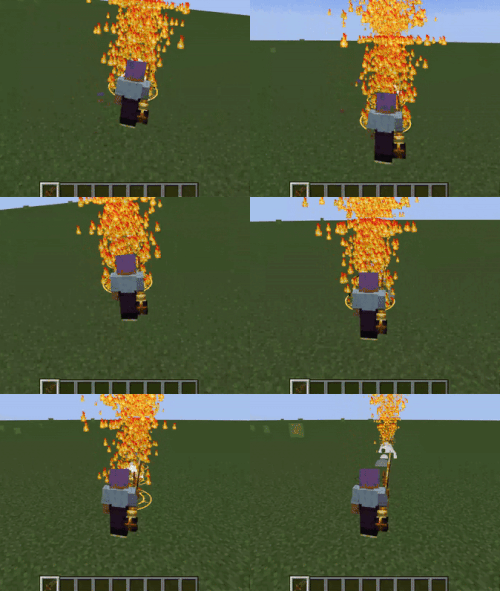
[The Immolator] (1.0.2+)
- Basic Damage of the weapon skill
- Max Health Percent Damage of the weapon skill
- Charging Time to cast the skill
- The Charging Time to form the max magic circle
- Radius of Ignis Circles released by the weapon skill
[Tidal Claws] (1.0.2+)
- Basic Damage of Tidal Tentacle
- Tentacle's First/Second Detection Range released by Tidal Claws (1.0.4+)
- Hook's Max Range released by Tidal Claws (1.0.4+)
- Hook's Max Speed released by Tidal Claws (1.0.4+)
[Gauntlet of Bulwark] (1.0.3+)
- Charge Damage Multiplier
[Bloom Stone Pauldrons] (1.0.4+)
- Cooldown time of Amethyst Cluster Shooting
Verfügbare Versionen
Cataclysm: Weapon Skill Config/ Incinerator's Try Hard auf dem Server installieren
Server bestellen
Bestelle einen Minecraft Java Server mit mindestens 3 GB RAM (4 GB empfohlen).
forge Loader setzen
Wähle im Panel unter "Egg" den forge-Loader und die passende Minecraft-Version (1.20.1).
Mod installieren
Öffne den Mod-Browser im Dashboard und suche nach "Cataclysm: Weapon Skill Config/ Incinerator's Try Hard". Klicke "Installieren" – fertig! Alternativ: Lade die .jar via SFTP in den /mods Ordner.
Kompatibilität
Mod-Loader
Minecraft-Versionen
1.20.1
Server-seitig
✓ ErforderlichEmpfohlener RAM
4 GB(min. 3 GB)Häufige Fragen
Cataclysm: Weapon Skill Config/ Incinerator's Try Hard Server crasht beim Start – was tun?
Häufigste Ursache: falsche forge-Version oder zu wenig RAM. Prüfe im Server-Log (latest.log), ob ein "OutOfMemoryError" oder "Mixin"-Fehler auftritt. Bei Mado Hosting: Stelle sicher, dass mindestens 3 GB RAM zugewiesen sind und der Loader zur Mod-Version passt (1.20.1). Über das Panel kannst du den Loader mit einem Klick wechseln.
Ist Cataclysm: Weapon Skill Config/ Incinerator's Try Hard mit forge kompatibel?
Cataclysm: Weapon Skill Config/ Incinerator's Try Hard unterstützt offiziell forge für Minecraft 1.20.1. Im Mado Dashboard werden inkompatible Loader-Kombinationen automatisch erkannt.
Server laggt mit Cataclysm: Weapon Skill Config/ Incinerator's Try Hard – wie optimiere ich die Performance?
Empfohlener RAM: 4 GB (+1 GB pro 8 Spieler). Prüfe mit /spark profiler, ob Cataclysm: Weapon Skill Config/ Incinerator's Try Hard den meisten Tick-Time verbraucht. Häufige Fixes: Server-View-Distance auf 8-10 reduzieren, bei Forge "performant" oder "starlight" als Zusatz-Mod installieren. Bei Mado Hosting läuft dein Server auf NVMe-SSDs mit dedizierten CPU-Kernen für minimale Latenz.
Ähnliche Mods



![[TaCZ] Timeless and Classics Zero](https://cdn.modrinth.com/data/SzzJttH8/fd27766d2bb8390d284696b1dbd358f87e081439_96.webp)


Modded Server mieten
Installiere Cataclysm: Weapon Skill Config/ Incinerator's Try Hard mit nur einem Klick auf deinem Server.