
Info+ 📑
Show detailed system information directly in Minecraft chat. View CPU, RAM, GPU, OS, Java, Minecraft, and Loader details. Built for debugging, player support, server checks, and modpack troubleshooting.
Screenshots
Über diese Mod

InfoPlus
Show detailed system information directly in Minecraft chat.
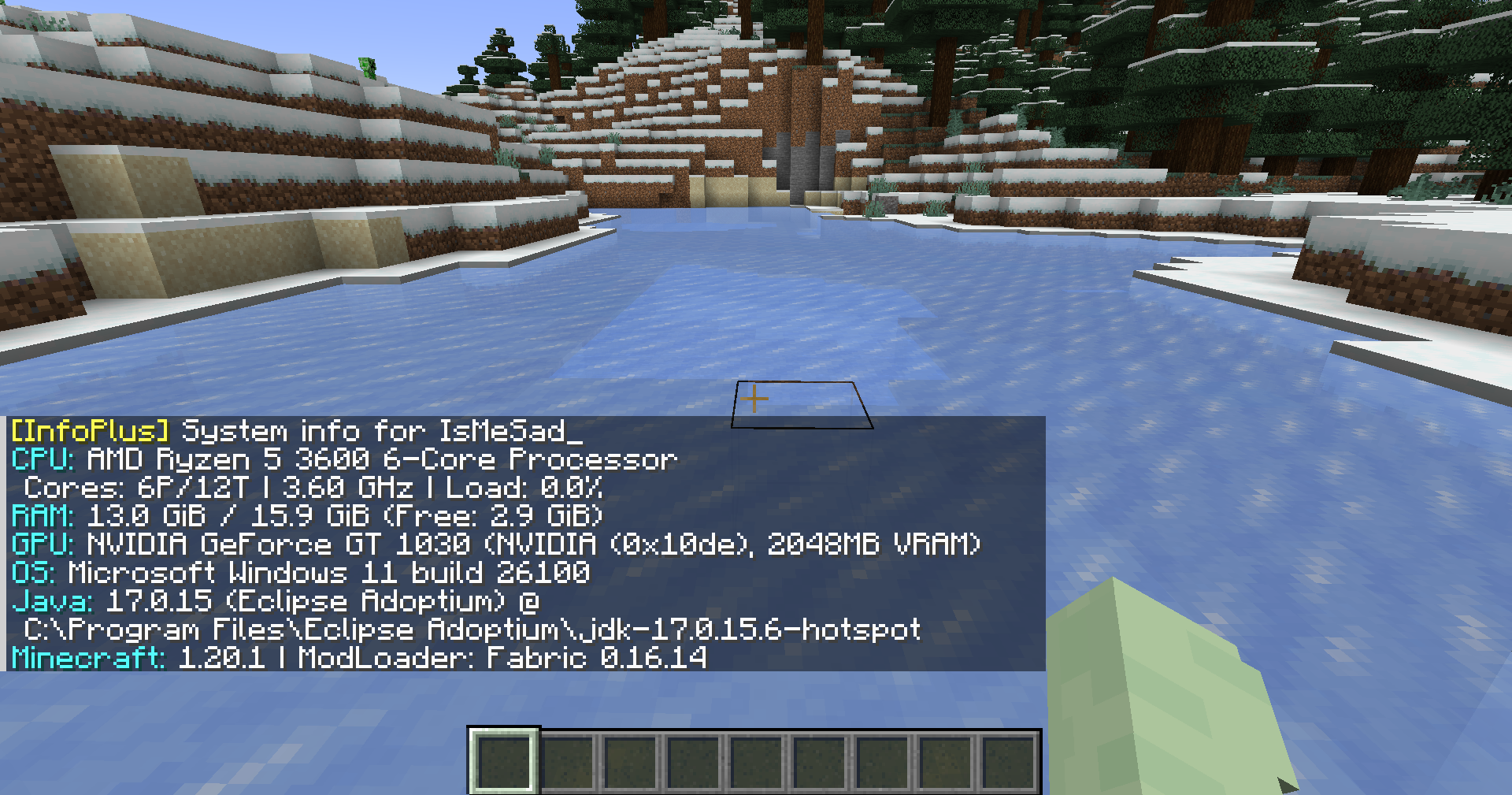
View CPU, RAM, GPU, OS, Java, Minecraft, and Loader details.
Built for debugging, player support, server checks, and modpack troubleshooting.
Features
- View CPU information, including model, vendor, cores, threads, frequency, and usage
- View RAM usage, including total, used, available, and swap/virtual memory
- View GPU details, including model, vendor, VRAM, device ID, and version info
- View operating system information, uptime, process count, and boot time
- View Java runtime information, Minecraft version, loader name, and loader version
- View disk, network, battery, firmware, motherboard, and file system information when using full mode
- Supports both local client checks and multiplayer player checks
- Outputs information in a clear chat-friendly format
Screenshot
Usage
Local system info
Run the command in Minecraft chat:
/info
Basic system information:
/info basic
Full system information:
/info full
You can also use the alias:
/infoplus
Multiplayer player info
Request system information from another player:
/info <player>
Request basic information from another player:
/info <player> basic
Request full information from another player:
/info <player> full
Alias:
/infoplus <player> full
Server-side player requests require permission level 2.
Command Summary
| Command | Description |
|---|---|
/info |
Shows your basic system information |
/info basic |
Shows your basic system information |
/info full |
Shows your full system information |
/info <player> |
Requests basic system information from a player |
/info <player> basic |
Requests basic system information from a player |
/info <player> full |
Requests full system information from a player |
/infoplus |
Alias for /info |
Privacy Notice
InfoPlus can display hardware and runtime information such as CPU, RAM, GPU, operating system, Java version, Minecraft version, loader version, and other system details.
Full mode may include more detailed information depending on the enabled options. Server-side player requests are limited to users with the required permission level.
Use this mod responsibly and avoid sharing sensitive system information publicly.
Requirements
- Minecraft 1.20.1
- Fabric Loader
- Fabric API
- Java 17
Download
Source Code
The source code is available on GitHub:
https://github.com/TamKungZ/infoplus
License
This project is licensed under the MIT License.
See the LICENSE file for more details.
Verfügbare Versionen
Info+ 📑 auf dem Server installieren
Server bestellen
Bestelle einen Minecraft Java Server mit mindestens 3 GB RAM (4 GB empfohlen).
fabric Loader setzen
Wähle im Panel unter "Egg" den fabric-Loader und die passende Minecraft-Version (1.21.6-pre4).
Mod installieren
Öffne den Mod-Browser im Dashboard und suche nach "Info+ 📑". Klicke "Installieren" – fertig! Alternativ: Lade die .jar via SFTP in den /mods Ordner.
Kompatibilität
Mod-Loader
Minecraft-Versionen
1.21.6-pre4, 1.21.6-pre3, 1.21.6-pre2 (+10 weitere)
Server-seitig
~ OptionalEmpfohlener RAM
4 GB(min. 3 GB)Häufige Fragen
Info+ 📑 Server crasht beim Start – was tun?
Häufigste Ursache: falsche fabric-Version oder zu wenig RAM. Prüfe im Server-Log (latest.log), ob ein "OutOfMemoryError" oder "Mixin"-Fehler auftritt. Bei Mado Hosting: Stelle sicher, dass mindestens 3 GB RAM zugewiesen sind und der Loader zur Mod-Version passt (1.21.6-pre4). Über das Panel kannst du den Loader mit einem Klick wechseln.
Ist Info+ 📑 mit fabric und forge und quilt kompatibel?
Info+ 📑 unterstützt offiziell fabric, forge, quilt für Minecraft 1.21.6-pre4, 1.21.6-pre3, 1.21.6-pre2. Achtung: Forge- und Fabric-Mods sind NICHT untereinander kompatibel – wähle einen Loader und bleibe dabei. Im Mado Dashboard werden inkompatible Loader-Kombinationen automatisch erkannt.
Server laggt mit Info+ 📑 – wie optimiere ich die Performance?
Empfohlener RAM: 4 GB (+1 GB pro 8 Spieler). Prüfe mit /spark profiler, ob Info+ 📑 den meisten Tick-Time verbraucht. Häufige Fixes: Server-View-Distance auf 8-10 reduzieren, bei Forge "performant" oder "starlight" als Zusatz-Mod installieren. Bei Mado Hosting läuft dein Server auf NVMe-SSDs mit dedizierten CPU-Kernen für minimale Latenz.
Ähnliche Mods



Modded Server mieten
Installiere Info+ 📑 mit nur einem Klick auf deinem Server.