
Item Compare
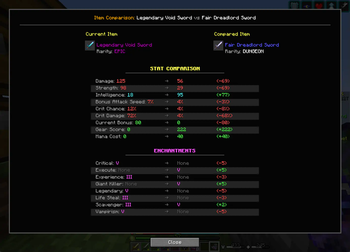
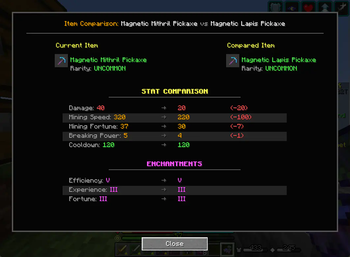
A comparison tool that lets you compare item stats and enchantments side-by-side with visual +/- indicators, including support for Hypixel Skyblock. Simply hover over items and press M to instantly see which gear upgrades are actually better.
Screenshots
Über diese Mod
Item Compare - Universal Gear Comparison for Minecraft
Ever find yourself squinting at two different items, trying to figure out which one is actually better? Wish you could just see a clear comparison of their stats and enchantments? Now you can!
Item Compare brings the intuitive item comparison mechanics from Diablo, Path of Exile, and other ARPGs directly into your Minecraft experience! With smart auto-detection that works with ANY stat pattern. Perfect for RPG servers, modpacks, and vanilla gameplay!
✅ Universal Compatibility: Works seamlessly with Hypixel (Skyblock, Bedwars, SkyWars), Wynncraft, modded servers, and any Minecraft setup - no configuration needed!
✨ Features
- 🎮 Clean Interface: Side-by-side gear comparison with visual +/- indicators (just like Diablo!)
- 🤖 Smart Auto-Detection: Automatically finds and compares ANY stat pattern - Mining Speed, Breaking Power, Damage, Defense, you name it!
- 📜 Enchantment Comparison: Compare enchantment levels with Roman numerals (I, II, III, etc.)
- 🎯 Visual Indicators: Green for improvements, red for downgrades - see the differences at a glance
- 🔮 Future-Proof: Generic parsing system automatically supports new stats as they're added
- ⚡ Zero Configuration: Works perfectly out of the box with any items and servers
- 🏰 Popular Server Support: Optimized for Hypixel Skyblock, Wynncraft, and other RPG servers with full stat pattern support
- 📦 Modpack Friendly: Compatible with any modded Minecraft setup - works alongside other inventory mods
🕹️ How to Use
- Hover over any item in your inventory and press
M - Hover over a second item and press
Magain - Boom! The comparison screen appears instantly
- Press
ESCto close
📊 What Gets Compared
Stats (Auto-Detected!)
- Combat: Damage, Defense, Strength, Crit Chance, Crit Damage, Health, Ferocity
- Mining: Mining Speed, Mining Fortune, Breaking Power
- Utility: Speed, Mana, Intelligence, Magic Find, Pet Luck
- And literally ANY other stat pattern!
Enchantments
- All enchantment levels with proper Roman numeral display
- Missing enchantments clearly marked as "None"
- Level differences shown with +/- indicators
🚀 Why You'll Love It
- ⏱️ Save Time: Make instant, informed decisions about your gear upgrades
- 📈 Optimize Builds: Easily see which items boost your playstyle the most - perfect for PvP, mining, or dungeon builds
- 🎯 No More Guesswork: Clear visual indicators show exactly what you gain or lose (ARPG veterans will feel right at home!)
- 🔧 Always Up-to-Date: Auto-detection means it works with future updates and new content
- 🌐 Server Versatility: Whether you're on Hypixel, Wynncraft, or your favorite modded server - it just works!
- 🎮 Familiar Feel: If you've played Diablo, Path of Exile, or any loot-based RPG, you'll instantly know how to use this
Installation is simple: Just drop the mod into your Fabric mods folder and start comparing! Compatible with all popular modpacks and inventory management mods.
☕ Support Development
Love this mod? Consider supporting development with a coffee! ☕
Verfügbare Versionen
Item Compare auf dem Server installieren
Server bestellen
Bestelle einen Minecraft Java Server mit mindestens 3 GB RAM (4 GB empfohlen).
fabric Loader setzen
Wähle im Panel unter "Egg" den fabric-Loader und die passende Minecraft-Version (1.21.8).
Mod installieren
Öffne den Mod-Browser im Dashboard und suche nach "Item Compare". Klicke "Installieren" – fertig! Alternativ: Lade die .jar via SFTP in den /mods Ordner.
Kompatibilität
Mod-Loader
Minecraft-Versionen
1.21.8, 1.21.7, 1.21.6 (+1 weitere)
Server-seitig
~ OptionalEmpfohlener RAM
4 GB(min. 3 GB)Häufige Fragen
Item Compare Server crasht beim Start – was tun?
Häufigste Ursache: falsche fabric-Version oder zu wenig RAM. Prüfe im Server-Log (latest.log), ob ein "OutOfMemoryError" oder "Mixin"-Fehler auftritt. Bei Mado Hosting: Stelle sicher, dass mindestens 3 GB RAM zugewiesen sind und der Loader zur Mod-Version passt (1.21.8). Über das Panel kannst du den Loader mit einem Klick wechseln.
Ist Item Compare mit fabric kompatibel?
Item Compare unterstützt offiziell fabric für Minecraft 1.21.8, 1.21.7, 1.21.6. Im Mado Dashboard werden inkompatible Loader-Kombinationen automatisch erkannt.
Server laggt mit Item Compare – wie optimiere ich die Performance?
Empfohlener RAM: 4 GB (+1 GB pro 8 Spieler). Prüfe mit /spark profiler, ob Item Compare den meisten Tick-Time verbraucht. Häufige Fixes: Server-View-Distance auf 8-10 reduzieren, bei Forge "performant" oder "starlight" als Zusatz-Mod installieren. Bei Mado Hosting läuft dein Server auf NVMe-SSDs mit dedizierten CPU-Kernen für minimale Latenz.
Ähnliche Mods



![[TaCZ] Timeless and Classics Zero](https://cdn.modrinth.com/data/SzzJttH8/fd27766d2bb8390d284696b1dbd358f87e081439_96.webp)


Modded Server mieten
Installiere Item Compare mit nur einem Klick auf deinem Server.