
ItemViz
A client-side mod that gives you complete control to easily resize and reposition items and blocks in your hand and inventory using an in-game UI.
Screenshots
Über diese Mod
ItemViz
ItemViz is a powerful client-side Fabric utility mod that gives you complete, granular control over how items and blocks look both when held in your hand (first-person view) and when rendered inside your inventory UI.
Whether you're a PvP player looking to shrink massive weapons to clear up screen space, or a builder who wants to tweak exactly how blocks sit in your hand, ItemViz provides a seamless in-game interface to make it happen.
Features
Total Visual Control: Adjust the Size, X, and Y offsets of any individual item or block independently.
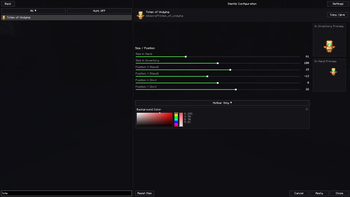
In-Game Configuration Menu: No need to edit config files manually! Simply press the dedicated keybind or type /itemviz in chat to open a sleek, interactive configuration menu.
Hand & Inventory Scaling: Settings are split into two categories. You can shrink a sword in your hand while keeping it normal-sized in your inventory, or vice-versa.
Custom Backgrounds: Add custom colored backgrounds behind items in the configuration previews to help you see how they look against different colors.
Multiple UI Themes: Customize the look of the ItemViz configuration menu itself with built-in Classic, Light, and Dark themes.
Neat & Shareable Configs: All custom settings are saved securely in config/itemviz/items.json. Unmodified items are automatically kept out of the file to keep it clean, making it extremely easy to share your perfect PvP setups with friends or include them in modpacks.
How to Use
Launch the game and join a world or server.
Press the ItemViz Menu Key (configurable in standard Minecraft Controls) or type /itemviz in chat.
Select any item from the scrolling list on the left.
Use the sliders on the right to tweak the Size, Position X, and Position Y for both the "In Hand" view and the "Inventory" view.
Watch the live previews update instantly!
Click "Done" to save. Any item you reset to its default size will automatically be cleaned from your config file.
Installation
ItemViz is a client-side only mod. You only need to install it on your client; it will work on any multiplayer server!
Requires Fabric Loader.
Requires Fabric API.
Verfügbare Versionen
ItemViz auf dem Server installieren
Server bestellen
Bestelle einen Minecraft Java Server mit mindestens 3 GB RAM (4 GB empfohlen).
fabric Loader setzen
Wähle im Panel unter "Egg" den fabric-Loader und die passende Minecraft-Version (1.21.11).
Mod installieren
Öffne den Mod-Browser im Dashboard und suche nach "ItemViz". Klicke "Installieren" – fertig! Alternativ: Lade die .jar via SFTP in den /mods Ordner.
Kompatibilität
Mod-Loader
Minecraft-Versionen
1.21.11
Server-seitig
✗ Nicht unterstütztEmpfohlener RAM
4 GB(min. 3 GB)Häufige Fragen
ItemViz Server crasht beim Start – was tun?
Häufigste Ursache: falsche fabric-Version oder zu wenig RAM. Prüfe im Server-Log (latest.log), ob ein "OutOfMemoryError" oder "Mixin"-Fehler auftritt. Bei Mado Hosting: Stelle sicher, dass mindestens 3 GB RAM zugewiesen sind und der Loader zur Mod-Version passt (1.21.11). Über das Panel kannst du den Loader mit einem Klick wechseln.
Ist ItemViz mit fabric kompatibel?
ItemViz unterstützt offiziell fabric für Minecraft 1.21.11. Im Mado Dashboard werden inkompatible Loader-Kombinationen automatisch erkannt.
Server laggt mit ItemViz – wie optimiere ich die Performance?
Empfohlener RAM: 4 GB (+1 GB pro 8 Spieler). Prüfe mit /spark profiler, ob ItemViz den meisten Tick-Time verbraucht. Häufige Fixes: Server-View-Distance auf 8-10 reduzieren, bei Forge "performant" oder "starlight" als Zusatz-Mod installieren. Bei Mado Hosting läuft dein Server auf NVMe-SSDs mit dedizierten CPU-Kernen für minimale Latenz.
Ähnliche Mods






Modded Server mieten
Installiere ItemViz mit nur einem Klick auf deinem Server.