Jewelcraft
Adds Jewelry, using Curios, which the player can craft and customize with enchantments.
Screenshots
Über diese Mod
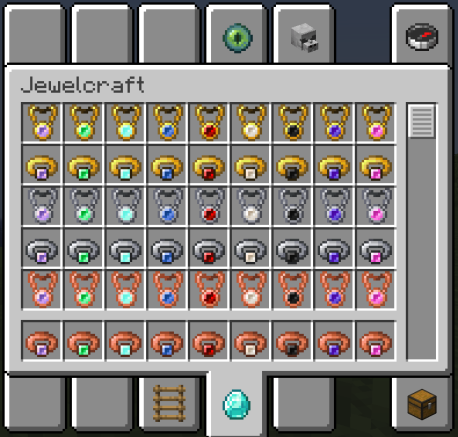
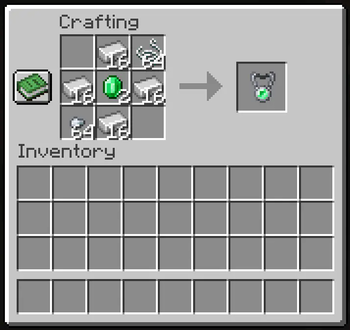
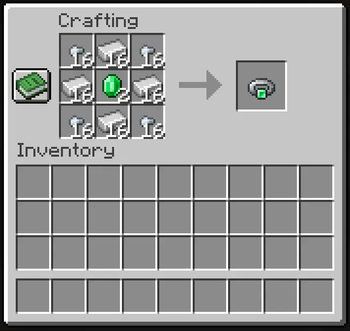
This mod adds three sets of rings and amulets to the game, requiring curios in order to equip and use them. These jewelry can be crafted easily using your gem and metal of choice. The metal choices being Gold, Iron, and Copper. Gold gives a Piglin Neutrality benefit while Iron and Copper gives +1 to Armor Toughness and Knockback Resistance respectfully.
Each metal also have nine gem variations, seven of which are vanilla while the last two are bonus and by default crafted with specific dyes. The variations are as follow:
- Amethyst
- Emerald
- Diamond
- Lapis Lazuli
- Redstone
- Quartz
- Obsidian (Onyx)
- Purple Dye (Shadow) - base on magical gems.
- Pink Dye (Rose) - base on Rose Quartz.
Gem variations do not give any additional benefit. The passive benefit from rings also cannot be stacked but they can be stacked with an amulet. For example, three iron pieces will only yield +2 Armor Toughness, so trading an iron ring for a golden ring or copper ring is recommended.
The main benefit of this mod is that the Jewelry are fully customizable by the player and can fit any story they wish to tell or be used in maps if desired to help tell a story. So the player can craft and enchant as they please, however rules are still applied for balancing reasons, such as the rule for stacking effects on two rings or that certain enchantment benefits are split, but beyond a few rules... Everything works well at allowing customizing your experience and storytelling. There is even some uniquely enchanted jewelry in the world to find with unique names.
Enchantments
These lovely pieces of jewelry can be customized with enchantments. Secondary enchantments are named after actual gems and have effects similar to said gem's own lore or use in the real world while be applicable to both Rings & Amulets. There are also unique primary enchantments for amulets and rings. You can only have one primary and secondary enchantment per piece of Jewelry!
However, be mindful of what jewelry enchantments you use... Similar to the base effects, you cannot stack ring enchantments, so if you are using the same enchantment on both rings, one of them is not doing anything. But you can still stack secondary enchantments if one is on the amulet and the other is on a ring, which could be recommended depending on what you're aiming for as some secondary enchantments has their full benefits only if applied to both an amulet and ring.
Secondary Enchantments
- Alexandrite: Grants 0.5 Step, 2.5 (1.5) Reach, and (15% movement speed).
- Heliodor: Grants 1 (1) Luck and +1 to Looting (Fortune).
- Fluorite: Protects the user from Poison, Slowness, Blindness, (Weakness, and Mining Fatigue) and converts those effects.
- Sodalite: Cannot trample crops and heavily improves growth rate of nearby plants (same on both).
Primary Enchantments
Amulets
- Magnetic: Causes items within 16 blocks to teleport to you if you have space.
- Satisfication: Your hunger will never go below 12 points and you are immune to the Hunger effect.
- Aquamarine: Grants 85% swimming speed and water breathing.
- Titanite: Consumes a Totem of Undying to protect wearer from death with weakened Totem effects.
Rings
- Bloody: Increases damage base on your missing health.
- Empowered: Increases the Critical Damage boost by 50% and also allows for random critz on normal hits at 50% reduction.
- Infused: 25% increased attack speed.
- Regenerative: Heals players, animals, and villagers around the wearer.
Verfügbare Versionen
Jewelcraft auf dem Server installieren
Server bestellen
Bestelle einen Minecraft Java Server mit mindestens 3 GB RAM (4 GB empfohlen).
forge Loader setzen
Wähle im Panel unter "Egg" den forge-Loader und die passende Minecraft-Version (1.20.1).
Mod installieren
Öffne den Mod-Browser im Dashboard und suche nach "Jewelcraft". Klicke "Installieren" – fertig! Alternativ: Lade die .jar via SFTP in den /mods Ordner.
Kompatibilität
Mod-Loader
Minecraft-Versionen
1.20.1, 1.19.4, 1.19.2
Server-seitig
✓ ErforderlichEmpfohlener RAM
4 GB(min. 3 GB)Häufige Fragen
Jewelcraft Server crasht beim Start – was tun?
Häufigste Ursache: falsche forge-Version oder zu wenig RAM. Prüfe im Server-Log (latest.log), ob ein "OutOfMemoryError" oder "Mixin"-Fehler auftritt. Bei Mado Hosting: Stelle sicher, dass mindestens 3 GB RAM zugewiesen sind und der Loader zur Mod-Version passt (1.20.1). Über das Panel kannst du den Loader mit einem Klick wechseln.
Ist Jewelcraft mit forge kompatibel?
Jewelcraft unterstützt offiziell forge für Minecraft 1.20.1, 1.19.4, 1.19.2. Im Mado Dashboard werden inkompatible Loader-Kombinationen automatisch erkannt.
Server laggt mit Jewelcraft – wie optimiere ich die Performance?
Empfohlener RAM: 4 GB (+1 GB pro 8 Spieler). Prüfe mit /spark profiler, ob Jewelcraft den meisten Tick-Time verbraucht. Häufige Fixes: Server-View-Distance auf 8-10 reduzieren, bei Forge "performant" oder "starlight" als Zusatz-Mod installieren. Bei Mado Hosting läuft dein Server auf NVMe-SSDs mit dedizierten CPU-Kernen für minimale Latenz.
Ähnliche Mods




Modded Server mieten
Installiere Jewelcraft mit nur einem Klick auf deinem Server.