
JustLeveling Fork
Just Leveling adds a leveling system, skills and titles like in a RPG system.
Screenshots
Über diese Mod

Add aptitudes, skills, passives, item requirements, and player titles in a vanilla-friendly RPG progression system.
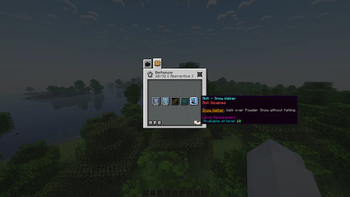
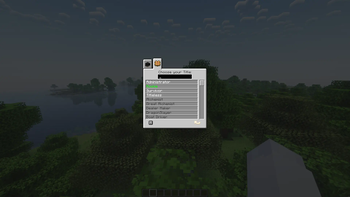
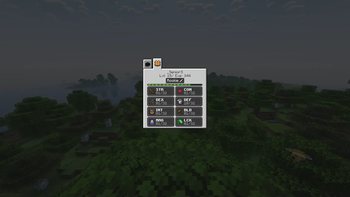
JustLeveling Fork lets players grow through eight aptitudes, invest in passive bonuses, toggle unique skills, unlock titles, and configure item/block/entity requirements for progression-focused modpacks. The main progression screen keeps aptitude levels, passives, skills, and titles in one place.
Features
- Eight aptitudes with configurable maximum levels.
- Passive bonuses for combat, movement, reach, mining, defense, magic, and luck.
- Toggleable skills for each aptitude, including utility and combat effects.
- Player titles that can be unlocked and displayed.
- Configurable item, block, and entity requirements.
- In-game configuration support.
- Built for client and server use.
- Current 1.21.1 builds support Fabric and NeoForge.
Optional Integrations
- Better Combat support.
- FTB Quests support.
- Questlog support.
- Modular Item API / Tetra-related item requirement support.
Dependencies
For Fabric 1.21.1, install Fabric API, Trinkets, YetAnotherConfigLib, and Cloth Config.
For NeoForge 1.21.1, install Architectury API. Optional integrations only need to be installed when you use those mods.
FAQ
How do I open the leveling screen?
Use the configured keybind in Minecraft's controls menu. The default key may vary between packs.
Do I need the original Just Leveling mod?
No. Use this fork by itself.
Can I use this in a modpack?
Yes.
How do I add or change item restrictions?
Edit the generated config files in .minecraft/config/JLFork/, especially justleveling-fork.lockItems.json5. The wiki has examples and accepted aptitude names.
A compatibility issue or restriction is missing. What should I do?
Open an issue with the item/block/entity ID and the mod it comes from so support can be added or documented.
Verfügbare Versionen
JustLeveling Fork auf dem Server installieren
Server bestellen
Bestelle einen Minecraft Java Server mit mindestens 3 GB RAM (4 GB empfohlen).
fabric Loader setzen
Wähle im Panel unter "Egg" den fabric-Loader und die passende Minecraft-Version (1.21.1).
Mod installieren
Öffne den Mod-Browser im Dashboard und suche nach "JustLeveling Fork". Klicke "Installieren" – fertig! Alternativ: Lade die .jar via SFTP in den /mods Ordner.
Kompatibilität
Mod-Loader
Minecraft-Versionen
1.21.1, 1.20.6, 1.20.5 (+5 weitere)
Server-seitig
✓ ErforderlichEmpfohlener RAM
4 GB(min. 3 GB)Häufige Fragen
JustLeveling Fork Server crasht beim Start – was tun?
Häufigste Ursache: falsche fabric-Version oder zu wenig RAM. Prüfe im Server-Log (latest.log), ob ein "OutOfMemoryError" oder "Mixin"-Fehler auftritt. Bei Mado Hosting: Stelle sicher, dass mindestens 3 GB RAM zugewiesen sind und der Loader zur Mod-Version passt (1.21.1). Über das Panel kannst du den Loader mit einem Klick wechseln.
Ist JustLeveling Fork mit fabric und forge und neoforge kompatibel?
JustLeveling Fork unterstützt offiziell fabric, forge, neoforge für Minecraft 1.21.1, 1.20.6, 1.20.5. Achtung: Forge- und Fabric-Mods sind NICHT untereinander kompatibel – wähle einen Loader und bleibe dabei. Im Mado Dashboard werden inkompatible Loader-Kombinationen automatisch erkannt.
Server laggt mit JustLeveling Fork – wie optimiere ich die Performance?
Empfohlener RAM: 4 GB (+1 GB pro 8 Spieler). Prüfe mit /spark profiler, ob JustLeveling Fork den meisten Tick-Time verbraucht. Häufige Fixes: Server-View-Distance auf 8-10 reduzieren, bei Forge "performant" oder "starlight" als Zusatz-Mod installieren. Bei Mado Hosting läuft dein Server auf NVMe-SSDs mit dedizierten CPU-Kernen für minimale Latenz.
Ähnliche Mods




Modded Server mieten
Installiere JustLeveling Fork mit nur einem Klick auf deinem Server.