
Keybind Coords
Shows your coordinates with a keybind.
Screenshots
Über diese Mod
Keybind Coords Display
Overview
Keybind Coords Display is a configurable Minecraft mod that displays the player's coordinates on a press of a keybind.
Features
General
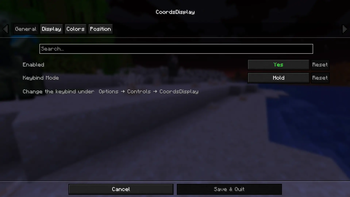
Enable or disable the coordinate HUD.
Two keybind modes:
- Hold – Coordinates are only visible while the key is held.
- Toggle – Press the key once to show coordinates and again to hide them.
Keybind can be configured through Minecraft's Controls menu.
Display
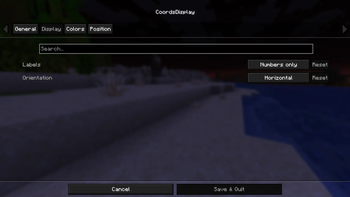
Label styles:
- Numbers Only – Displays only coordinate values.
- XYZ Labels – Prefixes coordinates with X, Y, and Z.
Orientation options:
- Horizontal – Displays all coordinates on a single line.
- Vertical – Displays each coordinate on its own line.
Colors
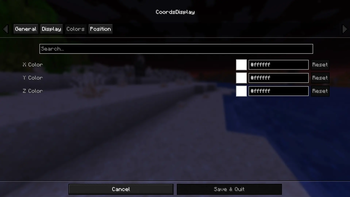
Individual color customization for:
- X coordinate
- Y coordinate
- Z coordinate
Positioning
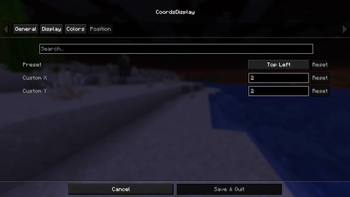
Built-in presets:
- Top Left
- Top Right
- Bottom Left
- Bottom Right
Custom positioning with configurable X and Y.
Verfügbare Versionen
Keybind Coords auf dem Server installieren
Server bestellen
Bestelle einen Minecraft Java Server mit mindestens 3 GB RAM (4 GB empfohlen).
fabric Loader setzen
Wähle im Panel unter "Egg" den fabric-Loader und die passende Minecraft-Version (1.21.11).
Mod installieren
Öffne den Mod-Browser im Dashboard und suche nach "Keybind Coords". Klicke "Installieren" – fertig! Alternativ: Lade die .jar via SFTP in den /mods Ordner.
Kompatibilität
Mod-Loader
Minecraft-Versionen
1.21.11
Server-seitig
✗ Nicht unterstütztEmpfohlener RAM
4 GB(min. 3 GB)Häufige Fragen
Keybind Coords Server crasht beim Start – was tun?
Häufigste Ursache: falsche fabric-Version oder zu wenig RAM. Prüfe im Server-Log (latest.log), ob ein "OutOfMemoryError" oder "Mixin"-Fehler auftritt. Bei Mado Hosting: Stelle sicher, dass mindestens 3 GB RAM zugewiesen sind und der Loader zur Mod-Version passt (1.21.11). Über das Panel kannst du den Loader mit einem Klick wechseln.
Ist Keybind Coords mit fabric kompatibel?
Keybind Coords unterstützt offiziell fabric für Minecraft 1.21.11. Im Mado Dashboard werden inkompatible Loader-Kombinationen automatisch erkannt.
Server laggt mit Keybind Coords – wie optimiere ich die Performance?
Empfohlener RAM: 4 GB (+1 GB pro 8 Spieler). Prüfe mit /spark profiler, ob Keybind Coords den meisten Tick-Time verbraucht. Häufige Fixes: Server-View-Distance auf 8-10 reduzieren, bei Forge "performant" oder "starlight" als Zusatz-Mod installieren. Bei Mado Hosting läuft dein Server auf NVMe-SSDs mit dedizierten CPU-Kernen für minimale Latenz.
Modded Server mieten
Installiere Keybind Coords mit nur einem Klick auf deinem Server.