![Laser's Fakemon Pack [Cobblemon]](https://cdn.modrinth.com/data/MkY2yZlo/e5da30892a8238052028ffb365691812a236b024_96.webp)
Laser's Fakemon Pack [Cobblemon]
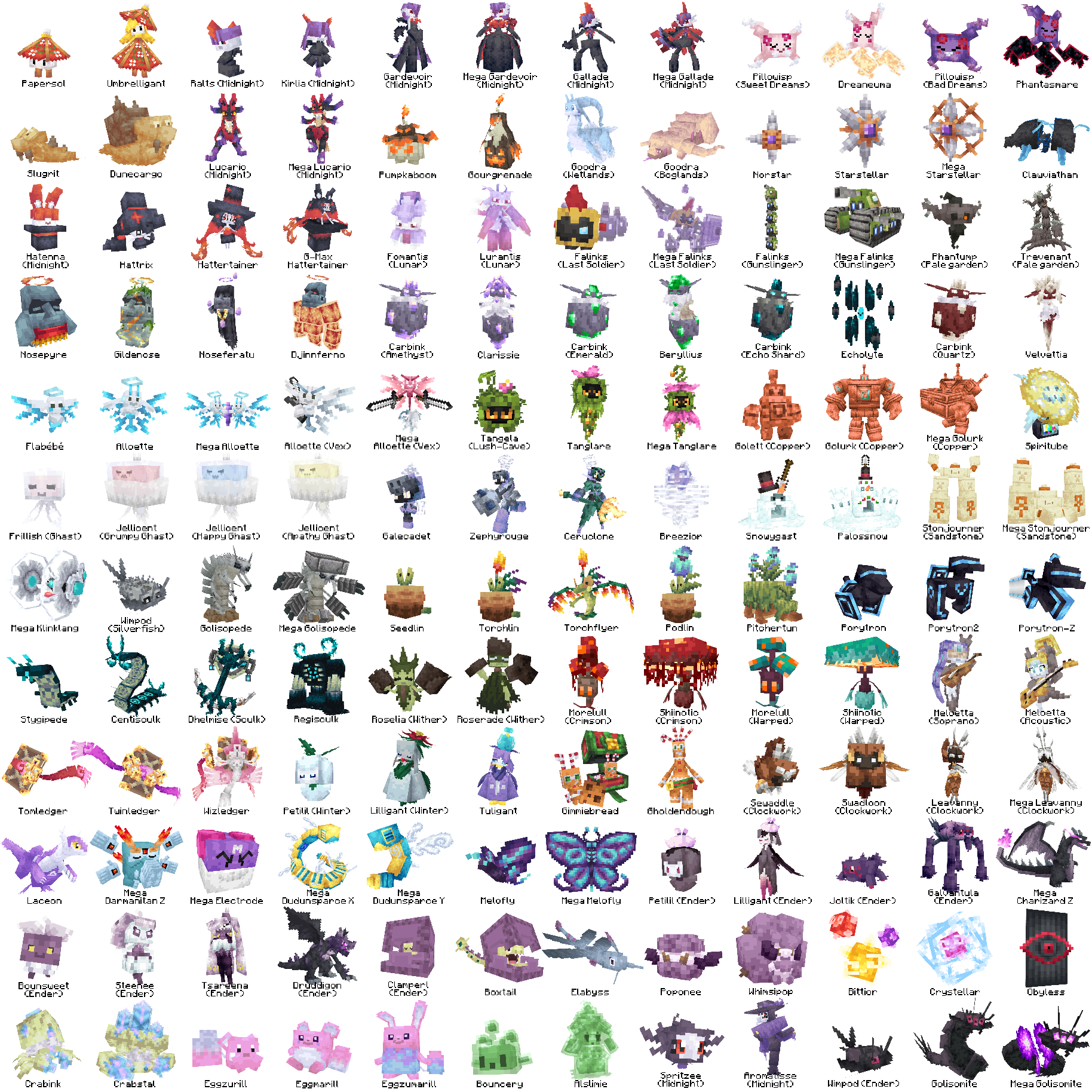
Cobblemon addon that adds custom fakemon by yours truly. Has new regional variants, convergent forms, and even brand new Pokémon!
Screenshots
![Laser's Fakemon Pack [Cobblemon] Screenshot 1](https://cdn.modrinth.com/data/MkY2yZlo/images/02ad86e48f6ae986e20d7dccc253afdf87bdf432_350.webp)
![Laser's Fakemon Pack [Cobblemon] Screenshot 2](https://cdn.modrinth.com/data/MkY2yZlo/images/08ecf8bf2b2d0d1e880b36c3f0a8f6dde0c1246b_350.webp)
![Laser's Fakemon Pack [Cobblemon] Screenshot 3](https://cdn.modrinth.com/data/MkY2yZlo/images/098e6d3de6865c1dfc63ffb1a0359607ff95e4f2_350.webp)
![Laser's Fakemon Pack [Cobblemon] Screenshot 4](https://cdn.modrinth.com/data/MkY2yZlo/images/09945662acf8ec54391c54f920f0d71e3fc8794f_350.webp)
![Laser's Fakemon Pack [Cobblemon] Screenshot 5](https://cdn.modrinth.com/data/MkY2yZlo/images/103296c68722cb49a05d3c8e903a9f89ba4fc184_350.webp)
![Laser's Fakemon Pack [Cobblemon] Screenshot 6](https://cdn.modrinth.com/data/MkY2yZlo/images/11ed77a4c71dd79f02a1ec3816cbb50985fbbb5b_350.webp)
Über diese Mod


IMPORTANT: This pack has a datapack version and a mod version. If it says "+mod" it means all you have to do is put it in your mod folder. If its the datapack version you put a copy of the ZIP in your world's datapack folder, and a second copy in your resourcepack folder.
ALSO IMPORTANT: Versions 1.5 and above will require Cobblemon Mega Showdown to access all of its features!
This is an addon for the popular Cobblemon mod that adds a bunch of new Fakemon to the game (made by yours truly). It adds new regional forms and convergent evolutions of familiar faces, but also intruduces some brand new Pokemon!
DISCLAIMER: The custom items will not show up in the creative inventory unless you have the filament mod (they can still be crafted, they just don't show up in the creative inventory or JEI due to datapack limitations). The mod version is just a datapack packaged as a mod, so the same is true for the mod.
The number of Pokemon in the pack is too large to list here, If you want to learn more about the pack there's a wiki for it on my public Discord!
Verfügbare Versionen
Laser's Fakemon Pack [Cobblemon] auf dem Server installieren
Server bestellen
Bestelle einen Minecraft Java Server mit mindestens 3 GB RAM (4 GB empfohlen).
datapack Loader setzen
Wähle im Panel unter "Egg" den datapack-Loader und die passende Minecraft-Version (1.21.1).
Mod installieren
Öffne den Mod-Browser im Dashboard und suche nach "Laser's Fakemon Pack [Cobblemon]". Klicke "Installieren" – fertig! Alternativ: Lade die .jar via SFTP in den /mods Ordner.
Kompatibilität
Mod-Loader
Minecraft-Versionen
1.21.1
Server-seitig
✓ ErforderlichEmpfohlener RAM
4 GB(min. 3 GB)Häufige Fragen
Laser's Fakemon Pack [Cobblemon] Server crasht beim Start – was tun?
Häufigste Ursache: falsche datapack-Version oder zu wenig RAM. Prüfe im Server-Log (latest.log), ob ein "OutOfMemoryError" oder "Mixin"-Fehler auftritt. Bei Mado Hosting: Stelle sicher, dass mindestens 3 GB RAM zugewiesen sind und der Loader zur Mod-Version passt (1.21.1). Über das Panel kannst du den Loader mit einem Klick wechseln.
Ist Laser's Fakemon Pack [Cobblemon] mit datapack und fabric und minecraft und neoforge kompatibel?
Laser's Fakemon Pack [Cobblemon] unterstützt offiziell datapack, fabric, minecraft, neoforge für Minecraft 1.21.1. Im Mado Dashboard werden inkompatible Loader-Kombinationen automatisch erkannt.
Server laggt mit Laser's Fakemon Pack [Cobblemon] – wie optimiere ich die Performance?
Empfohlener RAM: 4 GB (+1 GB pro 8 Spieler). Prüfe mit /spark profiler, ob Laser's Fakemon Pack [Cobblemon] den meisten Tick-Time verbraucht. Häufige Fixes: Server-View-Distance auf 8-10 reduzieren, bei Forge "performant" oder "starlight" als Zusatz-Mod installieren. Bei Mado Hosting läuft dein Server auf NVMe-SSDs mit dedizierten CPU-Kernen für minimale Latenz.
Ähnliche Mods




Modded Server mieten
Installiere Laser's Fakemon Pack [Cobblemon] mit nur einem Klick auf deinem Server.