![[Let's Do] BloomingNature](https://cdn.modrinth.com/data/4Vno77MY/0a9de643f6b432e89c25889f309749d0903c3808_96.webp)
[Let's Do] BloomingNature
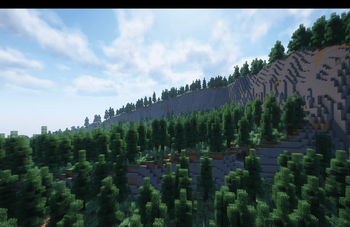
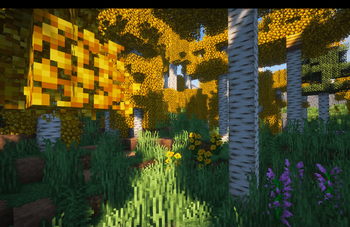
Transform your overworld with enhanced terrain, expanded plant life, and handcrafted sub-biomes that make each region feel more immersive. The environment tells a deeper story, filled with small details to uncover.
Screenshots
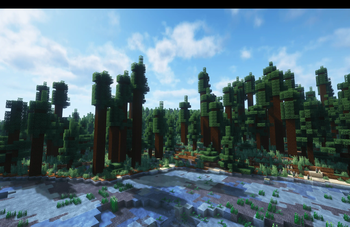
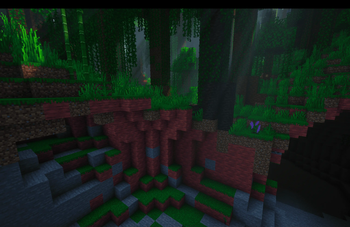
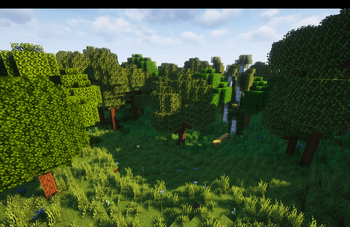
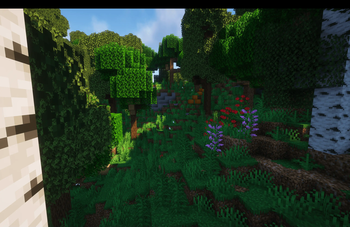
Über diese Mod

Overgrown Worlds & Living Landscapes
The wild biome overhaul of the Let's Do collection
"Let the world grow"
BloomingNature reshapes nearly every Vanilla biome with new tree forms, fresh vegetation, subtle terrain changes and atmospheric detail. The goal is simple: make the world feel denser, wilder and more alive.
Not louder. Not bigger. Just blooming.
A Living Overhaul
- Overhauls nearly all biomes
- Introduces 10 new smaller biomes designed as natural transitions between existing regions
- Adds larger new forests such as Aspen and Larch Forests
- Expands vegetation with 26 new flower species, new Grass Variants and much more
- Introduces new stone types including Laterite, Travertine, Marlstone and more
- Adds Mushroom Bricks, Quicksand, Marsh Blocks, Forest Moss and many additional ambient and decorative blocks
BloomingNature refines and replaces vanilla features while preserving biome placement and overall world structure.
Worldgen Compatibility
BloomingNature integrates seamlessly with major world generation overhauls.
Confirmed Compatible Mods
- Terralith
- Meadow
- Beachparty
- Nature's Spirit
- Regions Unexplored
- Reterraforged
- William Wythers Expanded Ecosphere
- William Wythers Overhauled Overworld
- Continents
- Biome Makeover
- Ecologics
- Naturalist
- Spawn
- Good Ending
BloomingNature is not intended to be realistic or adhere to real-world biome accuracy. It embraces artistic freedom while drawing inspiration from nature.
The Let’s Do Collection

Support & Community
Let’s Do grows through its community.
Verfügbare Versionen
[Let's Do] BloomingNature auf dem Server installieren
Server bestellen
Bestelle einen Minecraft Java Server mit mindestens 4 GB RAM (6 GB empfohlen).
fabric Loader setzen
Wähle im Panel unter "Egg" den fabric-Loader und die passende Minecraft-Version (1.21.1).
Mod installieren
Öffne den Mod-Browser im Dashboard und suche nach "[Let's Do] BloomingNature". Klicke "Installieren" – fertig! Alternativ: Lade die .jar via SFTP in den /mods Ordner.
Kompatibilität
Mod-Loader
Minecraft-Versionen
1.21.1, 1.20.1
Server-seitig
✓ ErforderlichEmpfohlener RAM
6 GB(min. 4 GB)Häufige Fragen
[Let's Do] BloomingNature Server crasht beim Start – was tun?
Häufigste Ursache: falsche fabric-Version oder zu wenig RAM. Prüfe im Server-Log (latest.log), ob ein "OutOfMemoryError" oder "Mixin"-Fehler auftritt. Bei Mado Hosting: Stelle sicher, dass mindestens 4 GB RAM zugewiesen sind und der Loader zur Mod-Version passt (1.21.1). Über das Panel kannst du den Loader mit einem Klick wechseln.
Ist [Let's Do] BloomingNature mit fabric und forge und neoforge und quilt kompatibel?
[Let's Do] BloomingNature unterstützt offiziell fabric, forge, neoforge, quilt für Minecraft 1.21.1, 1.20.1. Achtung: Forge- und Fabric-Mods sind NICHT untereinander kompatibel – wähle einen Loader und bleibe dabei. Im Mado Dashboard werden inkompatible Loader-Kombinationen automatisch erkannt.
Server laggt mit [Let's Do] BloomingNature – wie optimiere ich die Performance?
Empfohlener RAM: 6 GB (+1 GB pro 5 Spieler). Prüfe mit /spark profiler, ob [Let's Do] BloomingNature den meisten Tick-Time verbraucht. Häufige Fixes: Server-View-Distance auf 8-10 reduzieren, bei Forge "performant" oder "starlight" als Zusatz-Mod installieren. Bei Mado Hosting läuft dein Server auf NVMe-SSDs mit dedizierten CPU-Kernen für minimale Latenz.
Ähnliche Mods


Modded Server mieten
Installiere [Let's Do] BloomingNature mit nur einem Klick auf deinem Server.