Level Text Fix
Fixes issues related to the level text in Minecraft.
Screenshots
Über diese Mod
This mod aims to fix several issues related to the level text used by enchantments and potions in Minecraft. These fixes will be applied automatically when the mod is installed however config options are also provided.
What this mod does:
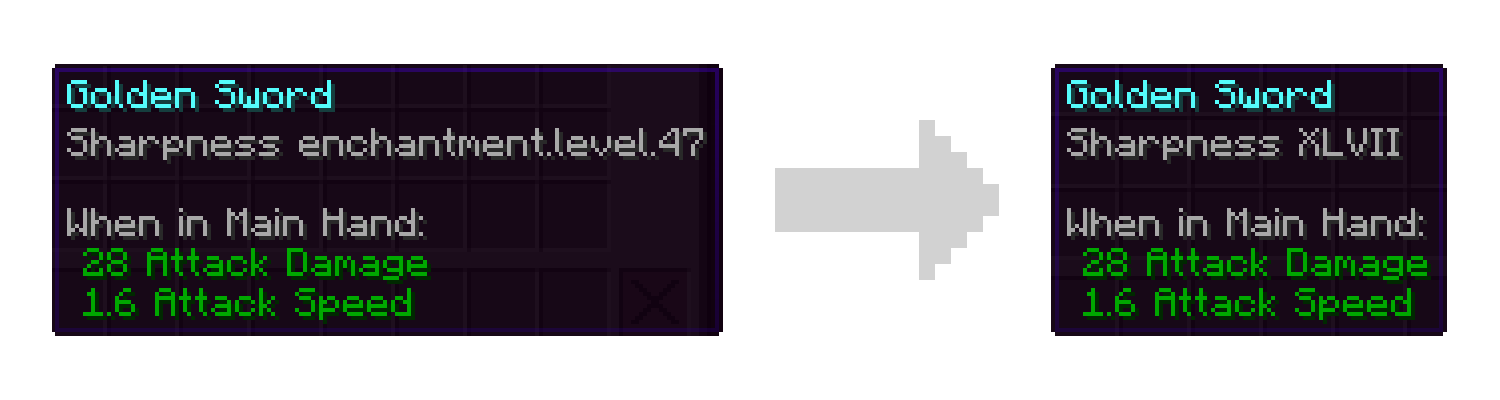
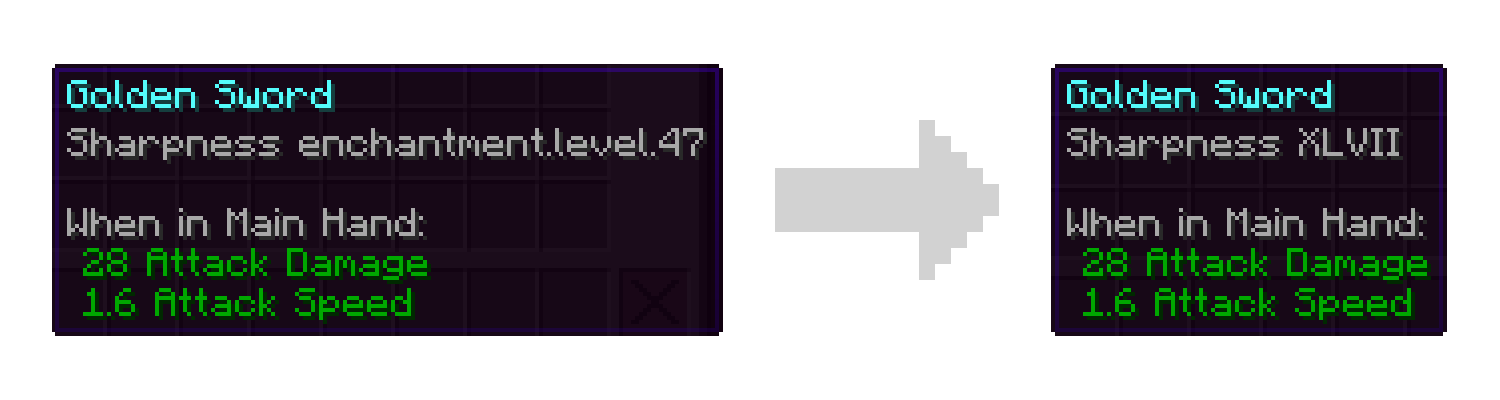
- Fix missing localization entries for levels greater than 10. Rather than showing "enchantment.level.11" you will see "XI".
- Add accessibility options for those less familiar with roman numerals. You can replace all roman numerals with their modern counterparts or set a threshold for when they should switch over. For example you may be comfortable with numbers 10 and below, but not know that "XLVII" means 47. These options are disabled by default meaning you will only see roman numerals.
What this mod does NOT do:
- Allow you to get enchantments with higher levels in survival.
- Change the maximum level of enchantments that can be applied.
- Remove the technical cap on how high an enchantment level can be.
Note: Versions of this mod for legacy versions of Minecraft may not have the full feature set. For example versions prior to 1.19.2 only fix the missing level text and do not provide the accessibility features.
Like the mod and want to support me?

This project is sponsored by Nodecraft. Use code DARKHAX for 30% off your first month of service!
Verfügbare Versionen
Level Text Fix auf dem Server installieren
Server bestellen
Bestelle einen Minecraft Java Server mit mindestens 3 GB RAM (4 GB empfohlen).
fabric Loader setzen
Wähle im Panel unter "Egg" den fabric-Loader und die passende Minecraft-Version (26.3).
Mod installieren
Öffne den Mod-Browser im Dashboard und suche nach "Level Text Fix". Klicke "Installieren" – fertig! Alternativ: Lade die .jar via SFTP in den /mods Ordner.
Kompatibilität
Mod-Loader
Minecraft-Versionen
26.3, 26.2, 26.1.2 (+13 weitere)
Server-seitig
~ OptionalEmpfohlener RAM
4 GB(min. 3 GB)Häufige Fragen
Level Text Fix Server crasht beim Start – was tun?
Häufigste Ursache: falsche fabric-Version oder zu wenig RAM. Prüfe im Server-Log (latest.log), ob ein "OutOfMemoryError" oder "Mixin"-Fehler auftritt. Bei Mado Hosting: Stelle sicher, dass mindestens 3 GB RAM zugewiesen sind und der Loader zur Mod-Version passt (26.3). Über das Panel kannst du den Loader mit einem Klick wechseln.
Ist Level Text Fix mit fabric und forge und neoforge und quilt kompatibel?
Level Text Fix unterstützt offiziell fabric, forge, neoforge, quilt für Minecraft 26.3, 26.2, 26.1.2. Achtung: Forge- und Fabric-Mods sind NICHT untereinander kompatibel – wähle einen Loader und bleibe dabei. Im Mado Dashboard werden inkompatible Loader-Kombinationen automatisch erkannt.
Server laggt mit Level Text Fix – wie optimiere ich die Performance?
Empfohlener RAM: 4 GB (+1 GB pro 8 Spieler). Prüfe mit /spark profiler, ob Level Text Fix den meisten Tick-Time verbraucht. Häufige Fixes: Server-View-Distance auf 8-10 reduzieren, bei Forge "performant" oder "starlight" als Zusatz-Mod installieren. Bei Mado Hosting läuft dein Server auf NVMe-SSDs mit dedizierten CPU-Kernen für minimale Latenz.
Ähnliche Mods





Modded Server mieten
Installiere Level Text Fix mit nur einem Klick auf deinem Server.