
Loot Beams: Relooted!
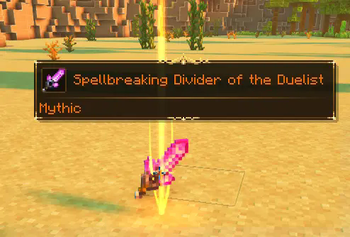
Adds colorful and customizable beams to your items!
Screenshots
Über diese Mod
No Fabric. Please don't port it either, I (Amo) don't want asked about fabric issues on a forge page.

A client-side mod that adds colorful and customizable loot beams to dropped items!
PLEASE LOOK AT THE CONFIG PRESETS LINKED HERE BEFORE ASKING WHY IT LOOKS WEIRD
Loot Beams are added to all items by default and they change colors depending on the items name. You can specify a whitelist/blacklist for Beams, color overrides, and even NBT tags to change their color! (like "lootbeams.color:"0xFFFFFF"").
Beams also have nametags that show up when looking at an item or crouching so you can see what an item is without even picking it up. This mod is client-side, meaning it will run on vanilla servers and forge servers that do not have this mod installed!
As of 17/09/23, this mod has received MAJOR changes to its customizability. For example configs, please visit here. You can change the textures and sound of this mod via a resource pack - including trail texture, particle texture, beam texture and glow texture.
Have any questions or need help? Visit my Discord here.
Verfügbare Versionen
Loot Beams: Relooted! auf deinem Client installieren
Mod-Loader lokal installieren
Installiere forge für deine lokale Minecraft-Version.
Passende Datei herunterladen
Wähle die Loot Beams: Relooted!-Datei für forge und Minecraft 1.20.2.
Mod installieren
Lege die .jar-Datei in deinem lokalen .minecraft/mods-Ordner ab und starte Minecraft neu. Eine Installation auf dem Server ist nicht nötig.
Kompatibilität
Mod-Loader
Minecraft-Versionen
1.20.2, 1.20.1
Server-seitig
✗ Nicht unterstütztEmpfohlener RAM
4 GB(min. 3 GB)Häufige Fragen
Muss Loot Beams: Relooted! auf dem Minecraft Server installiert werden?
Nein. Modrinth kennzeichnet Loot Beams: Relooted! serverseitig als nicht unterstützt. Installiere die Mod nur im lokalen Minecraft-Mods-Ordner. Dein Server kann unverändert bleiben, sofern die Mod-Seite keine zusätzliche Abhängigkeit nennt.
Welche Version und welchen Loader braucht Loot Beams: Relooted!?
Nutze eine Datei für forge und exakt deine Minecraft-Version. Unterstützte Versionen sind unter anderem 1.20.2, 1.20.1. Loader-Dateien sind nicht untereinander austauschbar.
Loot Beams: Relooted! funktioniert nicht – was kann ich prüfen?
Prüfe zuerst Minecraft-Version, Loader-Version und erforderliche Abhängigkeiten. Lege die .jar-Datei im lokalen .minecraft/mods-Ordner ab und entferne ältere Duplikate. Da die Mod clientseitig ist, löst mehr Server-RAM dieses Problem nicht.
Ähnliche Mods




Minecraft Server für deine Gruppe
Loot Beams: Relooted! bleibt auf deinem Client. Hoste dazu eine kompatible Welt für deine Mitspieler.