
Lucky Block Mod
This is a sample Fabric mod that adds a block called LuckyBlock. (100% Random)
Screenshots

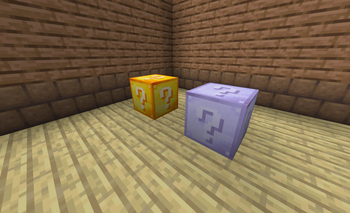
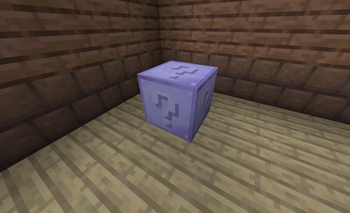
Über diese Mod
Lucky Blocks by KI10: for the ultimate in randomness
Put your luck to the test and shatter a Lucky Block. You might come away with a fortune in diamonds or be in for a lethal shock.
We have put together this mod to ensure no two breaks are ever the same, with a host of custom loot tiers, epic events and unique random drops to keep things interesting. It is all a matter of chance; one block will be your good luck, the next could spell chaos.
What you can expect
- A range of exclusive finds, be it enchanted apples, netherite and diamond equipment or other treasures.
- Complete unpredictability. There is no telling what will happen once the block is broken.
- Works as intended on Fabric 1.21 and other current versions.
Verfügbare Versionen
Lucky Block Mod auf dem Server installieren
Server bestellen
Bestelle einen Minecraft Java Server mit mindestens 3 GB RAM (4 GB empfohlen).
fabric Loader setzen
Wähle im Panel unter "Egg" den fabric-Loader und die passende Minecraft-Version (1.21.10).
Mod installieren
Öffne den Mod-Browser im Dashboard und suche nach "Lucky Block Mod". Klicke "Installieren" – fertig! Alternativ: Lade die .jar via SFTP in den /mods Ordner.
Kompatibilität
Mod-Loader
Minecraft-Versionen
1.21.10, 1.21.9, 1.21.8 (+8 weitere)
Server-seitig
✓ ErforderlichEmpfohlener RAM
4 GB(min. 3 GB)Häufige Fragen
Lucky Block Mod Server crasht beim Start – was tun?
Häufigste Ursache: falsche fabric-Version oder zu wenig RAM. Prüfe im Server-Log (latest.log), ob ein "OutOfMemoryError" oder "Mixin"-Fehler auftritt. Bei Mado Hosting: Stelle sicher, dass mindestens 3 GB RAM zugewiesen sind und der Loader zur Mod-Version passt (1.21.10). Über das Panel kannst du den Loader mit einem Klick wechseln.
Ist Lucky Block Mod mit fabric kompatibel?
Lucky Block Mod unterstützt offiziell fabric für Minecraft 1.21.10, 1.21.9, 1.21.8. Im Mado Dashboard werden inkompatible Loader-Kombinationen automatisch erkannt.
Server laggt mit Lucky Block Mod – wie optimiere ich die Performance?
Empfohlener RAM: 4 GB (+1 GB pro 8 Spieler). Prüfe mit /spark profiler, ob Lucky Block Mod den meisten Tick-Time verbraucht. Häufige Fixes: Server-View-Distance auf 8-10 reduzieren, bei Forge "performant" oder "starlight" als Zusatz-Mod installieren. Bei Mado Hosting läuft dein Server auf NVMe-SSDs mit dedizierten CPU-Kernen für minimale Latenz.
Ähnliche Mods





Modded Server mieten
Installiere Lucky Block Mod mit nur einem Klick auf deinem Server.