
Many Flowers
Discover flowers with surprising powers!
Screenshots
Über diese Mod
Many Flowers
About

In minecraft there are not enough flowers that would decorate this world. And I did this by creating my own mod, the world is now not so empty and not so boring.
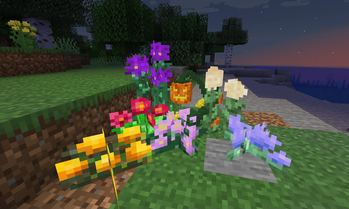
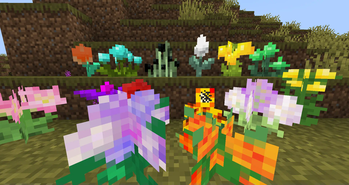
Flowers are divided into several types:
- Common Flowers, usually vanilla flowers
- Uncommon Flowers, gives some effects
- Rare Flowers, affects the world and the players.
- Ore Flowers, doubles ore items
- Epic Flowers, affects the behavior of mobs and the movement of players
You can grow any flower from mod with random chance by floral meal:

If you just wanna play with beautiful flowers - you can just turn off effects in config.
Advancements as wiki
Explore flowers in Advancements where written everything about every flower.
It is recommended to use Better Advancements

Doubling ores
Get petals from ore crop block

Crop blocks can be grew only by Floral Meal
 |
 |
|---|
Verfügbare Versionen
Many Flowers auf dem Server installieren
Server bestellen
Bestelle einen Minecraft Java Server mit mindestens 4 GB RAM (6 GB empfohlen).
fabric Loader setzen
Wähle im Panel unter "Egg" den fabric-Loader und die passende Minecraft-Version (1.21.8).
Mod installieren
Öffne den Mod-Browser im Dashboard und suche nach "Many Flowers". Klicke "Installieren" – fertig! Alternativ: Lade die .jar via SFTP in den /mods Ordner.
Kompatibilität
Mod-Loader
Minecraft-Versionen
1.21.8, 1.21.7, 1.21.6 (+13 weitere)
Server-seitig
✓ ErforderlichEmpfohlener RAM
6 GB(min. 4 GB)Häufige Fragen
Many Flowers Server crasht beim Start – was tun?
Häufigste Ursache: falsche fabric-Version oder zu wenig RAM. Prüfe im Server-Log (latest.log), ob ein "OutOfMemoryError" oder "Mixin"-Fehler auftritt. Bei Mado Hosting: Stelle sicher, dass mindestens 4 GB RAM zugewiesen sind und der Loader zur Mod-Version passt (1.21.8). Über das Panel kannst du den Loader mit einem Klick wechseln.
Ist Many Flowers mit fabric kompatibel?
Many Flowers unterstützt offiziell fabric für Minecraft 1.21.8, 1.21.7, 1.21.6. Im Mado Dashboard werden inkompatible Loader-Kombinationen automatisch erkannt.
Server laggt mit Many Flowers – wie optimiere ich die Performance?
Empfohlener RAM: 6 GB (+1 GB pro 5 Spieler). Prüfe mit /spark profiler, ob Many Flowers den meisten Tick-Time verbraucht. Häufige Fixes: Server-View-Distance auf 8-10 reduzieren, bei Forge "performant" oder "starlight" als Zusatz-Mod installieren. Bei Mado Hosting läuft dein Server auf NVMe-SSDs mit dedizierten CPU-Kernen für minimale Latenz.
Ähnliche Mods




Modded Server mieten
Installiere Many Flowers mit nur einem Klick auf deinem Server.