
MC Musics
A mod that lets you play Minecraft music manually.
Screenshots
Über diese Mod
MC Musics – Play Any Minecraft Music Anytime!
Minecraft has one of the most iconic soundtracks in gaming. The peaceful background music makes exploring, building, and surviving even more enjoyable. But normally, you have to wait for the game to randomly play a song.
That's where MC Musics comes in!
MC Music is a simple Fabric mod that lets you play any official Minecraft music whenever you want with just a single key press.
Features
🎵 Play Any Minecraft Music Instantly
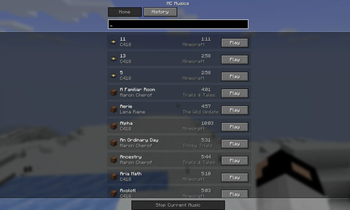
Press the U key (default keybind) to open the Music Menu.
Default Key:
U(Fully customizable in Minecraft Controls settings.)
Inside the GUI, you'll find a collection of Minecraft's official music tracks. Simply click on any song to start playing it instantly.
📚 Beautiful Music Library
The music selection screen displays useful information for every track, including:
- 🎼 Music Name
- 👤 Official Composer/Author
- ⏱ Music Duration
- ▶ One-click Play
Everything is organized in a clean and easy-to-use interface.
🏆 "Now Playing" Toast Notification
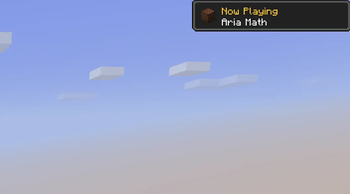
Whenever a music track starts playing, either automatically by Minecraft or manually through the mod, you'll see a beautiful advancement-style toast notification in the corner of your screen.
It displays:
- 🎵 Now Playing
- 📀 Music Name
This makes the experience feel just like Minecraft's built-in notifications while letting you know exactly which soundtrack is currently playing.
🔍 Search Your Favourite Music Instantly
Looking for a specific Minecraft soundtrack? MC Musics includes a built-in Search feature that helps you quickly find any available music track.
Simply type the song's name, and the list updates instantly, making it easy to play your favourite music without scrolling through the entire library.
🕒 Recently Played History
MC Musics also keeps track of your recently played songs.
The History section lets you quickly access tracks you've listened to before, so you can replay your favourite Minecraft music with just a single click instead of searching for it again.
⚙ Fully Customizable Keybind
Don't like using the U key?
No problem!
You can change the keybind anytime from:
Options → Controls → Key Binds
Choose any key you prefer.
Why Use MC Musics?
Minecraft has dozens of amazing music tracks, but many players never hear their favorites because the game plays them randomly.
MC Music gives you complete control over the soundtrack, allowing you to:
- Listen to your favourite Minecraft songs anytime
- Create the perfect atmosphere while building
- Relax with peaceful music during exploration
- Enjoy the official soundtrack without waiting for random playback
Perfect For
- Builders
- Survival Players
- Creative Mode
- Roleplay Worlds
- Content Creators
- Streamers
- Minecraft Music Lovers
Compatibility
- ✅ Fabric Loader
- ✅ Client-side Mod
- ✅ Multiplayer Compatible
- ✅ Lightweight & Performance Friendly
How to Use
- Install MC Music with Fabric.
- Launch Minecraft.
- Press U (or your custom keybind).
- Browse the music library.
- Click any song to play it instantly.
- Enjoy the official Minecraft soundtrack whenever you want!
Verfügbare Versionen
MC Musics auf dem Server installieren
Server bestellen
Bestelle einen Minecraft Java Server mit mindestens 3 GB RAM (4 GB empfohlen).
fabric Loader setzen
Wähle im Panel unter "Egg" den fabric-Loader und die passende Minecraft-Version (1.21).
Mod installieren
Öffne den Mod-Browser im Dashboard und suche nach "MC Musics". Klicke "Installieren" – fertig! Alternativ: Lade die .jar via SFTP in den /mods Ordner.
Kompatibilität
Mod-Loader
Minecraft-Versionen
1.21
Server-seitig
✗ Nicht unterstütztEmpfohlener RAM
4 GB(min. 3 GB)Häufige Fragen
MC Musics Server crasht beim Start – was tun?
Häufigste Ursache: falsche fabric-Version oder zu wenig RAM. Prüfe im Server-Log (latest.log), ob ein "OutOfMemoryError" oder "Mixin"-Fehler auftritt. Bei Mado Hosting: Stelle sicher, dass mindestens 3 GB RAM zugewiesen sind und der Loader zur Mod-Version passt (1.21). Über das Panel kannst du den Loader mit einem Klick wechseln.
Ist MC Musics mit fabric kompatibel?
MC Musics unterstützt offiziell fabric für Minecraft 1.21. Im Mado Dashboard werden inkompatible Loader-Kombinationen automatisch erkannt.
Server laggt mit MC Musics – wie optimiere ich die Performance?
Empfohlener RAM: 4 GB (+1 GB pro 8 Spieler). Prüfe mit /spark profiler, ob MC Musics den meisten Tick-Time verbraucht. Häufige Fixes: Server-View-Distance auf 8-10 reduzieren, bei Forge "performant" oder "starlight" als Zusatz-Mod installieren. Bei Mado Hosting läuft dein Server auf NVMe-SSDs mit dedizierten CPU-Kernen für minimale Latenz.
Ähnliche Mods



Modded Server mieten
Installiere MC Musics mit nur einem Klick auf deinem Server.