
McQoy
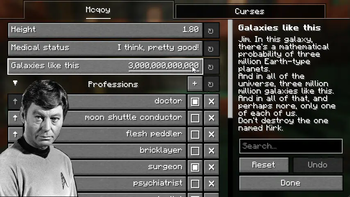
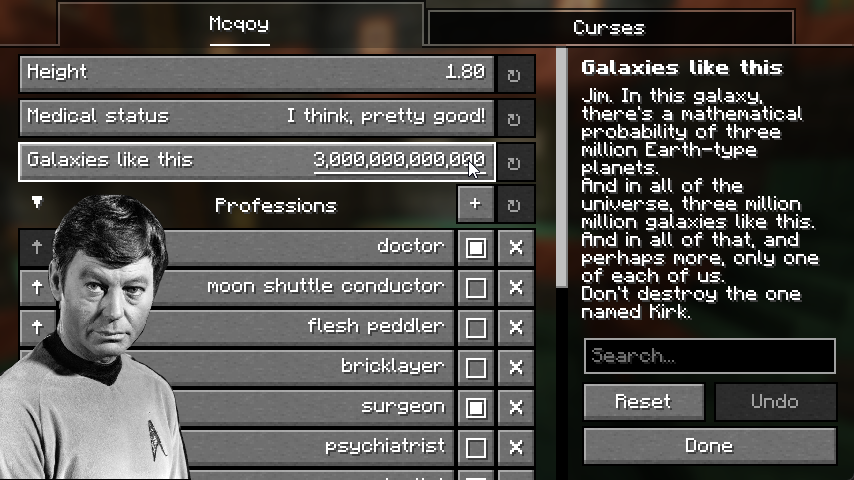
Dependencyless* config screens! An in-game editor for Kaleido-based configs - with no setup required.
Screenshots

Über diese Mod
QCONF OVER YACL (MCQOY)
For servers, use QoMC.
McQoy is a simple mod that automatically generates YACL (or Cloth) configuration screens for mods using Kaleido.
IT SEEMS I'VE MISSED YOU
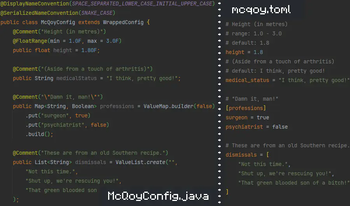
Some mods use Kaleido to provide a .toml configuration - like our own Surveyor, or Crunchy Crunchy, or PicoHUD.
The files look nice, but you can't edit them in-game. With McQoy, you can! Just drop the mod in and you're set.
I DON'T NEED A DOCTOR, I AM A DOCTOR
To set this up for your own mod, check out Kaleido#usage - any loader and version, doesn't matter, it's universal.
When setting the config up, just make sure to specify your folder or filename as your mod ID, so McQoy can find it.
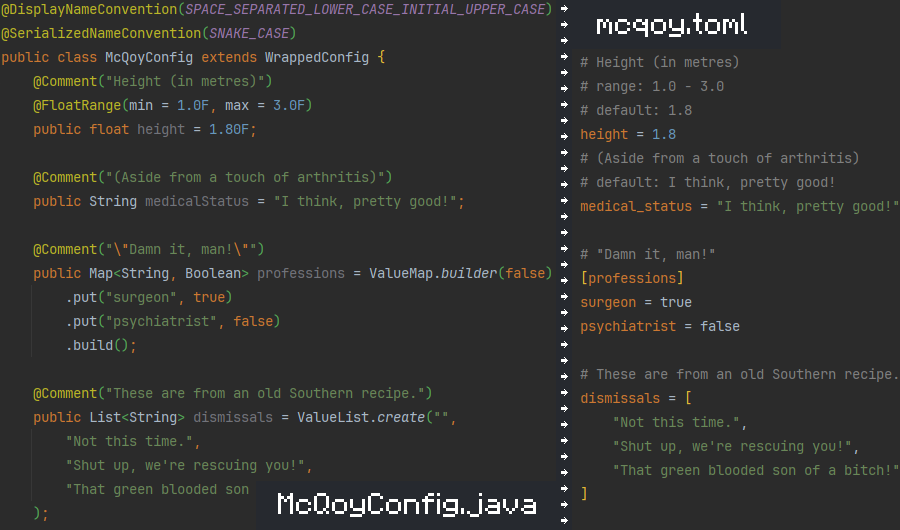
Then, on any McQoy-compatible version, installing McQoy will add screens! No setup, and no hard dependency.
For player visibility, you can also set McQoy as an optional dependency on Modrinth. (Or required, I'm not a cop.)
IF I'M NOT CAREFUL, I'LL END UP TALKING TO MYSELF
Oh, right - a little background and credit is due:
ALL I GOT LEFT IS MY BONES
Quilt Config isn't built on quilt, or even minecraft - It's a pure-java configuration library.
That means it works on every loader, and every version of minecraft, with no changes required.
The API is even designed for mods like McQoy to utilize - with fancy annotation-based metadata. Thanks qconf!
I'M NOT A MAGICIAN, SPOCK
Kaleido is just a wrapper for Quilt Config that shadows the library to avoid path conflicts with Quilt Loader.
With quilt seemingly being sunset, we'll be sure to follow the maintainers if they decide to fork it (hi ix!)
FASCINATING
All mods are built on the work of many others.
This project is based on Quilt Config - and exists only because it's a genuinely great pure-java config library.
Special thanks to ix0rai and cassiancc for providing helpful code snippets and having good ideas to begin with.
Verfügbare Versionen
McQoy auf deinem Client installieren
Mod-Loader lokal installieren
Installiere fabric für deine lokale Minecraft-Version.
Passende Datei herunterladen
Wähle die McQoy-Datei für fabric und Minecraft 26.1.2.
Mod installieren
Lege die .jar-Datei in deinem lokalen .minecraft/mods-Ordner ab und starte Minecraft neu. Eine Installation auf dem Server ist nicht nötig.
Kompatibilität
Mod-Loader
Minecraft-Versionen
26.1.2, 26.1.1, 26.1 (+30 weitere)
Server-seitig
✗ Nicht unterstütztEmpfohlener RAM
4 GB(min. 3 GB)Häufige Fragen
Muss McQoy auf dem Minecraft Server installiert werden?
Nein. Modrinth kennzeichnet McQoy serverseitig als nicht unterstützt. Installiere die Mod nur im lokalen Minecraft-Mods-Ordner. Dein Server kann unverändert bleiben, sofern die Mod-Seite keine zusätzliche Abhängigkeit nennt.
Welche Version und welchen Loader braucht McQoy?
Nutze eine Datei für fabric, forge, neoforge und exakt deine Minecraft-Version. Unterstützte Versionen sind unter anderem 26.1.2, 26.1.1, 26.1. Loader-Dateien sind nicht untereinander austauschbar.
McQoy funktioniert nicht – was kann ich prüfen?
Prüfe zuerst Minecraft-Version, Loader-Version und erforderliche Abhängigkeiten. Lege die .jar-Datei im lokalen .minecraft/mods-Ordner ab und entferne ältere Duplikate. Da die Mod clientseitig ist, löst mehr Server-RAM dieses Problem nicht.
Ähnliche Mods



Minecraft Server für deine Gruppe
McQoy bleibt auf deinem Client. Hoste dazu eine kompatible Welt für deine Mitspieler.