
Mediaworks
Mediaworks is a Hex Casting addon that adds new and exciting utilities!
Screenshots
Über diese Mod
Mediaworks is a Hex Casting addon that adds exciting new utilities.
Please note. Development for this addon has been halted indefinitely. However, you have my permission to create forks of this addon if you wish. Keep an eye out on the Hex Casting discord as there is at least one person already working on porting this mod to 1.20.1 under a different name.
We may return to get Mediaworks WORK-ing again, heh. If we do, you can be sure it will be on the most up to date version of Minecraft supported by Hex Casting.
Some noteworthy things to look forward to...
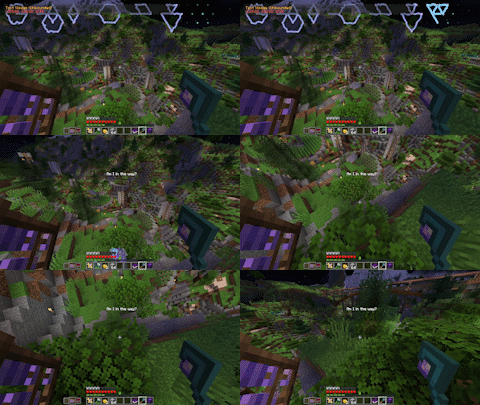
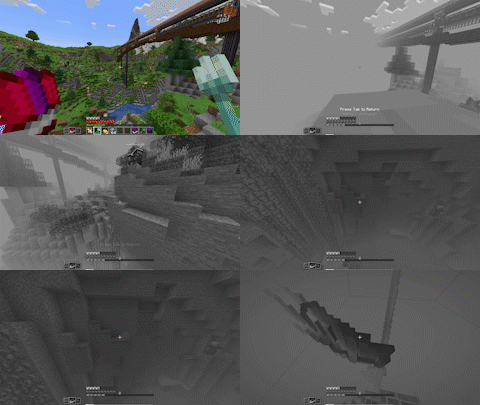
Astral Projection
A new great spell capable of separating the mind from the body. Your immaterial projection can pass through solids, but cannot interact with blocks. But clever mages may find other ways to affect the environment...
Macula Etching
The beginnings of a rudimentary display can be etched into your eyes. Display any iotas anywhere on the screen. Set their duration or leave them etched into your eyes permanently. Installing MoreIotas will allow you to add custom text to your Macula and also allow you to color text.
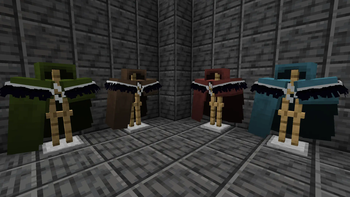
Featherweave Cloak
A powerful new garment hidden deep underground. This cloak's threads have the power to hold information, allowing you to read and write iotas to their cloth. But that's not all, new vanilla enchantments can be applied to a cloak to absorb damage, increase your ambit, and even trigger the stored iota upon taking damage. Cloaks are also dyeable in the same way leather armor is. The possibilities are endless!
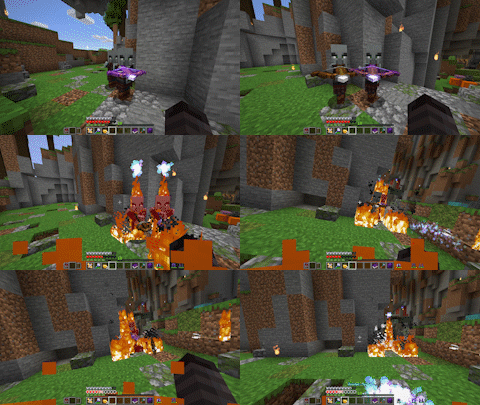
Some new tweaks and other miscellaneous features!
- A pattern which returns the amount of media available to the cast.
- Changes to media withdrawal logic for casts.
- Wearing a scrying lens on the head or in a Trinket or Curios slot now grants a bigger casting grid.
Verfügbare Versionen
Mediaworks auf dem Server installieren
Server bestellen
Bestelle einen Minecraft Java Server mit mindestens 3 GB RAM (4 GB empfohlen).
fabric Loader setzen
Wähle im Panel unter "Egg" den fabric-Loader und die passende Minecraft-Version (1.19.2).
Mod installieren
Öffne den Mod-Browser im Dashboard und suche nach "Mediaworks". Klicke "Installieren" – fertig! Alternativ: Lade die .jar via SFTP in den /mods Ordner.
Kompatibilität
Mod-Loader
Minecraft-Versionen
1.19.2
Server-seitig
✓ ErforderlichEmpfohlener RAM
4 GB(min. 3 GB)Häufige Fragen
Mediaworks Server crasht beim Start – was tun?
Häufigste Ursache: falsche fabric-Version oder zu wenig RAM. Prüfe im Server-Log (latest.log), ob ein "OutOfMemoryError" oder "Mixin"-Fehler auftritt. Bei Mado Hosting: Stelle sicher, dass mindestens 3 GB RAM zugewiesen sind und der Loader zur Mod-Version passt (1.19.2). Über das Panel kannst du den Loader mit einem Klick wechseln.
Ist Mediaworks mit fabric und forge kompatibel?
Mediaworks unterstützt offiziell fabric, forge für Minecraft 1.19.2. Achtung: Forge- und Fabric-Mods sind NICHT untereinander kompatibel – wähle einen Loader und bleibe dabei. Im Mado Dashboard werden inkompatible Loader-Kombinationen automatisch erkannt.
Server laggt mit Mediaworks – wie optimiere ich die Performance?
Empfohlener RAM: 4 GB (+1 GB pro 8 Spieler). Prüfe mit /spark profiler, ob Mediaworks den meisten Tick-Time verbraucht. Häufige Fixes: Server-View-Distance auf 8-10 reduzieren, bei Forge "performant" oder "starlight" als Zusatz-Mod installieren. Bei Mado Hosting läuft dein Server auf NVMe-SSDs mit dedizierten CPU-Kernen für minimale Latenz.
Ähnliche Mods




Modded Server mieten
Installiere Mediaworks mit nur einem Klick auf deinem Server.