
More Axolotl
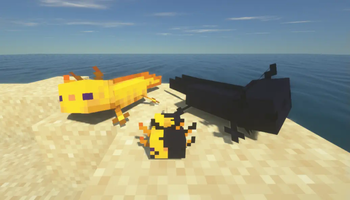
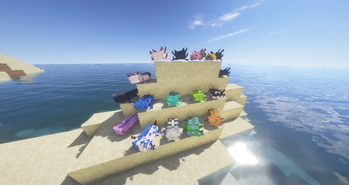
Adds many new realistic axolotl types
Screenshots

Über diese Mod




Requires MavAPI for 2.0.0 and higher!
Features
- Many new axolotl types
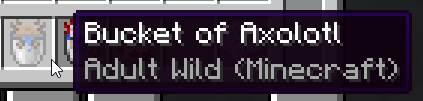
- Custom textures for the axolotl bucket for each variant
- Specific breeding to obtain specific variations
- Put Big Dripleafs on axolotl for extra armor that can be repaired with bonemeal
- Open mouths when fed
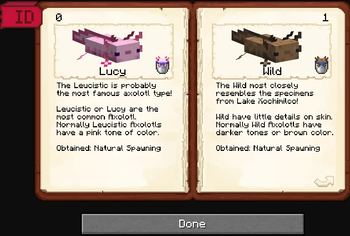
- An "Axolotl Catalog" where you can read about the different types
- A new fisherman trade that trades you the catalog
Common Questions
- Q: Will this mod get a forge release? A: We have no plans for a Forge release
- Q: Where can i get "Axolotl Catalog"? A: You can find it trading with Fisherman Villager (Barrel Workstation)
- Q: Where is Axolotls Variants ID's? A: The Variant ID's are listed in the "Axolotl Catalog" in the top corners
- Q: What is the chance of a rare Axolotl? A: It’s a 1 in a 1200 chance for all rare variant
Compatibilities
- More Axolotl Variants Mod - By Akashii_Kun_


Verfügbare Versionen
More Axolotl auf dem Server installieren
Server bestellen
Bestelle einen Minecraft Java Server mit mindestens 3 GB RAM (4 GB empfohlen).
fabric Loader setzen
Wähle im Panel unter "Egg" den fabric-Loader und die passende Minecraft-Version (1.20.1).
Mod installieren
Öffne den Mod-Browser im Dashboard und suche nach "More Axolotl". Klicke "Installieren" – fertig! Alternativ: Lade die .jar via SFTP in den /mods Ordner.
Kompatibilität
Mod-Loader
Minecraft-Versionen
1.20.1, 1.20, 1.19.2 (+7 weitere)
Server-seitig
✓ ErforderlichEmpfohlener RAM
4 GB(min. 3 GB)Häufige Fragen
More Axolotl Server crasht beim Start – was tun?
Häufigste Ursache: falsche fabric-Version oder zu wenig RAM. Prüfe im Server-Log (latest.log), ob ein "OutOfMemoryError" oder "Mixin"-Fehler auftritt. Bei Mado Hosting: Stelle sicher, dass mindestens 3 GB RAM zugewiesen sind und der Loader zur Mod-Version passt (1.20.1). Über das Panel kannst du den Loader mit einem Klick wechseln.
Ist More Axolotl mit fabric kompatibel?
More Axolotl unterstützt offiziell fabric für Minecraft 1.20.1, 1.20, 1.19.2. Im Mado Dashboard werden inkompatible Loader-Kombinationen automatisch erkannt.
Server laggt mit More Axolotl – wie optimiere ich die Performance?
Empfohlener RAM: 4 GB (+1 GB pro 8 Spieler). Prüfe mit /spark profiler, ob More Axolotl den meisten Tick-Time verbraucht. Häufige Fixes: Server-View-Distance auf 8-10 reduzieren, bei Forge "performant" oder "starlight" als Zusatz-Mod installieren. Bei Mado Hosting läuft dein Server auf NVMe-SSDs mit dedizierten CPU-Kernen für minimale Latenz.
Ähnliche Mods




Modded Server mieten
Installiere More Axolotl mit nur einem Klick auf deinem Server.