Multitool
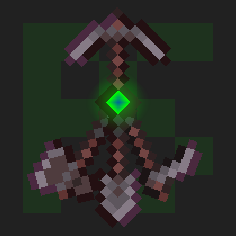
Combine all the tools into the Multitool
Screenshots
Über diese Mod
 Multitool
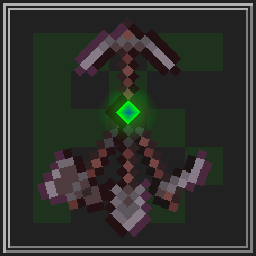
Do you hate it when your whole inventory is cluttered by tools?
Well, with this data pack you can combine all the tools into the Multitool.


Features
The Multitool can always break blocks meant for the axe, hoe, pickaxe or shovel, no matter what form it is currently in.
If you look at a block, the Multitool switches to a tool suited for that block like an axe to strip logs or a shovel to create paths.
When sneaking while looking at tillable blocks, the Multitool swaps to a hoe, so you can create fresh farmland.
You can enchant the Multitool!
It supports any enchantment that you can normally put onto a tool.
The Multitool has 3 times the durability of a regular tool made from the same material.
Mutlitool even supports resource packs, like this one by Dukette, it turns the Multitool into a halberd!
How to get
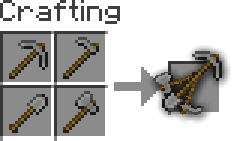
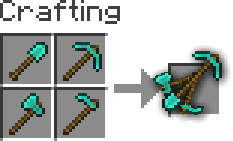
To craft a Multitool, you just need to combine all four types of tools of the same material in the crafting grid.
Adding or removing a Multitool
You can generate your own Multitool data pack simply by configuring a config and building it
This also works for modded tools but note that some mods break data packs so I won't guarantee compatability or support
Install Python and beet
If Python is allready installed, you should just be able to runpip install beetto install beetClone or download the GitHub repository
Add or remove
materialsinmultitool_config.ymland configureoverwrites, for mods where a tool isn't following vanilla's naming schemeYou can easily find the namespace by looking at the item in your inventory after pressing F3 + H, it should be in the form
<namespace>:<material>_<tool>Move to this folder with a terminal and run
beet, it should create a folder calledbuildwith your data pack in it




Verfügbare Versionen
Multitool auf dem Server installieren
Server bestellen
Bestelle einen Minecraft Java Server mit mindestens 3 GB RAM (4 GB empfohlen).
datapack Loader setzen
Wähle im Panel unter "Egg" den datapack-Loader und die passende Minecraft-Version (1.21.10).
Mod installieren
Öffne den Mod-Browser im Dashboard und suche nach "Multitool". Klicke "Installieren" – fertig! Alternativ: Lade die .jar via SFTP in den /mods Ordner.
Kompatibilität
Mod-Loader
Minecraft-Versionen
1.21.10, 1.21.9, 1.21.8 (+25 weitere)
Server-seitig
✓ ErforderlichEmpfohlener RAM
4 GB(min. 3 GB)Häufige Fragen
Multitool Server crasht beim Start – was tun?
Häufigste Ursache: falsche datapack-Version oder zu wenig RAM. Prüfe im Server-Log (latest.log), ob ein "OutOfMemoryError" oder "Mixin"-Fehler auftritt. Bei Mado Hosting: Stelle sicher, dass mindestens 3 GB RAM zugewiesen sind und der Loader zur Mod-Version passt (1.21.10). Über das Panel kannst du den Loader mit einem Klick wechseln.
Ist Multitool mit datapack und fabric und forge und neoforge und quilt kompatibel?
Multitool unterstützt offiziell datapack, fabric, forge, neoforge, quilt für Minecraft 1.21.10, 1.21.9, 1.21.8. Achtung: Forge- und Fabric-Mods sind NICHT untereinander kompatibel – wähle einen Loader und bleibe dabei. Im Mado Dashboard werden inkompatible Loader-Kombinationen automatisch erkannt.
Server laggt mit Multitool – wie optimiere ich die Performance?
Empfohlener RAM: 4 GB (+1 GB pro 8 Spieler). Prüfe mit /spark profiler, ob Multitool den meisten Tick-Time verbraucht. Häufige Fixes: Server-View-Distance auf 8-10 reduzieren, bei Forge "performant" oder "starlight" als Zusatz-Mod installieren. Bei Mado Hosting läuft dein Server auf NVMe-SSDs mit dedizierten CPU-Kernen für minimale Latenz.
Ähnliche Mods



![[TaCZ] Timeless and Classics Zero](https://cdn.modrinth.com/data/SzzJttH8/fd27766d2bb8390d284696b1dbd358f87e081439_96.webp)


Modded Server mieten
Installiere Multitool mit nur einem Klick auf deinem Server.