
MusicDisplay
This mod displays the currently playing music on Spotify. You can easily adjust the volume, pause the song, and more.
Screenshots

Über diese Mod
MusicDisplay
Version 2.5 is now available, supporting Minecraft version 26.1.x! Check the changelog here.
Take full control of your music without ever leaving the game! This mod seamlessly integrates Spotify into your Minecraft client, offering a sleek overlay and easy access to playback controls.
Features
- Full Playback Control: Pause, resume, skip, or rewind tracks directly from the game.
- Live Overlay: Displays the current song title, artist, album art, and a real-time progress bar.
- Search Spotify: You can search for your song or playlist directly from the GUI!
- Volume Management: Adjust Spotify volume instantly without Alt-Tabbing.
- Interactive Controls:
- Play/Pause
- Previous / Next Track
- Shuffle Toggle
- Loop Toggle
- Like/Save Songs
- State Synchronization: Automatically syncs with changes made on other devices (e.g., your phone).
- Custom API Keys: Use your own Spotify Client ID and Secret for full privacy and control.
How to Use
1. Initial Setup
To connect the mod to your Spotify account:
- Open the client GUI in the game (default key: Right Shift).
- Click the Setup Spotify button at the bottom of the panel. This will launch a local setup server and automatically open the setup page in your web browser (
http://127.0.0.1:8888/setup). - Follow the instructions on the web page:
- Log in to the Spotify Developer Dashboard.
- Create a new application.
- Edit the app settings and add
http://127.0.0.1:8888/callbackas a Redirect URI. - Copy your Client ID and Client Secret.
- Enter your Client ID and Client Secret in the web form and click Connect Spotify Account.
- Approve the authorization in your browser. Once completed, you can close the browser tab and return to the game!
2. State & Control
Enable the Spotify module in your client's GUI. Your music will start syncing instantly!
Configuration
Configuration files are stored locally at: .minecraft/config/spotify-config.json
Keybinds
- Right Shift - Opens the Client GUI
Requirements
- Spotify Account (Premium is required).
- Minecraft Java Edition (Fabric).
- Java 25 or higher.
Preview

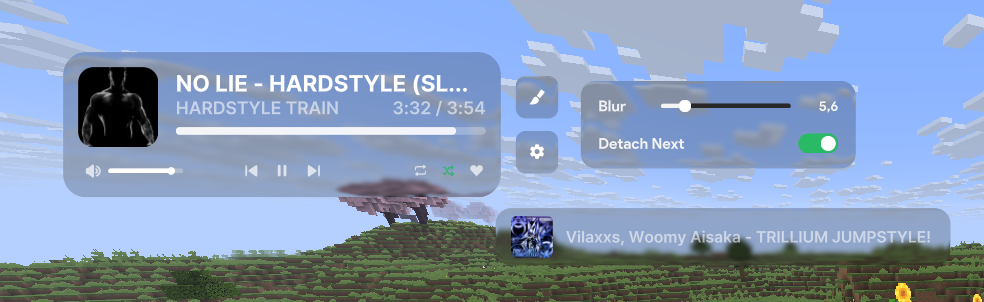
Showcase
Verfügbare Versionen
MusicDisplay auf deinem Client installieren
Mod-Loader lokal installieren
Installiere fabric für deine lokale Minecraft-Version.
Passende Datei herunterladen
Wähle die MusicDisplay-Datei für fabric und Minecraft 26.1.2.
Mod installieren
Lege die .jar-Datei in deinem lokalen .minecraft/mods-Ordner ab und starte Minecraft neu. Eine Installation auf dem Server ist nicht nötig.
Kompatibilität
Mod-Loader
Minecraft-Versionen
26.1.2, 26.1.1, 26.1 (+2 weitere)
Server-seitig
✗ Nicht unterstütztEmpfohlener RAM
4 GB(min. 3 GB)Häufige Fragen
Muss MusicDisplay auf dem Minecraft Server installiert werden?
Nein. Modrinth kennzeichnet MusicDisplay serverseitig als nicht unterstützt. Installiere die Mod nur im lokalen Minecraft-Mods-Ordner. Dein Server kann unverändert bleiben, sofern die Mod-Seite keine zusätzliche Abhängigkeit nennt.
Welche Version und welchen Loader braucht MusicDisplay?
Nutze eine Datei für fabric und exakt deine Minecraft-Version. Unterstützte Versionen sind unter anderem 26.1.2, 26.1.1, 26.1. Loader-Dateien sind nicht untereinander austauschbar.
MusicDisplay funktioniert nicht – was kann ich prüfen?
Prüfe zuerst Minecraft-Version, Loader-Version und erforderliche Abhängigkeiten. Lege die .jar-Datei im lokalen .minecraft/mods-Ordner ab und entferne ältere Duplikate. Da die Mod clientseitig ist, löst mehr Server-RAM dieses Problem nicht.
Ähnliche Mods





Minecraft Server für deine Gruppe
MusicDisplay bleibt auf deinem Client. Hoste dazu eine kompatible Welt für deine Mitspieler.