
NJ Capybaras
Adds realistic capybaras to Minecraft with unique behaviors, breeding, custom drops, and immersive world generation.
Screenshots
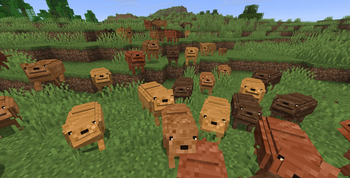
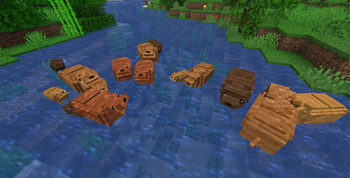
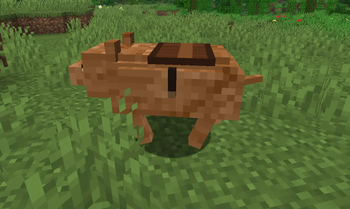
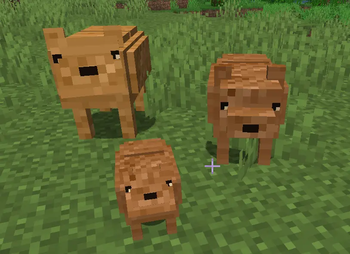
Über diese Mod
Capy Mod
Bring adorable capybaras to Minecraft!
Capy Mod adds naturally spawning capybaras to Minecraft with multiple unique variants, breeding mechanics, and dedicated server support. Explore your world, discover every capybara variant, and bring a relaxing new mob to your adventures.
Features
🦫 Four Unique Variants
Capy Mod currently includes four different capybara variants:
- Brown
- Dark
- Golden
- Rust
Each variant has its own appearance, giving players more variety while exploring the world.
🌍 Natural Spawning
Capybaras naturally generate in suitable biomes without changing Minecraft's vanilla gameplay.
Simply install the mod and start exploring.
❤️ Breeding
Breed capybaras to grow your own family.
Baby capybaras are fully supported and allow players to collect even more variants.
🥚 Capybara Spawn Egg
A Capybara Spawn Egg is included for Creative Mode, map makers, and testing.
👥 Multiplayer Compatible
Capy Mod works perfectly in both Singleplayer and Multiplayer.
Enjoy capybaras together with your friends on Fabric servers.
🖥️ Dedicated Server Support
The mod is fully compatible with dedicated Fabric servers.
Why Install Capy Mod?
- Adds a completely new peaceful mob.
- Multiple naturally spawning variants.
- Vanilla-friendly gameplay.
- Lightweight and performance-friendly.
- Multiplayer compatible.
- Easy to install.
- Regular updates with new content planned.
Requirements
- Minecraft 1.21.11
- Fabric Loader
- Fabric API
Supported Languages
Currently available in:
- 🇺🇸 English
- 🇩🇪 German
Additional translations are always welcome.
Current Status
⚠️ Alpha v0.1.0
Capy Mod is currently in active development.
This is the first public Alpha release. While the core features are already playable, many improvements and additional content are planned for future versions.
Because this is an early Alpha version, always create backups before using the mod on important worlds or servers.
Planned Features
The roadmap currently includes:
- 🤍 Albino Capybara
- 🥙 Gyros
- 💩 Poop
- 🎵 Custom sounds
- ✨ More animations
- 🦫 Additional capybara variants
- 🍃 More natural behaviors
- 🎮 More gameplay features
- 💡 Community-requested features
Feedback
Found a bug?
Have an idea?
Your feedback helps improve Capy Mod.
Bug reports, feature requests, balancing suggestions, and general feedback are always appreciated.
Looking for Contributors
We are currently looking for:
- 💻 Developers
- 🧪 Testers
- 🌍 Translators
Development access is restricted to approved contributors.
Interested developers can apply through our Discord server.
Community
Stay up to date with development and future projects.
- 🎮 Discord — Support, bug reports, community, and developer applications.
- 💻 GitHub — Source code, issue tracking, and development progress.
- 📺 YouTube — Showcases, updates, and development videos.
- 🎵 TikTok — Shorts and sneak peeks.
- 👻 Snapchat — Project updates.
Thank you for supporting Capy Mod!
Every download, suggestion, bug report, and piece of feedback helps improve the project and shape future updates.
Verfügbare Versionen
NJ Capybaras auf dem Server installieren
Server bestellen
Bestelle einen Minecraft Java Server mit mindestens 4 GB RAM (6 GB empfohlen).
fabric Loader setzen
Wähle im Panel unter "Egg" den fabric-Loader und die passende Minecraft-Version (1.21.11).
Mod installieren
Öffne den Mod-Browser im Dashboard und suche nach "NJ Capybaras". Klicke "Installieren" – fertig! Alternativ: Lade die .jar via SFTP in den /mods Ordner.
Kompatibilität
Mod-Loader
Minecraft-Versionen
1.21.11
Server-seitig
✓ ErforderlichEmpfohlener RAM
6 GB(min. 4 GB)Häufige Fragen
NJ Capybaras Server crasht beim Start – was tun?
Häufigste Ursache: falsche fabric-Version oder zu wenig RAM. Prüfe im Server-Log (latest.log), ob ein "OutOfMemoryError" oder "Mixin"-Fehler auftritt. Bei Mado Hosting: Stelle sicher, dass mindestens 4 GB RAM zugewiesen sind und der Loader zur Mod-Version passt (1.21.11). Über das Panel kannst du den Loader mit einem Klick wechseln.
Ist NJ Capybaras mit fabric kompatibel?
NJ Capybaras unterstützt offiziell fabric für Minecraft 1.21.11. Im Mado Dashboard werden inkompatible Loader-Kombinationen automatisch erkannt.
Server laggt mit NJ Capybaras – wie optimiere ich die Performance?
Empfohlener RAM: 6 GB (+1 GB pro 5 Spieler). Prüfe mit /spark profiler, ob NJ Capybaras den meisten Tick-Time verbraucht. Häufige Fixes: Server-View-Distance auf 8-10 reduzieren, bei Forge "performant" oder "starlight" als Zusatz-Mod installieren. Bei Mado Hosting läuft dein Server auf NVMe-SSDs mit dedizierten CPU-Kernen für minimale Latenz.
Ähnliche Mods




Modded Server mieten
Installiere NJ Capybaras mit nur einem Klick auf deinem Server.