
Nyctography
Adds the Nyctography substitution cipher as a usable Minecraft font.
Screenshots
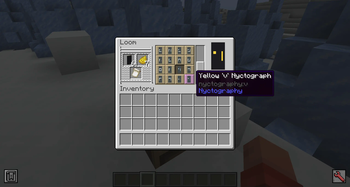

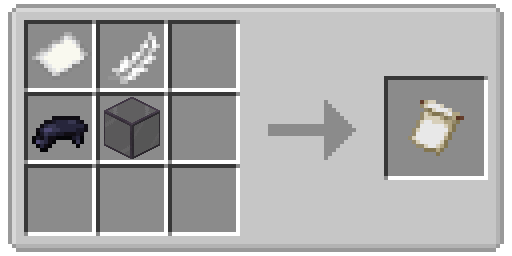
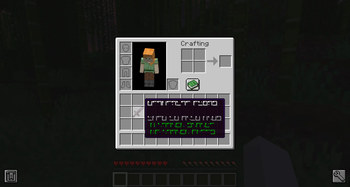
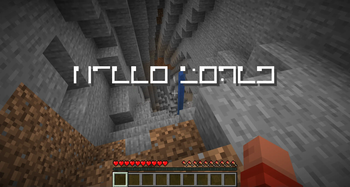
Über diese Mod

This mod adds the Nyctography substitution cipher as a Minecraft font! This font can be used for books, signs, chat messages, tooltips, and most forms of ingame text.
History
The nyctography writing system was invented in 1891 by Lewis Carrol. The goal of this system was to make writing in the dark easier, which is where the system gets its name. Text was written using a nyctograph, a stencil with squre holes that were used to align and write the characters. In modern times this writing system has been used for puzzles in games, DnD campaigns, and geocaches.
Understanding Nyctography
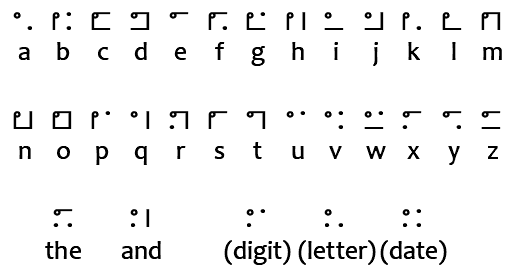
This writing system uses a series of dots and lines aranged around the edges of a square. For example the letter E has a dot in the top left corner and a line on the top. Each symbol loosely resembles its latin alphabet counterpart. For example the letter O has a dot in the top left corner and then a line on all sides of the box, creating a closed loop.
Similarly to braille, numbers are written using a letter. This mod will automatically handle this when writing text with the font but you will still need to know how to read them. Only consonants are used to avoid confusion with actual words.
- 0 = Z
- 1 = B (First consonant in the alphabet)
- 2 = D (Two in Latin is Duo)
- 3 = T
- 4 = F
- 5 = L (Roman for 50)
- 6 = S
- 7 = M (From Septem which is Seven in Latin)
- 8 = H (Eight in french is huit)
- 9 = N
There are five special characters in addition to the letters and numbers.
- The - Written in this mod using a dash (-). Appears as a dot in the top left, a line on the top, and two dots on the bottom.
- And - Written in this mod using an ampersand (&). Appears as a dot in the top and bottom left, and a line on the right.
- Digit - Written in this mod using a hashtag (#). Indicates that the following characters should be read as a number. Appears as only the corners of the letter F for "figures".
- Letter - Written in this mod using an asterisk (*). Indicates that the following characters are letters. Appears as only the corners of the letter L for "letters".
- Date - Written in this mod using an at (@). Indicates the following characters are a date in DDMMYY format. Appears as corners of the letter D for "date".
Technical Usage
This font can be applied to any text using Mojang's text component system, including all commands and datapack features that accept raw JSON text. This is done by setting the font property of the text to nyctography:nyctography.
Vanilla Commands
Vanilla commands will often allow you to define text using the raw JSON format. The font property controls which font will be used when rendering that text. This can be done for all fonts and is not unique to fonts added by this mod.
/give @a stone[custom_name='["",{"text":"Stone","font":"nyctography:nyctography",italic:false}]']/title @a title {"text":"Hello","font":"nyctography:nyctography"}/give @a written_book[written_book_content={pages:['[["",{"text":"Test book","font":"nyctography:nyctography"}]]'],title:"aaa",author:"bbb"}]
Bookshelf Commands
This mod depends on the Bookshelf library which offers several commands to help work with fonts. A few examples of these commands are given below.
- /bookshelf font say nyctography:nyctography
- Posts a chat message styled with the font. - /bookshelf font item nyctography:nyctography - Renames the held item to use the font.
- /bookshelf font block nyctography:nyctography X Y Z - Applies the font to the block. This will change sign text, or rename namable blocks like chests.
Scripts, Plugins, and Mods
If you have access to code or scripting tools you can apply the font to any mutable text component. This is done by setting the font ID on the style of the text component. You can find an example of how I do this in my code here.

This project is sponsored by Nodecraft. Use code DARKHAX for 30% off your first month of service!
Verfügbare Versionen
Nyctography auf dem Server installieren
Server bestellen
Bestelle einen Minecraft Java Server mit mindestens 3 GB RAM (4 GB empfohlen).
fabric Loader setzen
Wähle im Panel unter "Egg" den fabric-Loader und die passende Minecraft-Version (26.3).
Mod installieren
Öffne den Mod-Browser im Dashboard und suche nach "Nyctography". Klicke "Installieren" – fertig! Alternativ: Lade die .jar via SFTP in den /mods Ordner.
Kompatibilität
Mod-Loader
Minecraft-Versionen
26.3, 26.2, 26.1.2 (+3 weitere)
Server-seitig
✓ ErforderlichEmpfohlener RAM
4 GB(min. 3 GB)Häufige Fragen
Nyctography Server crasht beim Start – was tun?
Häufigste Ursache: falsche fabric-Version oder zu wenig RAM. Prüfe im Server-Log (latest.log), ob ein "OutOfMemoryError" oder "Mixin"-Fehler auftritt. Bei Mado Hosting: Stelle sicher, dass mindestens 3 GB RAM zugewiesen sind und der Loader zur Mod-Version passt (26.3). Über das Panel kannst du den Loader mit einem Klick wechseln.
Ist Nyctography mit fabric und forge und neoforge und quilt kompatibel?
Nyctography unterstützt offiziell fabric, forge, neoforge, quilt für Minecraft 26.3, 26.2, 26.1.2. Achtung: Forge- und Fabric-Mods sind NICHT untereinander kompatibel – wähle einen Loader und bleibe dabei. Im Mado Dashboard werden inkompatible Loader-Kombinationen automatisch erkannt.
Server laggt mit Nyctography – wie optimiere ich die Performance?
Empfohlener RAM: 4 GB (+1 GB pro 8 Spieler). Prüfe mit /spark profiler, ob Nyctography den meisten Tick-Time verbraucht. Häufige Fixes: Server-View-Distance auf 8-10 reduzieren, bei Forge "performant" oder "starlight" als Zusatz-Mod installieren. Bei Mado Hosting läuft dein Server auf NVMe-SSDs mit dedizierten CPU-Kernen für minimale Latenz.
Ähnliche Mods




Modded Server mieten
Installiere Nyctography mit nur einem Klick auf deinem Server.
Details
- Lizenz
- GNU Lesser General Public License v2.1 only
- Server-seitig
- Erforderlich