
Orbital Railgun Enhanced
Destroy your enemies with an orbital strike, but with sounds and more features!
Über diese Mod
Orbital Railgun Enhanced
Preview
Can't see the embed? Click here to watch on YouTube
This Video was made by HyIsNoob, but as it has nearly the same stuff as this mod, I just used his!
This is a fork of the Orbital Railgun mod by Mishkis that adds sounds and other useful features!
⚠️ Photosensitivity Warning: This mod uses a lot of shader effects, fast-moving lights, and chromatic aberration. Viewer discretion is advised.
Supported Minecraft Versions
| Version | Status |
|---|---|
| 1.19.1 - 1.19.2 | ⚠️ Deprecated |
| 1.20 - 1.20.6 | ✅ Supported |
| 1.21 - 1.21.11 | ⏰ Soon |
An unofficial Forge version can be found here.
Description
If you've ever wanted to destroy large swathes of land in an instant while having no regard for the local fauna and wildlife present, then our new invention of the Orbital Railgun may interest you. By harnessing the power of a star, you are able to communicate directly to our rapid-response railgun satellite, allowing for quick and easy access to absolute destruction. Simply aim your Orbital Railgun and fire, and within half a minute you will have caused an ecological disaster, but at least the area is clear now!
Note: it WILL destroy bedrock.
Usage
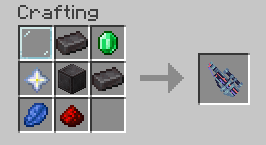
Once you've crafted the Orbital Railgun, hold right click to aim and then left click to fire.
Configuration
Access the config screen through Mod Menu (if installed) to customize:
- Volume Settings: Adjust the volume for each sound (scope, shoot, equip) from 0.0 to 1.0
- Enable/Disable Sounds: Toggle individual sound effects on or off
Configuration is stored in config/orbital-railgun-enhanced.json5 in your Minecraft directory.
Installation
Requirements
Steps
- Download the correct JAR for your Minecraft version from Releases
- Place the JAR file in your
modsfolder - Make sure all required dependencies are also installed
- Launch Minecraft with the Fabric Loader profile
Note: This mod includes server and client functionality. Server-side installation is required if not in Singleplayer!
Issues or Ideas
If you found any issues/bugs or have some ideas for this mod, head to the issue tracker and create a new issue.
We also welcome code contributions! Please see our Contributing Guide for more information on how to contribute.
Credits
- Original mod: Orbital Railgun by Mishkis
- Owner of this Mod: KingIronMan2011
- SFX Maker: HyIsNoob
- Source code license: MIT (see LICENSE)
Verfügbare Versionen
Orbital Railgun Enhanced auf dem Server installieren
Server bestellen
Bestelle einen Minecraft Java Server mit mindestens 3 GB RAM (4 GB empfohlen).
fabric Loader setzen
Wähle im Panel unter "Egg" den fabric-Loader und die passende Minecraft-Version (1.20.6).
Mod installieren
Öffne den Mod-Browser im Dashboard und suche nach "Orbital Railgun Enhanced". Klicke "Installieren" – fertig! Alternativ: Lade die .jar via SFTP in den /mods Ordner.
Kompatibilität
Mod-Loader
Minecraft-Versionen
1.20.6, 1.20.4, 1.20.3 (+5 weitere)
Server-seitig
✓ ErforderlichEmpfohlener RAM
4 GB(min. 3 GB)Häufige Fragen
Orbital Railgun Enhanced Server crasht beim Start – was tun?
Häufigste Ursache: falsche fabric-Version oder zu wenig RAM. Prüfe im Server-Log (latest.log), ob ein "OutOfMemoryError" oder "Mixin"-Fehler auftritt. Bei Mado Hosting: Stelle sicher, dass mindestens 3 GB RAM zugewiesen sind und der Loader zur Mod-Version passt (1.20.6). Über das Panel kannst du den Loader mit einem Klick wechseln.
Ist Orbital Railgun Enhanced mit fabric kompatibel?
Orbital Railgun Enhanced unterstützt offiziell fabric für Minecraft 1.20.6, 1.20.4, 1.20.3. Im Mado Dashboard werden inkompatible Loader-Kombinationen automatisch erkannt.
Server laggt mit Orbital Railgun Enhanced – wie optimiere ich die Performance?
Empfohlener RAM: 4 GB (+1 GB pro 8 Spieler). Prüfe mit /spark profiler, ob Orbital Railgun Enhanced den meisten Tick-Time verbraucht. Häufige Fixes: Server-View-Distance auf 8-10 reduzieren, bei Forge "performant" oder "starlight" als Zusatz-Mod installieren. Bei Mado Hosting läuft dein Server auf NVMe-SSDs mit dedizierten CPU-Kernen für minimale Latenz.
Ähnliche Mods





Modded Server mieten
Installiere Orbital Railgun Enhanced mit nur einem Klick auf deinem Server.