
Flyrr's Paxels
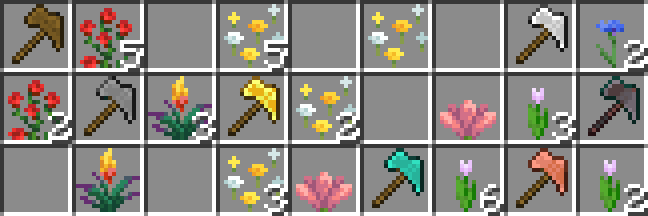
Adds the Paxel tool, a combination of pickaxes, shovels and axes to the game!
Screenshots
Über diese Mod
Introduction
This Datapack adds Paxels, a combination of Pickaxe, Axe and Shovel, which can efficiently mine all blocks which can be mined by Pickaxes, Axes and Shovels! (...as you can probably guess...)
They behave just like any of the three tools when it comes to enchanting and also have any additional abilities like stripping logs and disabling shields like axes do :)
Crafting
You can craft them by simply putting a Pickaxe, Axe and Shovel of the desired material in the crafting grid of either your inventory or a crafting table.
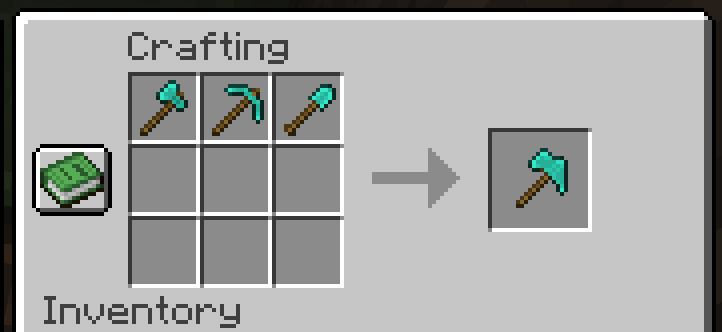
To upgrade a Diamond Paxel to Netherite just combine it with a Netherite Ingot and a Template in a Smithing Table
Required Recourcepack
While the datapack doesn't exactly "require" the Recourcepack to work, it's highly reccomended to use it to see the paxel's custom texture!
Interested in making your own datapacks? :)
I am part of a small team of people owning Datapack Hub, the perfect discord server for helping you do just that! Wether you are just getting started or have advanced questions, with 1700+ members and our team of verified helpers we got you covered!
(This is 100% a passion project and I don't get paid anything for promoting this :)) 
Need a minecraft server?
Note: This pack was previously simply called "Paxels", I renamed it to "Flyrr's Paxels" to avoid confusion with other packs! This might be the one you're looking for :P
Verfügbare Versionen
Flyrr's Paxels auf dem Server installieren
Server bestellen
Bestelle einen Minecraft Java Server mit mindestens 3 GB RAM (4 GB empfohlen).
datapack Loader setzen
Wähle im Panel unter "Egg" den datapack-Loader und die passende Minecraft-Version (26.3).
Mod installieren
Öffne den Mod-Browser im Dashboard und suche nach "Flyrr's Paxels". Klicke "Installieren" – fertig! Alternativ: Lade die .jar via SFTP in den /mods Ordner.
Kompatibilität
Mod-Loader
Minecraft-Versionen
26.3, 26.1.2, 26.1.1 (+14 weitere)
Server-seitig
✓ ErforderlichEmpfohlener RAM
4 GB(min. 3 GB)Häufige Fragen
Flyrr's Paxels Server crasht beim Start – was tun?
Häufigste Ursache: falsche datapack-Version oder zu wenig RAM. Prüfe im Server-Log (latest.log), ob ein "OutOfMemoryError" oder "Mixin"-Fehler auftritt. Bei Mado Hosting: Stelle sicher, dass mindestens 3 GB RAM zugewiesen sind und der Loader zur Mod-Version passt (26.3). Über das Panel kannst du den Loader mit einem Klick wechseln.
Ist Flyrr's Paxels mit datapack und fabric und forge und neoforge und quilt kompatibel?
Flyrr's Paxels unterstützt offiziell datapack, fabric, forge, neoforge, quilt für Minecraft 26.3, 26.1.2, 26.1.1. Achtung: Forge- und Fabric-Mods sind NICHT untereinander kompatibel – wähle einen Loader und bleibe dabei. Im Mado Dashboard werden inkompatible Loader-Kombinationen automatisch erkannt.
Server laggt mit Flyrr's Paxels – wie optimiere ich die Performance?
Empfohlener RAM: 4 GB (+1 GB pro 8 Spieler). Prüfe mit /spark profiler, ob Flyrr's Paxels den meisten Tick-Time verbraucht. Häufige Fixes: Server-View-Distance auf 8-10 reduzieren, bei Forge "performant" oder "starlight" als Zusatz-Mod installieren. Bei Mado Hosting läuft dein Server auf NVMe-SSDs mit dedizierten CPU-Kernen für minimale Latenz.
Ähnliche Mods



![[TaCZ] Timeless and Classics Zero](https://cdn.modrinth.com/data/SzzJttH8/fd27766d2bb8390d284696b1dbd358f87e081439_96.webp)


Modded Server mieten
Installiere Flyrr's Paxels mit nur einem Klick auf deinem Server.
Details
- Lizenz
- Creative Commons Attribution Non Commercial Share Alike 4.0 International
- Server-seitig
- Erforderlich