
Penchant
A rework of enchanting, centered around leveling up enchantments through usage
Screenshots


Über diese Mod
⚠️ Penchant is still in beta. Please report any bugs or balance issues to help improve the mod!
The core feature of Penchant is that all enchantments start off from level one and players must level up their enchantments through usage. Usage means any action that would normally reduce durability, such as mining, attacking, and taking damage (for armor).
You can view a progress bar for each enchantment by holding Left Ctrl (configurable). Once the bar is filled, the enchantment increases by one level and the bar resets, until the enchantment is maxed out.
This means that instead of grinding for a ton of XP and hoping for good RNG, all you need to do to improve your tools is go out and use them, like you were going to do anyway.
Modules
The remaining features of Penchant are organized into modules that can be disabled individually per-world via datapacks.
Configuring Modules
Datapacks can be enabled and disabled in the world creation menu, and after world creation using the /datapack command. You can also install Datapack/Gamerule Menus to configure datapacks with a menu after world creation.

Note: Some modules don't make sense without other modules enabled, these soft dependencies are listed at the start of each module.
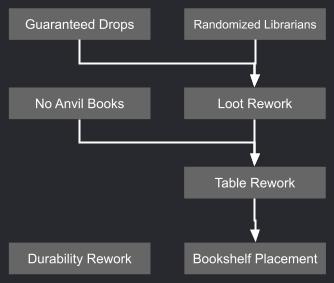

Table Rework
Strongly recommend Bookshelf Placement. This module includes advancements to guide you through the reworked enchanting.
The enchanting table now lets you choose individual enchantments. Each enchantment has an xp cost and a required number of books near the table, and costs 1 lapis lazuli.

Enchantments that are not in the table by default can be unlocked by placing enchanted books in nearby bookshelves.


If you place a grindstone within the bookshelf radius, you can remove enchantments from items onto books. This makes enchanted equipment you find more useful as you can unlock more rare enchantments.


Bookshelf Placement
Chiseled bookshelves and lecterns count towards the enchanting table bookshelf count depending on how many books they hold. 3 books = 1 vanilla bookshelf.

Additionally, there is no longer a requirement to have no blocks between the shelf & table, and shelves can be placed in a 7x4x7 area centered on the table (1 below, 2 above).


Durability Rework
Mending is removed. Instead, Unbreaking has 5 levels and Unbreaking V makes the tool unbreakable (but you have to work your way there!)

| Level | Damage chance |
|---|---|
| None | 100% |
| 1 | 100% |
| 2 | 75% |
| 3 | 50% |
| 4 | 25% |
| 5 | 0% (unreakable) |
Items in the world that already have Mending don't lose it but it no longer functions.

Loot Rework
Recommend Table Rework
Reorganizes enchantments and where they can be acquired so that basic enchantments are readily avaiilable but more important and special ones are harder to get. Enchantments are organized into the following categories:
Common
- The basic enchantments that directly increase the effectiveness of the tool
- In enchanting table by default
- Can be found on random loot equipment
- Can be found on traded equipment
- Can be found on mob equipment

All Common Enchantments
- Efficiency
- Protection
- Sharpness
- Unbreaking
- Power
- Piercing
- Quick Charge
- Impaling
- Loyalty
- Lure
- Density
Uncommon
- More specialized or auxiliary functions
- Can be purchased from villagers
- Can be found on traded equipment
- Can be found on random loot equipment
- Can be found on random loot books
- Can be found on mob spawn equipment

All Uncommon Enchantments
- Aqua Affinity
- Feather Falling
- Fire Protection
- Blast Protection
- Projectile Protection
- Smite
- Bane of Arthropods
- Sweeping Edge
- Knockback
- Punch
- Looting
- Luck of the Sea
Rare
- More unique or magical abilities
- Can be found in specific structure loot
- Can be found on random loot equipment
- Can be found on random loot books
- Can be found on mob equipment

All Rare Enchantments
- Frost Walker (Igloo)
- Fire Aspect (Nether Fortress, Ruined Portal)
- Flame (Nether Fortress, Ruined Portal)
- Silk touch (Mineshaft, Dungeon)
- Fortune (Mineshaft, Dungeon)
- Lunge (Bastion)
- Respiration (Ocean Ruins, Shipwrecks, Buried Treasure)
- Depth Strider (Ocean Ruins, Shipwrecks, Buried Treasure)
- Channeling (Buried Treasure)
- Riptide (Buried Treasure)
- Thorns (Desert Temple)
- Infinity (Jungle Temple)
- Multishot (Pillager Outpost)
Unique
- Can only be found in specific places
- Soul Speed (Piglin bartering)
- Swift Sneak (Ancient City loot)
- Wind Burst (Trial Chamber Ominous Vault)
- Breach (Trial Chamber Vault)

Curse
- All curse enchantments
- Can be found on random loot equipment
- Can be found on mob spawn equipment
Additionally, zombies can spawn with iron pickaxes that have the same chance to be enchanted as shovels and swords.

No Anvil Books
Strongly recommend Table Rework
Enchanted books can no longer be applied to items in the anvil, as chiseled bookshelves are the intended way to use enchanted books. Tools can still be combined.


Guranteed Drops
Makes more sense with Loot Rework
Mobs that spawn with enchanted equipment are guranteed to drop that equipment (if killed by player/wolf, as in vanilla), allowing you to move those enchantments onto books and apply them to your own gear. Also applies to all tridents.


Randomized Librarians
Disabled by default due to being experimental, makes more sense with Loot Rework
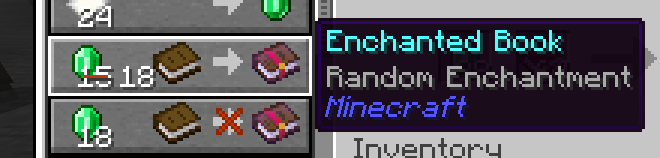
Librarian villagers will sell an enchanted book that is randomized each time you buy it, since duplicate enchanted books aren't useful.
The trades' max uses, cost, and xp are adjusted as follows:
| Level | Emerald Cost | Max Uses | Villager XP |
|---|---|---|---|
| 1 | 15 | 1 | 6 |
| 2 | 18 | 1 | 15 |
| 3 | 20 | 2 | 25 |
| 4 | 24 | 3 | 45 |
Recommended
I highly recommend adding these mods to make your experience more complete:
- Bookshelf Inspector or equivalent to see what books are on your shelves
- Menderman, Simple Smithing Overhaul, or similar to make anvil repairing more fair, especially if the durability tweak is enabled
- Datapack/Gamerule Menus to configure enabled modules for existing worlds
- McQoy for a config GUI
Additionally, these mods will enhance your experience:
- Enchanted Bookshelves to see which books are enchanted
- Item Descriptions to view enchantment descriptions in the enchanting table
- A resourcepack adding unique textures for enchanted books (there are many!)
Compatibility
- Most modded enchantments should work fine in this system
- The Loot Rework module has categorized enchantments from these mods:
- Veinminer Enchantment
- Enderscape
- Farmer's Delight
- Mods that alter enchanting may or may not be compatible, although I would like to eventually add compatibility. In most cases disabling modules should allow the other mods' functionality to work as normal.
- Items that do not have durability may be unable to level up, this will be fixed in the future
- Supports Item Descriptions
- See the datapacking wiki for further customization
As with most of my mods, only 26.1.2 and latest are actively updated. This mod page may not accurately reflect the features available in unsupported versions.
Roadmap
(in no particular order)
- ✔
Data-driven way to override costs & book requirements - ✔
Configurable levelup cost - ✔
Datapack documentation - Categorize some modded enchantments
- Improvements to loot locations
- Enchanted books on lecterns (tentative)
- Way to freeze the level of an enchantment
- More customizability for various parameters
- Level certain enchantments in different ways (distant)
Credits
- This mod was inspired by a listener email from episode 375 of The Spawn Chunks podcast
- Special thanks to Enchancement and Enchiridion for being cool enchanting reworks that I took inspiration from
- Thank you to Sisby folk for the mod name
- Thank you to several of my friends as well as users on the Fabric discord for providing feedback and suggestions
Verfügbare Versionen
Penchant auf dem Server installieren
Server bestellen
Bestelle einen Minecraft Java Server mit mindestens 3 GB RAM (4 GB empfohlen).
fabric Loader setzen
Wähle im Panel unter "Egg" den fabric-Loader und die passende Minecraft-Version (26.3).
Mod installieren
Öffne den Mod-Browser im Dashboard und suche nach "Penchant". Klicke "Installieren" – fertig! Alternativ: Lade die .jar via SFTP in den /mods Ordner.
Kompatibilität
Mod-Loader
Minecraft-Versionen
26.3, 26.3-rc-1, 26.3-pre-3 (+8 weitere)
Server-seitig
✓ ErforderlichEmpfohlener RAM
4 GB(min. 3 GB)Häufige Fragen
Penchant Server crasht beim Start – was tun?
Häufigste Ursache: falsche fabric-Version oder zu wenig RAM. Prüfe im Server-Log (latest.log), ob ein "OutOfMemoryError" oder "Mixin"-Fehler auftritt. Bei Mado Hosting: Stelle sicher, dass mindestens 3 GB RAM zugewiesen sind und der Loader zur Mod-Version passt (26.3). Über das Panel kannst du den Loader mit einem Klick wechseln.
Ist Penchant mit fabric und neoforge kompatibel?
Penchant unterstützt offiziell fabric, neoforge für Minecraft 26.3, 26.3-rc-1, 26.3-pre-3. Im Mado Dashboard werden inkompatible Loader-Kombinationen automatisch erkannt.
Server laggt mit Penchant – wie optimiere ich die Performance?
Empfohlener RAM: 4 GB (+1 GB pro 8 Spieler). Prüfe mit /spark profiler, ob Penchant den meisten Tick-Time verbraucht. Häufige Fixes: Server-View-Distance auf 8-10 reduzieren, bei Forge "performant" oder "starlight" als Zusatz-Mod installieren. Bei Mado Hosting läuft dein Server auf NVMe-SSDs mit dedizierten CPU-Kernen für minimale Latenz.
Ähnliche Mods



![[TaCZ] Timeless and Classics Zero](https://cdn.modrinth.com/data/SzzJttH8/fd27766d2bb8390d284696b1dbd358f87e081439_96.webp)


Modded Server mieten
Installiere Penchant mit nur einem Klick auf deinem Server.
Details
- Lizenz
- GNU Lesser General Public License v3.0 or later
- Server-seitig
- Erforderlich