
PlayerEX: Directors Cut
PlayerEX is a Minecraft mod built using the Fabric ecosystem that adds RPG-themed attributes to the game and the player.
Screenshots
Über diese Mod

Forge when?





(though more assembly is required, see further below)






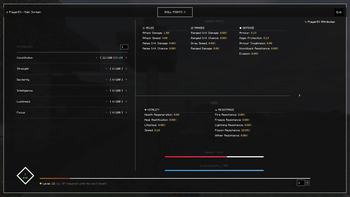
The 4.0.0+ PlayerEX Screen
🧬 What Is PlayerEX: Director’s Cut?
PlayerEX: Director’s Cut is a fundamentally rewritten and expanded version of CleverNucleus’ PlayerEx.
It adds:
- An RPG-style leveling system for players
- A full suite of custom attributes (offense, defense, utility, magic, etc.)
- Skill points & refund points with a dedicated screen
- And now: weapon & armor leveling, letting your gear gain experience and power over time
All of this is powered by Data Attributes: Director’s Cut, making PlayerEX highly configurable and extremely modpack-friendly.
🔢 By default, PlayerEX DC uses a level cap of 100.
This cap can be fully adjusted via Data Attributes and the config.
🎮 Core Features
📈 Player Leveling & Attributes
- Earn experience and levels beyond vanilla’s enchantment system.
- Spend skill points in a clean, modern GUI (default hotkey: -).
- Customize:
- How many points you gain per level
- Which attributes are available
- How strong each attribute is per point
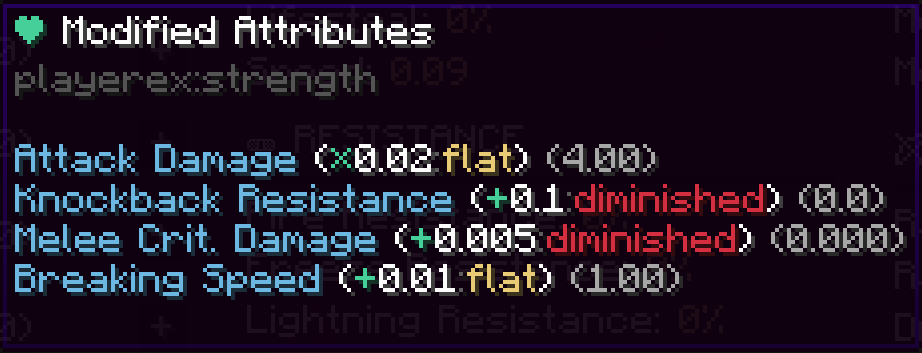
Attributes are defined & modified via Data Attributes DC, meaning:
- You can target any attribute, from base damage to custom modded stats.
- You can create complex formulas instead of static bonuses.
- Everything is data-driven, not hardcoded.
🛡️⚔️ Armor & Weapon Leveling
PlayerEX now also supports gear progression:
- Weapons can gain XP from combat (kills, damage dealt, etc., depending on config).
- Armor can gain XP from damage taken, blocking, or other events.
- Each item can level up and gain:
- Attribute bonuses
- Scaling effects (e.g. more damage, more defense, etc.)
- Pack-defined perks via Data Attributes
This system is:
- Optional – you can disable it entirely or per-item.
- Configurable – control XP rates, max levels, and how impactful leveling is.
- Modpack-oriented – designed so you can build “ARPG-style” progression (Diablo/PoE/MMO vibes) on top of vanilla or other combat overhauls.
🧩 The PlayerEX Screen
The PlayerEX screen provides:
- A non-intrusive, modern UI built with
owo-lib. - Sections for:
- Current level, XP bar, and next level info
- Attributes and their descriptions
- Skill points / refund points
- Fully extendable by other mods (e.g. WizardEX, RelicEX, EXHud) using PlayerEX’s APIs.
You can open it with a keybind (default: -), and pack makers can change that in configs.
📦 Companion Mods (The “EX” Family)
These are complementary but optional:
EXHud: Director’s Cut
An opinionated, highly configurable HUD for PlayerEX and other systemsRelicEX: Director’s Cut
An ARPG-style loot system for PlayerEX- Randomized relics dropped from mobs and chests
- Rarities, weighted attributes, tomes, refund orbs, Dragon Stone level resets
WizardEX: Director’s Cut
A bridge between PlayerEX and Wizards / Spell Power Attributes- Lets you tie magic scaling directly into PlayerEX attributes and gear progression
📚 Documentation
Full documentation, including:
- Attribute reference
- Config options
- Integration guides
- Modpack tips and best practices
…can be found here:
👉 https://bareminimumstudios.github.io/Bare-Minimum-Docs/
🛠️ For Modpack Authors
PlayerEX: DC is built as a toolbox for RPG packs. You can:
- Define your own attribute set or extend the default ones.
- Control:
- XP curve and level cap (default is 100)
- Skill point and refund point gains
- How expensive respecs are
Enable and tune weapon & armor leveling:
- Set max gear level
- Control XP gain sources and rates
- Attach attribute scaling or custom effects per gear level
Paired with Data Attributes DC, you get JSON-driven control over almost every number in the system.
👨💻 For Developers
You’re the fun ones.
PlayerEX DC exposes:
- A registry-based way to define and modify attributes, including custom ones.
- The ability to override any registered attribute safely.
- APIs to apply attributes to any
LivingEntity, not just players. - Hooks for screens and overlays using
owo-lib. - Integration points for:
- Custom skills and trees
- External XP sources
- Your own gear/level systems that plug into PlayerEX data
More technical details and examples are provided in the docs and on the GitHub repository.
🪨 Forge Users
Yes, we see you.
There is no planned official Forge port of PlayerEX: Director’s Cut.
Forge builds will not be developed or supported.
If you really want to try it on a Forge environment, you may be able to run it via Sinytra Connector:
⚠️ This is entirely at your own risk.
There is no guarantee it will work correctly, and support cannot be provided for Connector-based setups.
🙌 Contributors
The People Who Made This A Reality
- The studio – Bare Minimum Studios
- The wispforest team 💖 – for
owo-liband general ecosystem magic - One guy’s modpack – you know who you are
- Literally YOU – testers, packmakers, bug reporters, chaos gremlins
- And most importantly, CleverNucleus – creator of the original PlayerEx
Translators (legacy, <= 3.*)
- gyular – Korean
- Hertz – Spanish
- MrTYZzik – Russian
- Orygeunik – Russian improvements
- NianGuu – Simplified Chinese
- sky_bai – Simplified Chinese (older releases)
💸 Thanks to Our Sponsor
!
Use code bareminimum for 25% off your first month!
Verfügbare Versionen
PlayerEX: Directors Cut auf dem Server installieren
Server bestellen
Bestelle einen Minecraft Java Server mit mindestens 3 GB RAM (4 GB empfohlen).
fabric Loader setzen
Wähle im Panel unter "Egg" den fabric-Loader und die passende Minecraft-Version (1.20.1).
Mod installieren
Öffne den Mod-Browser im Dashboard und suche nach "PlayerEX: Directors Cut". Klicke "Installieren" – fertig! Alternativ: Lade die .jar via SFTP in den /mods Ordner.
Kompatibilität
Mod-Loader
Minecraft-Versionen
1.20.1
Server-seitig
✓ ErforderlichEmpfohlener RAM
4 GB(min. 3 GB)Häufige Fragen
PlayerEX: Directors Cut Server crasht beim Start – was tun?
Häufigste Ursache: falsche fabric-Version oder zu wenig RAM. Prüfe im Server-Log (latest.log), ob ein "OutOfMemoryError" oder "Mixin"-Fehler auftritt. Bei Mado Hosting: Stelle sicher, dass mindestens 3 GB RAM zugewiesen sind und der Loader zur Mod-Version passt (1.20.1). Über das Panel kannst du den Loader mit einem Klick wechseln.
Ist PlayerEX: Directors Cut mit fabric und quilt kompatibel?
PlayerEX: Directors Cut unterstützt offiziell fabric, quilt für Minecraft 1.20.1. Im Mado Dashboard werden inkompatible Loader-Kombinationen automatisch erkannt.
Server laggt mit PlayerEX: Directors Cut – wie optimiere ich die Performance?
Empfohlener RAM: 4 GB (+1 GB pro 8 Spieler). Prüfe mit /spark profiler, ob PlayerEX: Directors Cut den meisten Tick-Time verbraucht. Häufige Fixes: Server-View-Distance auf 8-10 reduzieren, bei Forge "performant" oder "starlight" als Zusatz-Mod installieren. Bei Mado Hosting läuft dein Server auf NVMe-SSDs mit dedizierten CPU-Kernen für minimale Latenz.
Ähnliche Mods




Modded Server mieten
Installiere PlayerEX: Directors Cut mit nur einem Klick auf deinem Server.