
PortalGunMod
Portal‑style traversal for Fabric 1.21.11 with custom sounds, clean visuals, and momentum‑accurate teleportation.
Screenshots

Über diese Mod
TikTok -- https://www.tiktok.com/@butterboyrs115
To allow me to keep making mods -- buymeacoffee.com/ButterBoyRS
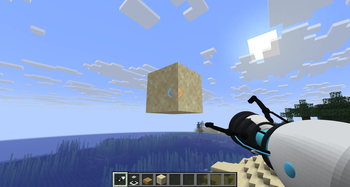
Portal Gun brings Portal-style traversal and physics to Fabric 1.21.11, with smooth portal placement, momentum-preserving teleportation, grabbing, throwing, portal viewing, and a polished first-person Portal Gun experience.
Fire a blue and orange portal onto valid walls, floors, or ceilings, then move through them while keeping your speed and direction intact. Each player gets their own portal pair, making the mod multiplayer-friendly without portals interfering with each other.
The goal is simple: make portal movement feel fast, clean, and satisfying while staying as close as possible to the style and behavior you’d expect from Portal.
✦ Features
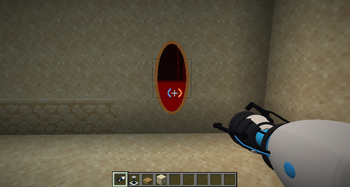
Blue and Orange Portals
Place portals on solid surfaces including walls, floors, and ceilings with automatic orientation and alignment.
Momentum-Based Teleportation
Players, mobs, arrows, snowballs, and other supported projectiles preserve their velocity when traveling through portals.
Portal View Rendering
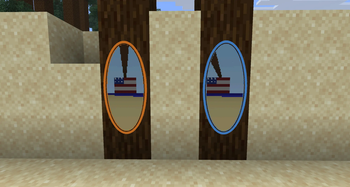
Look through one portal and see a pixelated view from the other side, including support for portals across dimensions.
Personal Portal Pairs
Every player has their own blue and orange portals, keeping multiplayer gameplay clean and independent.
Portal Stability
Portals automatically fizzle if the blocks supporting them are removed.
Portal-Style First-Person Animations
The Portal Gun features custom recoil, muzzle effects, claw movement, and clearing animations instead of standard Minecraft hand motion.
Custom HUD Reticle
Portal-style reticle indicators show portal availability and active portal status while holding the gun.
Grab Tool
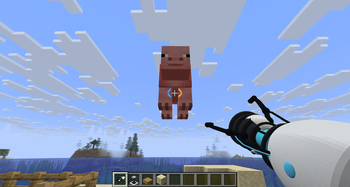
Press G to grab nearby mobs and hold them in front of you.
Block Grabbing
Pick up and move supported solid blocks, including Monster Spawners, while preserving their block entity data.
Throwing
Launch grabbed mobs or blocks using left-click or right-click while grab mode is active.
Moon Portals
At night, portals placed on the moon can create a black-hole effect that pulls nearby players, mobs, entities, and supported blocks toward it.
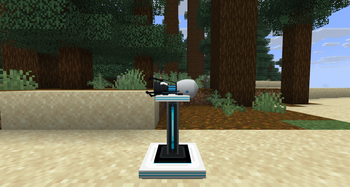
Portal Gun Pedestal
Display your Portal Gun on a custom Aperture-inspired pedestal designed to fit the mod’s clean sci-fi look.
Custom Sounds
Dedicated sounds for firing, teleporting, clearing portals, grabbing, releasing, and other Portal Gun actions.
✦ Controls
V — Clear your portals
G — Grab or release mobs and supported blocks
Left/Right Click while grabbing — Throw the held object
✦ Design
Portal Gun is built around smooth movement, clean visuals, responsive physics, and a strong Portal-inspired style without adding bulky portal frames or unnecessary setup.
The mod is still actively being developed, so new mechanics, visual improvements, and refinements will continue to be added over time.
Verfügbare Versionen
PortalGunMod auf dem Server installieren
Server bestellen
Bestelle einen Minecraft Java Server mit mindestens 3 GB RAM (4 GB empfohlen).
fabric Loader setzen
Wähle im Panel unter "Egg" den fabric-Loader und die passende Minecraft-Version (1.21.11).
Mod installieren
Öffne den Mod-Browser im Dashboard und suche nach "PortalGunMod". Klicke "Installieren" – fertig! Alternativ: Lade die .jar via SFTP in den /mods Ordner.
Kompatibilität
Mod-Loader
Minecraft-Versionen
1.21.11, 1.21.10, 1.21.9 (+8 weitere)
Server-seitig
✓ ErforderlichEmpfohlener RAM
4 GB(min. 3 GB)Häufige Fragen
PortalGunMod Server crasht beim Start – was tun?
Häufigste Ursache: falsche fabric-Version oder zu wenig RAM. Prüfe im Server-Log (latest.log), ob ein "OutOfMemoryError" oder "Mixin"-Fehler auftritt. Bei Mado Hosting: Stelle sicher, dass mindestens 3 GB RAM zugewiesen sind und der Loader zur Mod-Version passt (1.21.11). Über das Panel kannst du den Loader mit einem Klick wechseln.
Ist PortalGunMod mit fabric kompatibel?
PortalGunMod unterstützt offiziell fabric für Minecraft 1.21.11, 1.21.10, 1.21.9. Im Mado Dashboard werden inkompatible Loader-Kombinationen automatisch erkannt.
Server laggt mit PortalGunMod – wie optimiere ich die Performance?
Empfohlener RAM: 4 GB (+1 GB pro 8 Spieler). Prüfe mit /spark profiler, ob PortalGunMod den meisten Tick-Time verbraucht. Häufige Fixes: Server-View-Distance auf 8-10 reduzieren, bei Forge "performant" oder "starlight" als Zusatz-Mod installieren. Bei Mado Hosting läuft dein Server auf NVMe-SSDs mit dedizierten CPU-Kernen für minimale Latenz.
Ähnliche Mods



![[TaCZ] Timeless and Classics Zero](https://cdn.modrinth.com/data/SzzJttH8/fd27766d2bb8390d284696b1dbd358f87e081439_96.webp)


Modded Server mieten
Installiere PortalGunMod mit nur einem Klick auf deinem Server.